
Canva Pro Review: AI Design Tool for Small Business (2026)
Canva Pro is best for small business owners who need to create professional social media graphics, presentations, videos, and marketing materials without hiring a designer. The free plan covers basic design needs. Pro starts at $15/month ($120/year) and unlocks AI image generation, background remover, Magic Resize, 100M+ stock assets, and 1TB storage. Our rating: 8.8/10.
AI Video & Image Tools
Create scroll-stopping social posts, polished presentations, and professional marketing materials in minutes. No design skills required. Canva’s AI does the heavy lifting so you can focus on your business.
Start Free Plan
Magic Media (AI Image Generator)
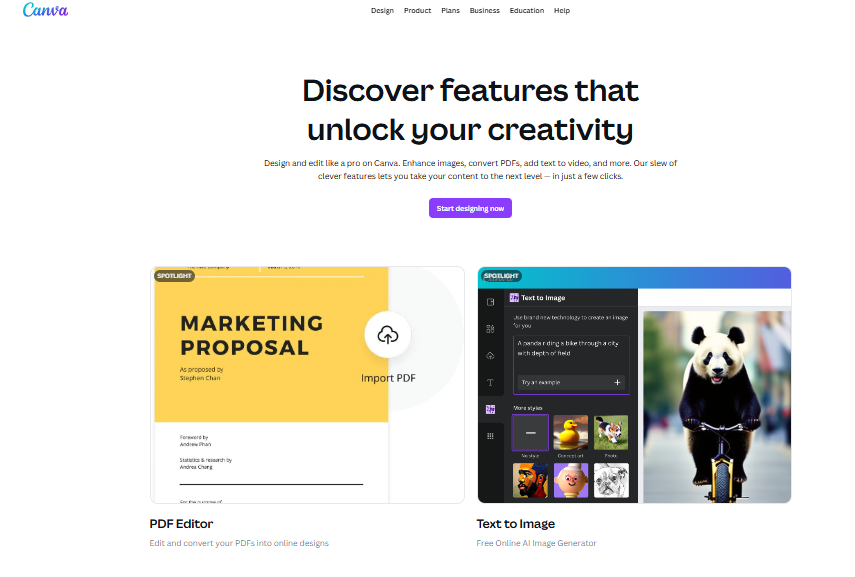
Type a description and Canva generates original images, graphics, and videos using AI. Need a custom illustration for a blog post or a unique background for a social ad? Magic Media creates it in seconds. This eliminates hours of stock photo searching and saves money on custom design work that would otherwise cost $50 to $200 per image from a freelancer.
Background Remover (One Click)
Remove backgrounds from product photos, headshots, and any image with a single click. The AI detects subjects accurately even on complex images. For e-commerce store owners and anyone who needs clean product images, this feature alone replaces tools like Remove.bg ($5.99 per image) and pays for the entire Pro subscription.
Magic Resize
Design once, then instantly resize for every platform: Instagram post, Facebook cover, LinkedIn banner, Pinterest pin, YouTube thumbnail, and more. One click adapts your design to any dimension. Without this, small business owners spend 30 to 60 minutes manually recreating the same graphic for each social channel.
Brand Kit
Upload your logos, set your brand colors, choose your fonts, and every new design automatically uses your brand identity. Team members can access the kit to maintain visual consistency across all company materials. Pro supports up to 100 brand identity folders, which is more than enough for businesses managing multiple brands or product lines.
Magic Write (AI Text Generator)
Generate headlines, social captions, email copy, and marketing text directly inside your designs using AI. You can set tone, length, and style, then drop the text straight into your graphic. It is not as powerful as dedicated AI writers like Jasper AI, but for short-form copy inside designs, it saves a significant amount of time.
Video Editor, Presentations, and Website Builder
Canva is no longer just a graphic design tool. Pro includes a full video editor with stock footage, a presentation maker that rivals Google Slides, and a simple website builder for landing pages and portfolios. For small businesses that cannot afford separate subscriptions to Adobe Premiere, PowerPoint, and a website builder, Canva consolidates all three.
Pricing
Free plan available. Pro from $15/month
Canva offers a Free plan with access to 250,000+ free templates, basic design tools, 5GB cloud storage, and limited AI features. No credit card required. Canva Pro costs $15/month (monthly billing) or $120/year ($10/month), and includes everything in Free plus 100M+ premium stock photos, videos, audio, and graphics, 610,000+ premium templates, background remover, Magic Resize, Brand Kit (up to 100 brands), Magic Media AI image generator, Magic Write AI text, 1TB cloud storage, content scheduler for social media, and priority support. Canva Teams (formerly Canva for Teams) costs $10/person/month ($100/person/year) with a minimum of 3 users, and adds real-time collaboration, team templates, approval workflows, admin controls, and unlimited brand kits. Canva Enterprise offers custom pricing with SSO, advanced admin controls, IP indemnity, and dedicated support. A 30-day free trial of Canva Pro is available. Nonprofits and educators qualify for free Pro/Teams access.
What We Like
- The free plan is genuinely powerful; many small businesses never need to upgrade for basic social media graphics.
- Pro at $10/month (annual) is extraordinary value considering it replaces stock photo subscriptions, basic video editing, and design tools.
- The AI tool suite (Magic Media, Magic Write, Background Remover, Magic Resize) bundles $50 to $100/month worth of standalone AI tools into one subscription.
- The drag-and-drop interface requires zero design experience; most users create professional graphics within minutes of signing up.
- 600,000+ templates covering every business use case (social media, presentations, flyers, business cards, invoices, resumes) mean you rarely start from a blank canvas.
- Free access for verified nonprofits (up to 50 users) and educators makes it the most generous design tool for these organizations.
What Could Be Better
- Designs can look “template-y” if you use popular templates without customization; your graphics may look identical to competitors using the same layout.
- Advanced design capabilities (vector editing, layer blending, precise typography controls) are still far behind Adobe Illustrator and Photoshop.
- The Teams plan requires a minimum of 3 users ($30/month minimum), which is frustrating for two-person businesses.
- Premium elements are everywhere in the free plan with crown icons, which creates constant upsell pressure and makes it hard to know what is actually free.
Who Is Canva Pro For?
Best for: Small business owners who create their own marketing materials and need professional-looking social media posts, email headers, presentations, and print materials without hiring a designer or learning Adobe tools. If you post on social media regularly, Canva Pro is the single most useful tool you can subscribe to.
Good for: Content creators, bloggers, and solopreneurs who need a fast way to create thumbnails, infographics, Pinterest pins, and branded visuals for their content across multiple platforms.
Good for: Small marketing teams of 3 to 10 people who need shared brand assets, template libraries, and approval workflows to maintain visual consistency without a dedicated design team.
Not ideal for: Professional graphic designers or agencies who need advanced vector editing, print-ready CMYK output with full color management, or complex photo manipulation. Adobe Creative Cloud (Illustrator, Photoshop, InDesign) remains the industry standard for professional-level design work.
| Feature | Canva Pro | Adobe Express |
|---|---|---|
| Starting Price | Free / Pro from $10/month (annual) | Free / Premium from $9.99/month |
| Free Plan | Yes (250K+ templates, 5GB storage) | Yes (limited templates and stock) |
| Best For | Non-designers creating marketing visuals fast | Users already in the Adobe ecosystem |
| Key Strength | Largest template library (610K+), all-in-one (design + video + websites) | Adobe Stock integration, Firefly AI, seamless Photoshop/Illustrator export |
| AI Features | Magic Media (image gen), Magic Write, Background Remover, Magic Resize | Firefly AI (image gen), text effects, generative fill |
| Stock Library | 100M+ photos, videos, audio, graphics | Adobe Stock (separate subscription for full access) |
| Video Editing | Yes (built-in, basic to intermediate) | Yes (basic) |
| Our Rating | 8.8/10 | 7.5/10 |
Canva is used by over 190 million monthly active users across 190+ countries worldwide
The Canva library includes 100+ million premium stock photos, videos, audio tracks, and graphics
Canva offers 610,000+ professionally designed templates covering every business and personal design need
Our Verdict
Canva Pro is the most valuable design tool for small businesses in 2026, and it is not particularly close. At $10/month (annual), it replaces stock photo subscriptions, basic video editing software, presentation tools, and simple website builders in one platform. The AI features (Magic Media, Magic Write, Background Remover) add functionality that would cost $50 to $100/month if purchased separately. The free plan is strong enough to start with, and the 30-day Pro trial lets you test everything before committing. If your business creates any visual content at all, Canva Pro should be one of the first tools you invest in.
Frequently Asked Questions
Is Canva Pro worth it for small businesses?
Yes. At $10/month (annual), Canva Pro costs less than a single stock photo on most premium sites and gives you unlimited access to 100M+ assets, AI design tools, and 610,000+ templates. If you create social media posts, presentations, or any marketing materials regularly, it pays for itself within the first week of use.
Is Canva really free?
Yes. Canva’s free plan has no time limit and no credit card required. It includes 250,000+ free templates, basic design tools, 5GB cloud storage, and limited AI features. The main limitations are restricted access to premium templates and stock assets (marked with crown icons), no background remover, and no Magic Resize.
Canva Pro vs Adobe Express: which is better?
Canva Pro is better for non-designers who want the largest template library and an all-in-one platform (design, video, websites, presentations). Adobe Express is better if you already use Adobe Creative Cloud and want seamless integration with Photoshop and Illustrator. For most small businesses without design expertise, Canva Pro is the simpler and more complete choice.
Can I use Canva Pro for free as a nonprofit or teacher?
Yes. Verified nonprofits get free Canva Teams access for up to 50 users. Verified K-12 teachers and students get free Canva Pro access through Canva for Education. Educational institutions can also apply for campus-wide access. These programs provide full premium features at no cost.
What happens to my designs if I cancel Canva Pro?
You keep all your designs, but lose access to premium features. Any designs using premium stock elements (photos, graphics, videos) will show watermarks when you try to download them. Your storage reverts to 5GB (from 1TB), so you may need to export or delete files if you exceed the limit.
Part of our Complete Guide to AI Tools for Small Business guide.