
AI automation helps small businesses save 10-20 hours per week by automating repetitive tasks like email marketing, customer support, data entry, and social media. This complete guide to AI automation for small business shows you exactly which processes to automate first, which tools to use, what it all costs, and how to build your first workflow this week, even if you have never automated anything before.
Everything here comes from hands-on testing. We run our own automations on Zapier, Make, Pabbly Connect, and n8n, and we have rated each platform on our weighted 10-point scale: features (30 percent), ease of use (25 percent), pricing value (20 percent), support quality (15 percent), and integrations (10 percent). No theory, no vendor talking points, just what actually works for a small team.
Quick Answer
AI automation for small business means connecting your everyday apps with tools like Zapier (free plan, paid from $19.99/month), Make (from $9/month), Pabbly Connect (from $16/month), and n8n (free self-hosted) so repetitive tasks run themselves. Most owners automate email, support, and data entry first, save 10 to 20 hours weekly, and spend under $50 per month.
New to business AI in general? Start with our Complete Guide to AI Tools for Small Business to pick your core tools first, then come back here to connect them.
What Is AI Automation for Small Business?
AI automation for small business is the practice of connecting your apps with software that completes repetitive tasks automatically, using artificial intelligence to handle the steps that require judgment, like writing a reply, summarizing a message, or categorizing a lead. You set up the workflow once; it then runs every time without you.
Traditional automation followed rigid rules: if a form is submitted, add a row to a spreadsheet. AI automation adds a brain to those rules. The same workflow can now read the form, decide whether the lead is hot or cold, draft a personalized reply in your tone, and route it to the right place. That difference is why automation in 2026 finally works for messy, real-world small business tasks, not just tidy data transfers.
You do not need to be technical. Modern platforms let you describe what you want in plain English, and the workflow builds itself. According to Workday research, 43 percent of small business owners say automation is their top priority right now, and the barrier to entry has never been lower: a free plan and one afternoon are genuinely enough to start.
Every automation, on every platform, has the same three parts. A trigger starts the workflow (a form is submitted, an email arrives, a sale happens). Actions are what happens next (create a contact, send a message, update a sheet). AI steps sit between them, doing the thinking (summarize this email, score this lead, draft this reply). Once you see those three pieces, every automation in this guide stops looking like software and starts looking like a checklist you wrote once and never have to run again.
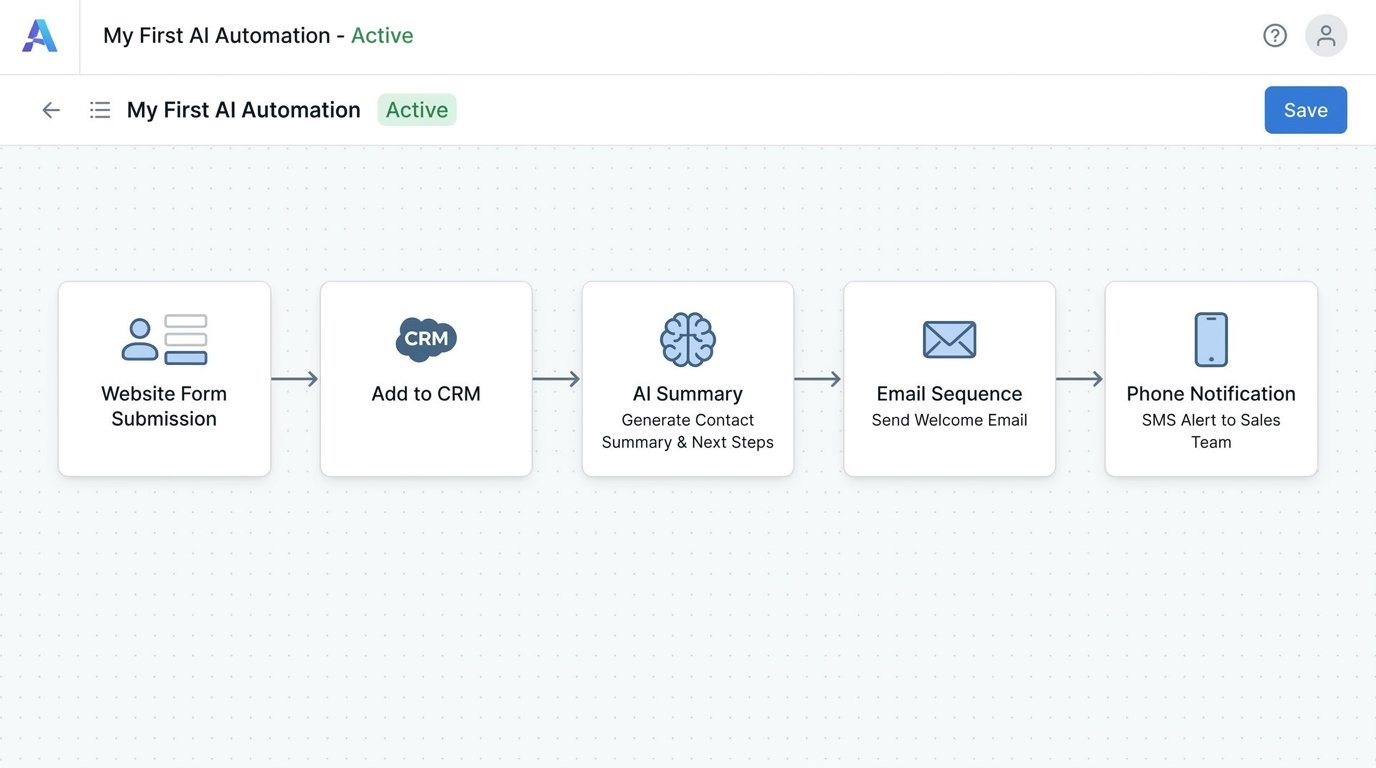
10 Business Processes You Can Automate with AI
Based on our testing and the workflows we see small businesses run every day, these are the 10 processes worth automating, roughly in order of payoff. You do not need all 10. Pick the one that steals the most of your week and start there.
1. Email Marketing Automation
Email marketing is the highest-ROI process most small businesses can automate first. Welcome sequences, abandoned cart reminders, and re-engagement campaigns run on autopilot once built. GetResponse (free plan, paid from $19/mo) generates entire campaigns with AI, while ActiveCampaign (from $15/mo) is the strongest pick when you need deep behavioral automation, like triggering emails based on what someone clicked or bought. Picture the basic version: someone joins your list and receives a welcome email instantly, your bestsellers on day three, and a small discount on day seven. You build it once in under an hour; it greets every subscriber forever.
Full tutorial: How to Automate Email Marketing with AI
2. Customer Support with AI Chatbots
An AI chatbot answers your common questions instantly, around the clock, and only escalates the conversations that genuinely need you. Tidio (free plan available) puts an AI support agent on your website that learns from your help content. Expect it to handle most routine questions (hours, shipping, returns, pricing) on its own and hand the rest to you with the full conversation attached, so customers never repeat themselves. If you would rather have it configured professionally, our AI chatbot setup guide covers what specialists charge and deliver.
3. Social Media Posting and Engagement
AI now drafts your posts, designs the graphics, schedules everything, and even replies to comments. Canva Pro (from $10/mo) generates and resizes a week of branded visuals in one sitting, and an automation platform can publish them on schedule while logging engagement to a spreadsheet you never touch.
Best tools for this: Best AI Tools for Social Media Marketing
4. Lead Generation and Qualification
Speed wins leads. Automation captures an inquiry from your website or social DMs, asks qualifying questions, and routes hot prospects to your phone within seconds. ManyChat (free plan, paid from $15/mo) handles Instagram, Facebook, and WhatsApp capture automatically. To wire those leads cleanly into a pipeline, a specialist can do it end to end; see our AI CRM setup and integration guide.
5. Invoicing and Billing
Late invoices are usually a memory problem, not a money problem. Automation creates the invoice when a job is marked complete, sends it, chases politely at 7 and 14 days, and logs payment when it lands. Platforms like Zapier and Pabbly Connect link your accounting tool to your project tracker so the chasing happens without you. The pattern looks like this: marking a job complete creates the invoice, day seven without payment triggers a friendly nudge, day fourteen a firmer one, and the payment notification closes the loop. Owners who set this up often find they simply get paid faster, because the follow-up never slips.
6. Data Entry and Document Processing
Copying details from emails, PDFs, and receipts into spreadsheets is the purest waste of an owner’s time. AI reads the document, extracts the fields, and files them correctly. ChatGPT (free plan, Plus at $20/mo) handles one-off extractions conversationally, and an AI step inside any automation platform does the same job continuously. Receipts are the classic win: forward every receipt to one inbox, let the automation extract vendor, date, and amount, and watch a clean expense sheet build itself for tax time. The same pattern works for order confirmations, booking emails, and supplier price lists.
7. Appointment Scheduling
Back-and-forth scheduling emails disappear when a booking link or chatbot offers your real availability, books the slot, sends reminders, and reschedules automatically. Pair your calendar with an automation that adds every booking to your CRM and sends a prep summary the morning of the call. The full loop looks like this: a client books from your link, the slot blocks on your calendar, a confirmation and two reminders go out, and a no-show automatically receives a polite rebooking message. No-shows drop because the reminders never get forgotten.
8. Content Creation
AI drafts blog posts, product descriptions, and newsletters in minutes; automation moves those drafts through your pipeline, from idea list to draft to review folder. Copy.ai (free plan available) is a budget-friendly engine for short marketing copy, and its output can flow straight into your scheduling and email tools.
Make that content rank: How to Use AI for SEO
9. Inventory Management
For product businesses, automation watches stock levels, flags items below your reorder point, drafts purchase orders, and syncs counts between your store and your spreadsheet. AI adds simple forecasting, warning you before the holiday rush empties a bestseller. A simple version takes one afternoon: your store updates a stock sheet on every sale, and any item dropping below its reorder number triggers an email to you, or directly to the supplier, with the quantity to order.
10. HR and Recruitment Screening
Hiring even one person buries a small business in resumes. Automation collects applications into one place, AI screens them against your must-have criteria, and qualified candidates get a scheduling link automatically. You read five strong applications instead of eighty random ones.
Best AI Automation Tools Compared: Zapier vs Make vs Pabbly Connect vs n8n
Four platforms dominate small business automation in 2026, and after running real workflows on all of them, our honest take is that each wins for a different kind of owner. Here is the head-to-head, with prices verified in June 2026 (annual billing unless noted).
| Tool | Best For | Starting Price | Free Option | Rating | Try It |
|---|---|---|---|---|---|
| Zapier | Beginners and the widest app support | From $19.99/mo | Yes, 100 tasks/mo | 8.5/10 | Visit |
| Pabbly Connect | Best value at volume, flat pricing | From $16/mo | Yes, 100 tasks/mo | 8.5/10 | Visit |
| n8n | Most control and AI-heavy workflows | Free self-hosted / Cloud from $20/mo | Yes, self-hosted | 8.4/10 | Visit |
| Make | Cheapest paid entry, visual builder | From $9/mo | Yes, 1,000 ops/mo | 8.3/10 | Visit |
Zapier
Best for BeginnersZapier is the best AI automation tool for non-technical small business owners in 2026. Describe a workflow in plain English and it builds the steps for you, with AI actions that summarize, categorize, and draft text inside the automation. It connects more apps than anyone else.
- Plain-English AI workflow builder
- Thousands of app integrations
- AI steps for drafting and summarizing
- Free plan: 100 tasks per month
Make
Cheapest Paid EntryMake is the cheapest way to start paid automation at $9 per month, and its visual canvas makes complex, branching workflows easier to understand than a list of steps. The free plan includes 1,000 operations monthly, the most generous free allowance of the four.
- Visual drag-and-connect workflow canvas
- 1,000 free operations per month
- Strong logic, routers, and filters
- AI modules for text and data steps
Pabbly Connect
Best Value at VolumePabbly Connect is the best flat-rate option for small businesses that run lots of automations: roughly 12,000 tasks for $16 per month, with internal steps like filters and routers not counted against your bill. Lifetime deals from $249 make it the favorite of bootstrapped founders.
- 12,000 tasks/mo on the $16 Standard plan
- Filters and routers do not count as tasks
- Unlimited workflows and team members
- Lifetime deal pricing available
n8n
Most Powerfuln8n is the power user’s pick, especially for AI-heavy workflows that call language models at multiple steps. It bills per workflow run rather than per step, so complex automations cost far less than on Zapier. The self-hosted Community Edition is completely free with unlimited runs.
- Per-run billing: one execution per workflow run
- Free unlimited self-hosted edition
- Deep AI and language model integration
- Cloud Starter: $20/mo for 2,500 runs
Our bottom line: start with Zapier if you want the gentlest learning curve, Make if budget is the deciding factor, Pabbly Connect if you expect heavy volume, and n8n if you are comfortable with a little complexity in exchange for power and the lowest long-term cost.
One detail that matters more than any feature list: the four platforms bill differently, and the model decides your real cost. Zapier and Pabbly Connect count tasks, meaning every action step in a run uses one task, so a five-step workflow costs five tasks each time it fires. Make counts operations in a similar per-step way. n8n counts executions, one per complete run no matter how many steps, which is why complex workflows cost dramatically less there. Rule of thumb from our testing: short workflows that fire often suit task-based plans, long multi-step workflows suit n8n’s per-run model, and high predictable volume suits Pabbly’s flat allowances.
Go deeper: our full ranked list of the best AI automation tools for small business, the hands-on Zapier review, the head-to-head Zapier vs Make comparison, and the best Zapier alternatives if task-based pricing gets expensive.
Still not sure which platform fits your business? Take our free 60-second AI Automation Tool Finder quiz and get a personalized pick.
Task-Specific AI Workflows You Can Copy
Here are four workflows we recommend constantly, summarized step by step. Each one is getting its own full tutorial with screenshots; these summaries are enough to build the basic version today. Notice the shared pattern: every workflow pairs an AI tool that creates something with an automation that moves it, which is exactly the trigger, action, and AI step anatomy from earlier in this guide.
AI Workflow for Email Marketing Beginners
Step 1: create a free email platform account and import your contacts. Step 2: use the AI generator to draft a three-email welcome sequence in your voice. Step 3: connect your website form so every new signup enters the sequence automatically. Step 4: review performance after two weeks and let AI rewrite the weakest email. If you want this built and tested for you, our AI email marketing automation guide shows what experts charge ($50 to $500) and exactly what to ask for.
Full tutorial: AI Workflow for Email Marketing Beginners
How to Automate Social Media with AI
Step 1: batch-generate two weeks of post copy from one content idea using an AI assistant. Step 2: create the matching graphics in one sitting with AI design templates. Step 3: load everything into a scheduler so posts publish automatically. Step 4: add an automation that logs comments and DMs to one inbox, with AI drafting suggested replies. Prefer hands-off? See our AI social media management guide for done-for-you options from $50 per month.
Full tutorial: How to Automate Social Media with AI
AI Tools for Writing Product Descriptions
Step 1: export your product list with key attributes to a spreadsheet. Step 2: feed each row to an AI writer with a template prompt that locks your tone, length, and keywords. Step 3: have the automation write results back to the sheet for review. Step 4: bulk-upload approved descriptions to your store. For catalogs of 50+ products, our AI product description writing guide covers freelancers who do this from $25.
Full tutorial: AI Tools for Writing Product Descriptions
AI Tools for E-commerce Product Photography
Step 1: shoot simple phone photos of each product in plain light. Step 2: use AI background removal to cut clean product shots. Step 3: generate lifestyle backgrounds and scenes with an AI image tool such as DALL-E (included with ChatGPT plans), placing your product in settings that would normally need a studio. Step 4: batch-resize for your store, marketplace, and social formats automatically.
Full tutorial: AI Tools for E-commerce Product Photography
AI Agents: The Evolution of Automation
Automation follows your recipe. An AI agent writes its own. Where a workflow runs fixed steps every time, an agent is given a goal, like “answer support tickets about shipping,” and decides which steps, tools, and replies each situation needs. Agents are what automation becomes when the workflow itself requires judgment.
In 2026, practical small business agents already handle support triage, research, and appointment management. They are also more expensive and more fragile than simple automations, which is why our advice is sequential: automate first, then add agents where rules keep failing. If you have a use case now, custom builds on Fiverr run $200 to $2,000; our custom AI agent development guide explains the realistic scope at each price.
For the full picture of what agents can and cannot do yet, read our Complete Guide to AI Agents for Business.
DIY vs Hire a Professional
Honest answer: most owners can and should build their first one or two automations themselves. The plain-English builders have made simple workflows a one-afternoon job, and doing it yourself teaches you what is possible. DIY when the workflow has one trigger and one or two actions, when the apps are mainstream, and when a mistake costs annoyance rather than money.
Hire a professional when workflows touch billing or customer data, when you need several systems talking to each other reliably, or when your time is simply worth more than the fee. A botched automation that double-emails your list or mis-syncs invoices costs more than any setup fee. Specialists also build in error handling that beginners skip, which is the difference between an automation that works and one that works in February.
Want Your Automations Built Right the First Time?
Vetted automation specialists on Fiverr build, test, and document complete Zapier, Make, and n8n setups for small businesses, typically for $60 to $500 depending on complexity. Our AI workflow automation setup guide explains pricing tiers, what a good brief looks like, and the questions to ask before hiring.
How to Build Your First AI Automation Workflow
Here is the exact six-step process we recommend to every beginner. Total time: about one hour, cost: $0.
Step 1: Pick one painful, repetitive task. Choose something you do at least daily that follows the same pattern every time. New lead arrives, you copy it somewhere and reply: perfect. Do not start with your most complex process.
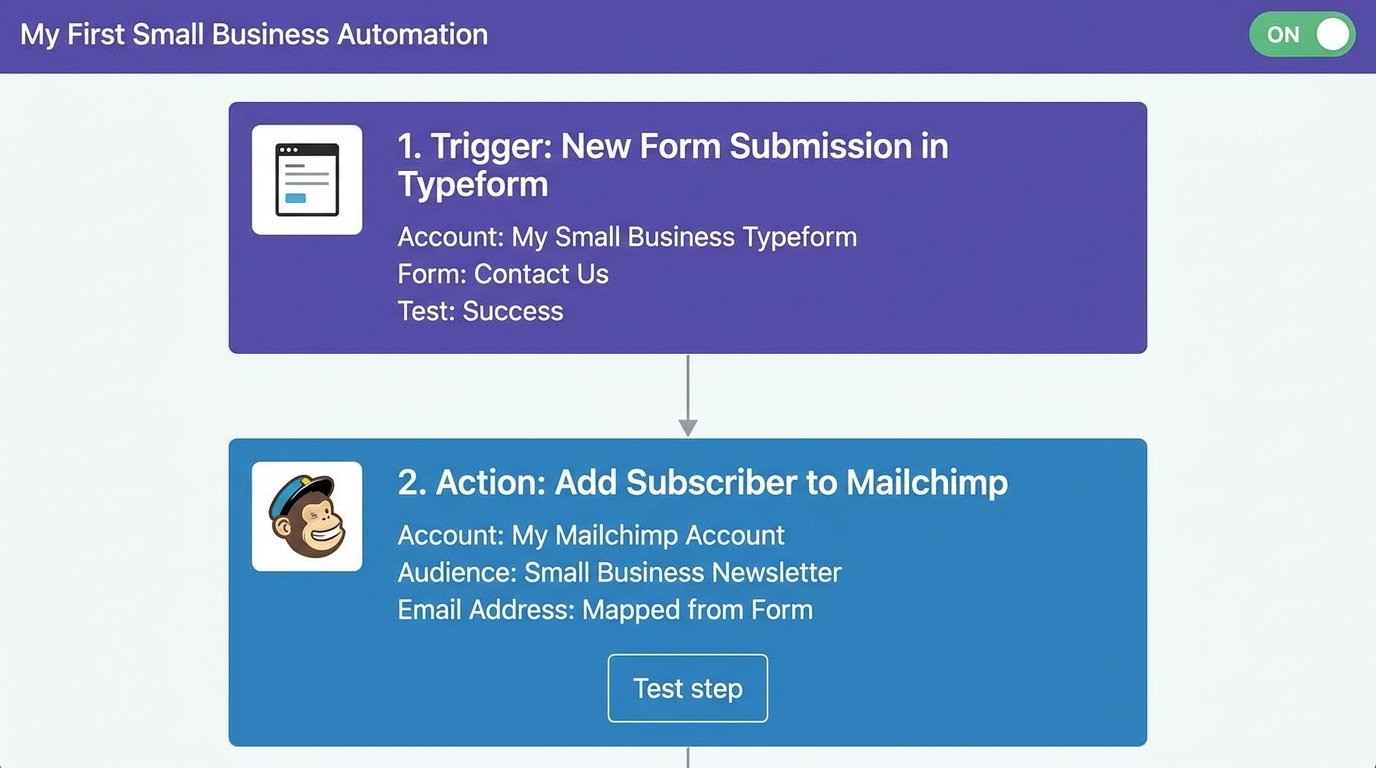
Step 2: Write the workflow as one sentence. “When X happens, do Y, then Z.” For example: when someone fills my contact form, add them to my email list and text me their details. If you cannot write the sentence, the task is not ready to automate.
Step 3: Create a free account on an automation platform. Zapier is the gentlest starting point; its free plan includes 100 tasks per month, which is plenty for your first workflow.
Step 4: Describe your sentence to the AI builder. Type your plain-English sentence and let the platform assemble the trigger and actions. Connect each app when prompted; you are clicking “allow,” not coding.
Step 5: Test with real data. Submit your own form, watch each step fire, and check the result lands where it should. Fix the field mapping if a name shows up in the email box. Every beginner hits this once.
Step 6: Turn it on and watch it for one week. Check the run history every day or two at first. Once it has run clean for a week, stop checking and go build the next one.
Full tutorial: How to Create AI Workflow Automation
AI Automation ROI: Is It Worth the Investment?
Let us do the honest math instead of hand-waving. The research case is strong: Accenture analysis puts the productivity value of generative AI tools at $7,800 per employee per year, and recent small business studies find that AI-adopting owners are nearly twice as likely to report year-over-year growth than non-adopters. Spending data from the JPMorgan Chase Institute shows most small businesses enter AI at just $20 to $30 per month, which keeps the downside tiny.
Now your numbers. A realistic starter setup costs $39 per month: Zapier Starter at $19.99 plus an email platform at $19. Value your time conservatively at $30 per hour and here is what different outcomes return:
| Scenario | Hours Saved per Week | Monthly Time Value at $30/hr | Monthly Cost | Return |
|---|---|---|---|---|
| Conservative | 3 | $390 | $39 | 10x |
| Typical | 10 | $1,300 | $39 | 33x |
| Heavy use | 20 | $2,600 | $39 | 66x |
Even the conservative case, three hours saved per week, returns ten times the subscription cost. For a typical small business, AI automation pays for itself within the first month. The real risk is not the money; it is paying for tools and never finishing the setup. That is the failure mode the six-step process above exists to prevent.
To measure your own return, track one number before you automate: hours spent on the task per week. Time yourself honestly for one normal week, build the automation, then time the same work two weeks later. The difference, multiplied by what an hour of your time is worth, is your monthly return, and it makes the renew-or-cancel decision for every subscription obvious.
Two honest caveats. First, count your setup time as a cost: budget a few hours per workflow at the start. Second, automations need light maintenance; apps change and a step occasionally breaks. Ten minutes of checking per week keeps everything healthy.
More AI Automation Guides and Tutorials
Each guide below goes deeper on one part of this page. Start with the task you want to automate first.
Tool Roundups and Reviews
Step-by-Step Tutorials
- How to Create AI Workflow Automation
- How to Automate Email Marketing with AI
- How to Automate Social Media with AI
- How to Use AI for SEO
Workflow Guides
- AI Workflow for Email Marketing Beginners
- AI Tools for Writing Product Descriptions
- AI Tools for E-commerce Product Photography
Comparisons
The Information People Are Looking For
What is AI automation for small business?
AI automation for small business means using software to complete repetitive tasks automatically, with artificial intelligence handling steps that need judgment, like drafting replies or qualifying leads. Tools such as Zapier, Make, Pabbly Connect, and n8n connect your existing apps so workflows run themselves around the clock.
How much does AI automation cost for a small business?
Most small businesses spend $0 to $50 per month on AI automation. Zapier, Make, and Pabbly Connect all offer free plans, with paid plans from $9 to $20 per month. Hiring a specialist to build workflows for you typically costs $60 to $500 as a one-time project fee.
What tasks can a small business automate with AI?
The highest-value tasks to automate are email marketing, customer support, lead capture and qualification, invoicing, data entry, appointment scheduling, social media posting, content production, inventory alerts, and resume screening. Start with one process that runs daily and touches revenue, usually email marketing or lead capture.
What is the best AI automation tool for small business?
Zapier is the best AI automation tool for most small businesses because of its plain-English builder and unmatched app support, from $19.99 per month with a free plan. Make is the cheapest paid option at $9 per month, Pabbly Connect wins on volume pricing, and n8n offers the most power.
Is Zapier or Make better for a small business?
Choose Zapier if you want the easiest setup and the widest app support; choose Make if budget matters most or your workflows branch in complex ways. Make starts at $9 per month with 1,000 free operations monthly, while Zapier starts at $19.99 per month with 100 free tasks.
How many hours can AI automation save a small business?
Most small businesses save 10 to 20 hours per week once core processes like email, lead capture, and data entry are automated. Even a single workflow typically saves 2 to 3 hours weekly. At $30 per hour, that conservative case is worth around $390 every month.
Do I need coding skills to set up AI automation?
No. Modern platforms are built for non-technical owners: you describe the workflow in plain English and the tool assembles the steps. Connecting apps is a matter of clicking allow, not writing code. Only advanced n8n self-hosting or custom API work benefits from technical skills.
Should I hire someone to set up my AI automation?
Build your first simple workflow yourself; it takes about an hour and teaches you the basics. Hire a specialist when automations touch billing or customer data, span several systems, or need proper error handling. Fiverr automation experts typically charge $60 to $500 per complete setup.
What is the difference between AI automation and AI agents?
AI automation runs the exact steps you define, every time, with AI assisting inside those steps. An AI agent receives a goal and decides its own steps, tools, and responses for each situation. Automation is the reliable foundation; agents are the next layer for tasks needing judgment.
You do not need a big budget or a technical background to put AI automation to work; you need one repetitive task and one free afternoon. Pick the process that eats most of your week, build the six-step workflow above, and let it run. The 10 to 20 hours come back one automation at a time.