
Zapier Review: No-Code AI Automation for Small Business (2026)
Zapier is best for small business owners who want to connect their apps and automate repetitive tasks without writing code. The free plan includes 100 tasks/month and 5 single-step Zaps. Paid plans start at $19.99/month (annual) with 750 tasks, multi-step workflows, conditional logic, and access to 8,000+ app integrations. Zapier is the most widely used automation platform in the world. Our rating: 8.5/10.
AI Automation & Workflow Tools
Stop copying data between apps manually. Zapier connects your email, CRM, spreadsheets, social media, and 8,000+ other tools so they talk to each other automatically. No coding, no developers, no IT department needed.
Start Free Plan
8,000+ App Integrations
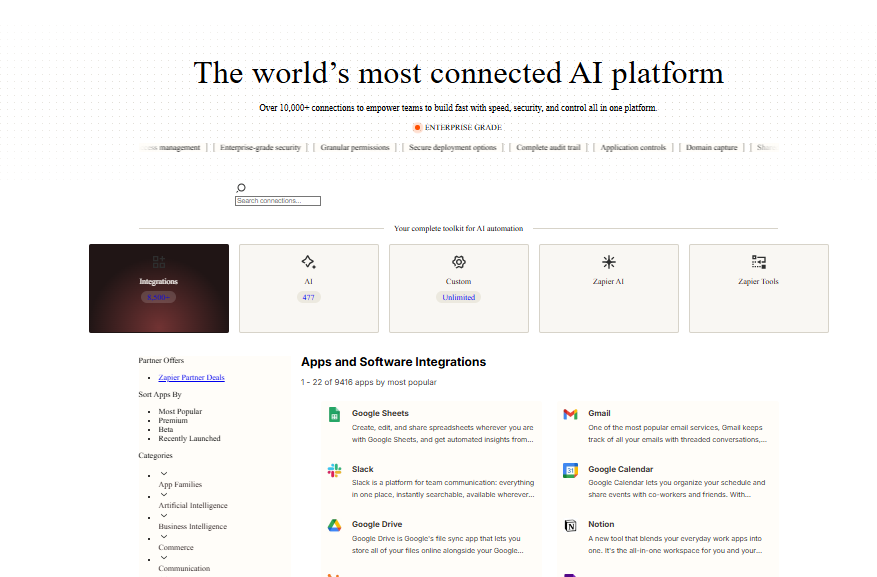
Zapier connects with more apps than any other automation platform: Gmail, Slack, Google Sheets, HubSpot, Shopify, QuickBooks, Salesforce, Trello, Notion, Mailchimp, and thousands more. If your business uses a web app, Zapier almost certainly integrates with it. This massive library means you rarely hit a dead end when building workflows.
No-Code Workflow Builder
Build automated workflows (called “Zaps”) using a visual, step-by-step editor that requires zero technical skills. Select a trigger (“When I get a new form submission”), add an action (“Create a contact in my CRM”), and Zapier runs it automatically every time. Most small business owners build their first Zap in under 10 minutes.
Multi-Step Zaps with Conditional Logic
Chain together multiple actions from a single trigger. Add if/else logic using Paths so your workflows branch based on conditions. For example: when a new order arrives, check the order value; if over $500, notify the sales team on Slack; if under $500, send an automated thank-you email. Paths turn simple automations into intelligent business processes.
AI Copilot for Building Workflows
Describe what you want to automate in plain English and Zapier’s AI Copilot builds the workflow for you. It suggests triggers, actions, and field mappings based on your description. It also helps generate code steps and troubleshoot errors. This makes automation accessible even to people who have never used an integration tool before.
Tables, Forms, and Interfaces
In 2026, Zapier bundles data storage (Tables), custom forms (Forms), and user interfaces (Interfaces) into every plan at no extra cost. Store automation data, collect inputs from your team or customers, and build simple internal apps without leaving Zapier. This transforms it from a simple connector into a lightweight business operations platform.
Filters, Formatters, and Webhooks
Fine-tune your automations with built-in tools that do not count toward your task limit. Filters stop a Zap from running unless specific conditions are met. Formatters manipulate text, dates, and numbers. Webhooks let you connect to any API, even apps not in Zapier’s library. These power-user tools make advanced workflows possible without code.
Pricing
Free plan available. Paid from $19.99/month
Zapier offers a Free plan with 100 tasks/month, up to 5 single-step Zaps, 15-minute trigger intervals, and access to Tables, Forms, and AI Copilot (with daily message limits). The Professional plan costs $19.99/month (annual) or $29.99/month (monthly) and includes 750 tasks, unlimited multi-step Zaps, conditional Paths, Filters, Formatters, premium app connections, and 2-minute update intervals. The Team plan costs $69/month (annual) or $103.50/month (monthly) and includes 2,000 tasks plus shared workspaces, unlimited users, shared app connections, and team admin controls. The Enterprise plan offers custom pricing with annual task limits, SSO, SAML, advanced admin permissions, and a dedicated account manager. Tasks scale with pricing: higher task tiers reduce cost per task. Annual billing saves approximately 33% compared to monthly. Filters, Formatters, and Paths do not count toward your task limit.
What We Like
- The 8,000+ app library is by far the largest in the automation space, which means you can connect virtually any combination of business tools.
- The visual Zap builder is genuinely beginner-friendly; most users build their first automation in under 10 minutes without any training.
- Tables, Forms, and Interfaces are now included free on all plans, adding data storage and input collection without extra subscriptions.
- Filters, Formatters, and Paths do not count as tasks, which keeps costs predictable for complex multi-step workflows.
- AI Copilot lets you describe automations in plain English and builds the Zap for you, removing the biggest barrier for non-technical users.
- Annual billing saves approximately 33%, which is more generous than most SaaS platforms.
What Could Be Better
- Task-based pricing becomes expensive at scale; a 3-step Zap running 500 times/month burns 1,000 tasks, exceeding the Professional plan’s 750-task limit.
- The free plan’s 100-task limit and single-step restriction makes it essentially a demo, not a usable production tool.
- Make (formerly Integromat) offers 10,000 operations for $9/month, making Zapier 3 to 4 times more expensive per automation at comparable volumes.
- Premium apps (Salesforce, NetSuite, and others) are locked behind paid plans, which can surprise users who assumed all integrations were available.
Who Is Zapier For?
Best for: Non-technical small business owners who want to automate repetitive tasks like moving form submissions into a CRM, sending follow-up emails, syncing spreadsheet data, or posting to social media. If you do not have a developer on staff, Zapier is the easiest way to get automation working today.
Good for: Marketing teams and agencies who need to connect advertising platforms, email tools, and analytics dashboards. Zapier bridges the gaps between tools that do not have native integrations, which saves hours of manual data entry every week.
Good for: E-commerce store owners who want to automate order notifications, inventory updates, customer follow-ups, and review requests across Shopify, WooCommerce, or other platforms.
Not ideal for: Businesses running high-volume automations on a budget. If your workflows execute thousands of tasks monthly, Make (Integromat) offers dramatically better cost-per-task pricing. Zapier’s strength is ease of use and integration breadth, not raw cost efficiency at scale.
| Feature | Zapier | Make (Integromat) |
|---|---|---|
| Starting Price (paid) | $19.99/month (750 tasks, annual) | $9/month (10,000 operations, annual) |
| Free Plan | Yes (100 tasks, 5 single-step Zaps) | Yes (1,000 operations, 2 scenarios) |
| App Integrations | 8,000+ | 3,000+ |
| Best For | Non-technical users needing the widest integration library | Technical users needing complex workflows at lower cost |
| Key Strength | Largest app library, simplest setup, AI Copilot | Visual flow builder, superior cost per operation, complex routing |
| Learning Curve | Very easy (10 minutes to first Zap) | Moderate (visual builder requires more planning) |
| Cost at 2,000 Tasks/month | $69/month (Team plan, annual) | $9/month (10,000 ops included on Core plan) |
| Our Rating | 8.5/10 | 8.3/10 |
Zapier integrates with over 8,000 apps, the largest automation integration library in the world
More than 2.2 million businesses use Zapier to automate workflows across their tech stack
Zapier now bundles Tables, Forms, Interfaces, and AI Copilot into every plan at no extra cost in 2026
Our Verdict
Zapier is the easiest and most widely supported automation platform for small businesses in 2026. Its 8,000+ app library is unmatched, the visual builder requires zero technical skill, and the addition of Tables, Forms, and AI Copilot makes it more than a simple connector. The main drawback is cost at scale: task-based pricing means your bill grows as your automations run more frequently, and Make offers significantly better pricing for high-volume workflows. Start with the free plan to test your first automation. If you find yourself bumping against the 100-task limit within the first week (most users do), the Professional plan at $19.99/month (annual) is the sweet spot for small businesses.
Frequently Asked Questions
Is Zapier worth it for small businesses?
Yes, if you spend time manually moving data between apps. Even a single automation that saves 15 minutes per day is worth more than the $19.99/month Professional plan. Zapier is especially valuable for non-technical teams who cannot build custom integrations. The ROI becomes clear within the first few workflows.
Is Zapier really free?
Zapier’s free plan exists but is very limited: 100 tasks/month, 5 Zaps, and single-step workflows only. Most users outgrow it within the first two weeks. It works for testing and learning how Zapier works, but not for running actual business automations. Think of it as a fully functional demo rather than a production plan.
Zapier vs Make: which is better?
Zapier is better for beginners and businesses that need the widest app library (8,000+ apps vs Make’s 3,000+). Make is better for cost-conscious users and technical teams who need complex visual workflows at a fraction of the price. If ease of use matters most, choose Zapier. If cost per automation matters most, choose Make.
What is a Zapier task?
A task is one successful action performed by a Zap. Triggers are free; only actions count. If a Zap triggers from a form submission, then adds a row to Google Sheets and sends a Slack message, that is 2 tasks. Filters, Formatters, and Paths do not count as tasks. Your monthly plan includes a set number of tasks, and usage beyond that limit pauses your Zaps.
Can I use Zapier without coding?
Yes. Zapier is specifically designed for non-technical users. The visual builder walks you through selecting apps, triggers, and actions step by step. The AI Copilot can even build Zaps from plain English descriptions. No programming knowledge is required. Advanced users can optionally add custom code steps for edge cases, but it is never mandatory.
Part of our Complete Guide to AI Automation for Small Business guide.