How to Build AI Chatbot for Small Business: A Step-by-Step Guide (2026)
If you are answering the same customer questions over and over, an AI chatbot can handle them for you, day and night. The good news is that figuring out how to build AI chatbot for small business use no longer requires a developer, a big budget, or months of work. With today’s no-code platforms, you can have a working bot live on your website or Instagram the same day. In this guide, we will walk through a clear, step-by-step process, share the exact tools we recommend after hands-on testing, and show you what it all costs.
We have tested the leading chatbot platforms for small business owners, and a few stand out depending on where your customers are. For website chat, Tidio is our top pick, so we will lean on it throughout this walkthrough.
Quick Answer
To build an AI chatbot for your small business, pick a no-code platform like Tidio (from $29/mo, free plan) for website chat or ManyChat (from $14/mo, free plan) for Instagram and Messenger. Define one goal, train the bot on your FAQs, design the conversation flow, add a human handoff, then test and launch. Most owners go live in under an hour.
This guide is part of our complete Guide to AI Agents for Business. Read the full pillar to see how AI agents can handle support, sales, and operations for your business.
What Is an AI Chatbot?
An AI chatbot is software that talks with your customers in plain language, answering questions and completing simple tasks without a human. It uses natural language processing to understand intent, then replies using the information you train it on. You set it up once, and it works around the clock on your website, Instagram, or WhatsApp.
Here is the simple version: a chatbot turns your busiest, most repetitive conversations into instant, automatic replies. A no-code AI chatbot is one of the fastest wins available to a small business this year, because it saves time and captures leads you would otherwise miss.
Demand is only growing. Gartner predicts chatbots will be the primary customer service channel for about 25% of organizations by 2027, and a Capgemini survey found 74% of consumers use chatbots to research and buy.
What an AI Chatbot Can Do for Your Small Business
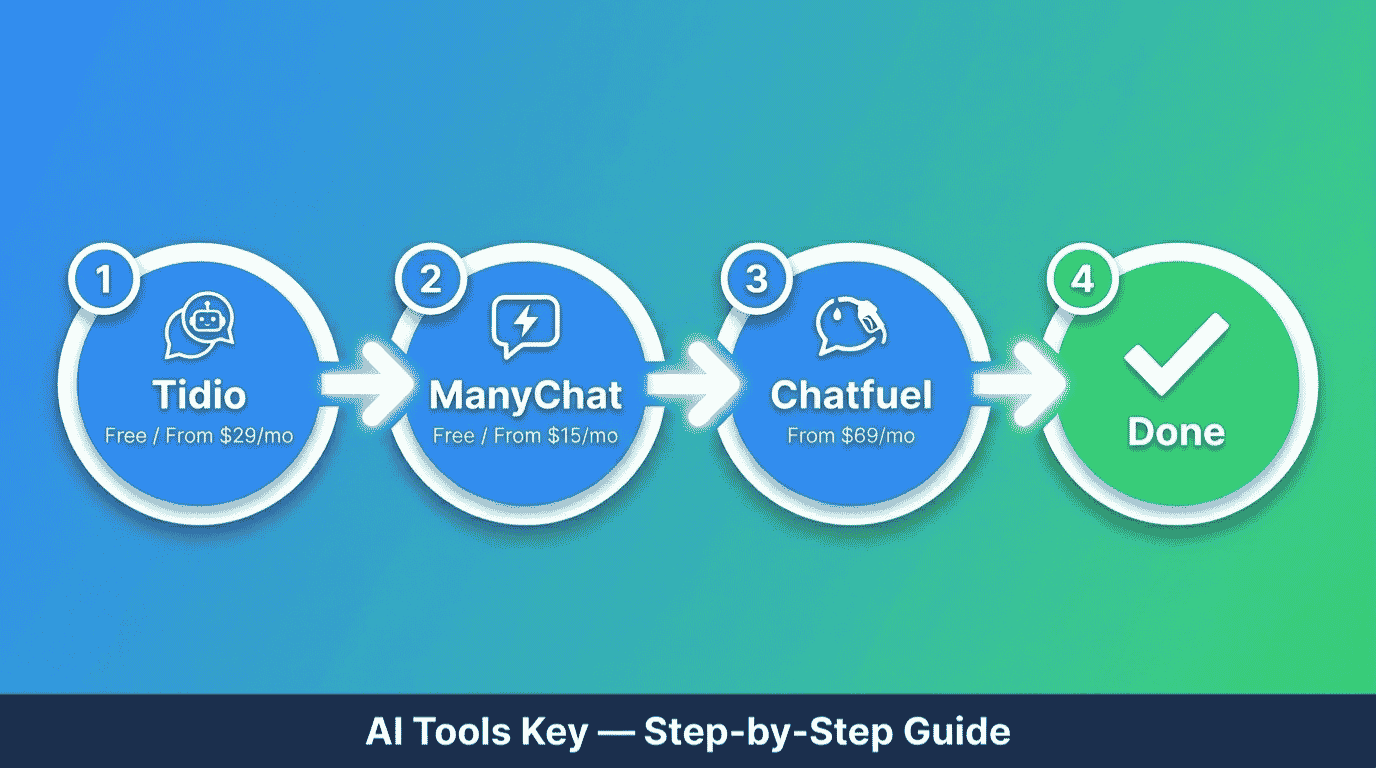
A chatbot will not replace your team, but it will take the repetitive load off it. Here is what modern no-code tools like Tidio, ManyChat, and Chatfuel can handle for you.
- Answer FAQs instantly: Hours, pricing, shipping, returns, and booking questions get answered the moment a customer asks.
- Capture and qualify leads: The bot greets visitors, collects details, and routes hot leads to you so none slip away.
- Work every channel: One bot can run on your website, Facebook Messenger, Instagram, and WhatsApp from a single dashboard.
- Book appointments and take orders: Customers can schedule, browse products, or start an order inside the chat.
- Hand off to a human: When the bot hits something it cannot answer, it passes the conversation to you with full context.
- Run 24/7: It never sleeps, never takes a day off, and replies in seconds even when 100 people message at once.
The payoff is real time and money saved. Gartner estimates conversational AI could cut contact center costs by $80 billion in 2026, and Tidio reports its Lyro AI agent resolves up to 67% of common questions on its own. For a small team, that is the difference between drowning in messages and staying ahead of them.
What You Need Before You Build
The barrier to entry is low. To follow this guide, you really need four things.
- A clear goal for your chatbot, such as answering FAQs or capturing leads.
- A short list of the questions your customers ask most.
- A channel where it will live, like your website, Instagram, or WhatsApp.
- About an hour of focused time to set it up.
Not sure if you are ready? Use the quick checker below. Answer four yes-or-no questions and it tells you whether to start Step 1 now or sort something out first. Everything stays in your browser, and nothing is saved or shared.
Are You Ready to Build Your Chatbot?
4 quick questions. Takes about 20 seconds.
How to Build AI Chatbot for Small Business in 7 Steps
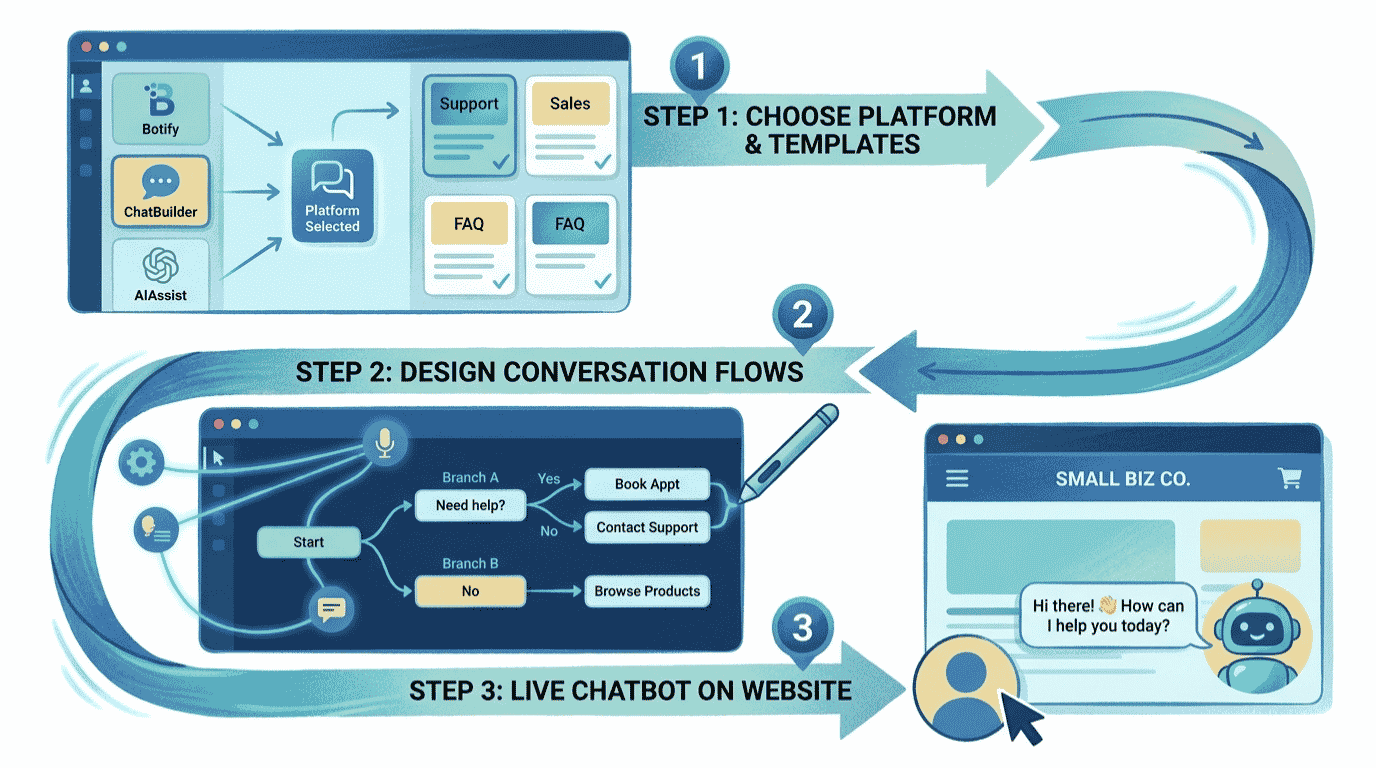
Here is the exact process we use to build a no-code chatbot for a small business. Follow it in order and you will have a working bot live by the end.
Step 1: Define your chatbot’s goal and where it will live
Start with a single, clear job. Will your bot answer FAQs, capture leads, or book appointments? Pick one to begin, because a focused bot beats a bloated one every time.
Next, decide where it will live. A website chatbot suits service businesses and stores, while an Instagram or Messenger bot suits creators and social-first brands. This choice points you straight to the right platform in Step 2.
Step 2: Choose your chatbot platform
Your platform depends on your main channel. For most small businesses, the winning pick is Tidio for websites, ManyChat for Instagram and Facebook, or Chatfuel for WhatsApp. All three are no-code, so you build by clicking, not coding.
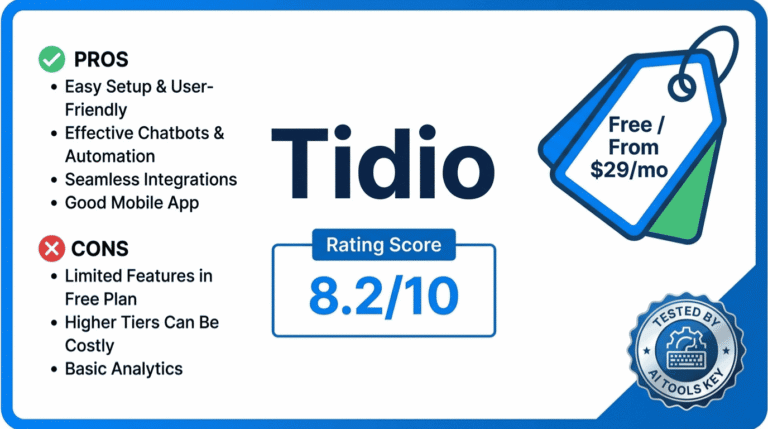
Tidio Editor’s Pick
- Website live chat and bot builder
- Lyro AI agent for FAQs
- Shopify and WordPress integrations
- Works on Messenger and Instagram too
We rate Tidio as the best chatbot for small business websites. Note that its Lyro AI agent is a separate add-on on lower plans, so factor that in if you want full AI replies from the start.
ManyChat Best for Social
- Instagram comment-to-DM automation
- Facebook Messenger and WhatsApp
- Visual drag-and-drop flow builder
- AI replies on the Pro plan
ManyChat is the best chatbot for Instagram and Messenger marketing. Its comment-to-DM trigger is the standout feature for turning social engagement into leads. Note that pricing scales with your active contacts.
If WhatsApp is your main sales channel, Chatfuel is the strongest pick, with a true AI agent built on GPT-class models and official WhatsApp API access. It starts at $39 per month (its main marketed plan is $69 per month) and offers a 7-day trial rather than a free plan. For a wider shortlist, see our roundup of the best AI chatbots for small business.
Step 3: Train it on your FAQs and knowledge base
This is what makes your bot smart. Most platforms let you train the AI in three ways: paste your FAQs, upload documents, or point it at your website URL. Tidio’s Lyro, for example, learns straight from your help content.
Feed it the ten questions you wrote down earlier, plus your hours, pricing, shipping, and return policies. The more accurate the source material, the better the answers. Keep it focused on facts only you can confirm.
Step 4: Design your conversation flow
Now map the conversation. Use the visual drag-and-drop builder to create a friendly greeting, a few quick-reply buttons for common paths, and clear next steps. Think of it as a flowchart your customer walks through.
Keep it simple and human. Write the way you would speak, offer obvious choices, and never trap someone in a loop. A short, clear flow converts far better than a long, clever one.
Step 5: Add a human handoff
No bot answers everything, and that is fine. Set a rule so that when the bot cannot help, or when a customer asks for a person, it hands the conversation to you with the full chat history attached.
This single feature prevents frustrated customers and lost sales. It lets the bot handle the routine 80% while you step in only for the cases that truly need a human touch.
Step 6: Connect your channels
Now put your bot where your customers are. For a website, you paste a small snippet of code or install a plugin, which is the only mildly technical step and takes a couple of minutes. For social channels, you connect your Instagram, Facebook, or WhatsApp account in a few clicks.
The beauty of these platforms is one bot, many channels. Build it once, then deploy it on your site and your social inboxes from the same dashboard.
Step 7: Test, launch, and improve
Before you go live, test the bot yourself. Ask it the awkward questions, click every button, and make sure the handoff works. Then publish it and watch the first real conversations roll in.
Based on our experience, the owners who win treat launch as the start, not the finish. Check your analytics weekly, see where people drop off, fill the gaps, and let the bot keep getting better.
Want your chatbot built for you?
A specialist can design your flows, train the AI on your business, and connect every channel in a few days. Browse vetted experts and have it done for you.
See AI Chatbot Setup ServicesA Real Example: How a Local Business Uses a Chatbot
Let me make this concrete. Say you run a small beauty salon and field the same questions all day: prices, availability, and booking. Here is the chatbot you would build.
First, you choose Tidio for your website and ManyChat for your busy Instagram. You train both on your service list, prices, and hours. Then you design a simple flow: greet the visitor, answer their question, and offer a “Book now” button that links to your calendar. You add a handoff so tricky requests reach you directly.
Within a day, your bot is answering price and booking questions at 11pm while you sleep, and capturing leads from Instagram comments automatically. The same blueprint works for a dentist, a plumber, a coach, or an online store.
What Does an AI Chatbot Cost?
Here is the honest answer: far less than the old way. Hiring a developer to build a custom bot once cost thousands. Today you can start free and scale only as you grow. The table below compares the platforms we recommend, with current pricing.
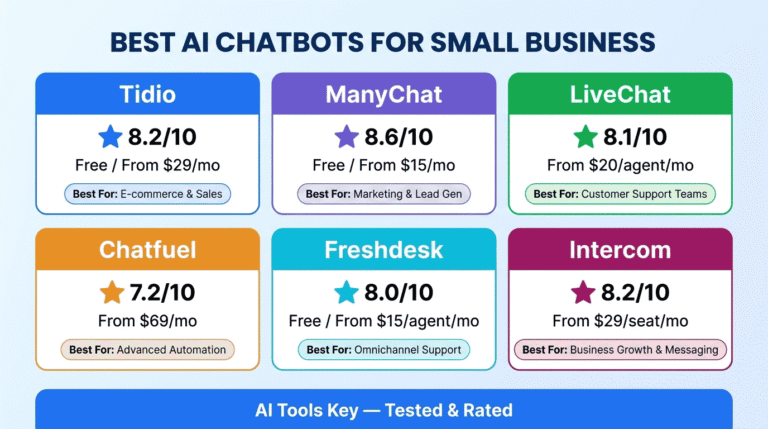
| Tool | Best For | Starting Price | Free Option | Rating |
|---|---|---|---|---|
| Tidio | Best for website live chat | $29/mo | Free plan + 7-day trial | 8.2/10 |
| ManyChat | Best for Instagram and Messenger | $14/mo | Free plan (25 contacts) | 8.6/10 |
| Chatfuel | Best for WhatsApp and AI-first DMs | $39/mo | 7-day trial | 7.2/10 |
For a true starter setup, you can begin on ManyChat’s free plan or Tidio’s free plan and pay nothing while you test. A realistic small business budget is around $14 to $39 per month once you upgrade, plus extra only if you add AI conversation volume or WhatsApp. Compared with the hours saved, the return is hard to beat. Browse our full AI chatbot tools category for more options.
Chatbot vs AI Agent: What Is the Difference?
You will see both terms, so here is the distinction in plain English. A chatbot follows a set flow and answers questions from the knowledge you give it. An AI agent goes further: it can take actions, like checking an order, processing a return, and updating your records inside the same conversation.
For most small businesses starting out, a knowledge-base chatbot delivers the large majority of the value at a fraction of the complexity. Start there, prove it works, then grow into full AI agent automation as your confidence and needs grow.
DIY vs Hiring an Expert
So should you build it yourself or hire help? It comes down to time and complexity.
Do it yourself if
- You want a simple FAQ or lead-capture bot.
- You enjoy the tools and have an hour to spare.
- Your budget is tight and you want full control.
Hire a specialist if
- You need complex flows, multiple channels, or deep integrations.
- Your time is better spent running the business.
- You want it built and optimized right the first time.
If you would rather skip the setup, a freelancer can design, train, and connect your bot for you. Many also offer ongoing AI customer support setup if you want the whole support workflow handled. Compare experts and budgets in the full directory of AI services on Fiverr.
Want your chatbot handled by an expert?
Hand the project to a vetted specialist and get a fully trained, multi-channel chatbot live in days, not weeks.
Hire a Chatbot ExpertIs It Worth Learning How to Build AI Chatbot for Small Business?
In our view, yes, clearly. A chatbot pays for itself by answering questions you would otherwise handle by hand and by catching leads around the clock. Every hour you spend setting it up returns many times over as it runs on its own.
We rate every tool on a transparent 10-point scale across features, ease of use, pricing value, support, and integrations. You can read more about how we test in our editorial guidelines. By that standard, Tidio remains our top pick for website chat, with ManyChat for social. For a broader view of support automation, see our best AI tools for customer service guide, or read our full Tidio review.
Our Recommendation
Start with Tidio for a website chatbot or ManyChat for Instagram and Messenger, both of which have free plans. Choose Chatfuel if WhatsApp is your main channel. Define one goal, train the bot on your FAQs, add a human handoff, and launch. Most owners go live in under an hour.
Get Started With TidioThe Information People Are Looking For
Can I build an AI chatbot for free?
Yes. You can build a basic AI chatbot for free using the free plans from Tidio or ManyChat. These cover website chat or Instagram and Messenger automation at no cost, though they limit conversations or contacts. They are a great way to test before you upgrade to a paid plan for higher volume and full AI features.
How much does it cost to build an AI chatbot?
You can start free with Tidio or ManyChat, then expect around $14 to $39 per month once you upgrade. ManyChat starts at $14/mo, Tidio at $29/mo, and Chatfuel at $39/mo. WhatsApp adds small per-message fees from Meta. A no-code bot costs a fraction of the thousands a custom developer build once required.
Can I build a chatbot without coding?
Yes. Modern platforms like Tidio, ManyChat, and Chatfuel are fully no-code. You build with a visual drag-and-drop editor, train the AI by pasting your FAQs, and connect channels in a few clicks. The only mildly technical step is adding a small snippet to your website, which most non-developers handle without help.
What is the best AI chatbot for small business?
For website chat, Tidio is the best AI chatbot for small business thanks to its Lyro AI agent and easy setup. ManyChat is the best for Instagram and Facebook Messenger marketing, and Chatfuel is the best for WhatsApp. The right pick depends on where your customers message you most.
How long does it take to build a chatbot?
Most small business owners build a basic no-code chatbot in under an hour and go live the same day. Training the AI on your FAQs and designing the conversation flow take the most time at first. Adding more flows or channels later takes only minutes once the foundation is in place.
Do AI chatbots really help small businesses?
Yes. AI chatbots answer common questions instantly, capture leads around the clock, and free your team from repetitive work. Gartner predicts chatbots will be a primary service channel for about 25% of organizations by 2027. For small teams, a chatbot often replaces hours of manual replies while improving response times.
What is the difference between a chatbot and an AI agent?
A chatbot answers questions from the knowledge you give it and follows a set flow. An AI agent goes further by taking actions, like checking an order, processing a return, or updating records inside the conversation. Most small businesses start with a chatbot, then grow into agent-style automation as needs expand.