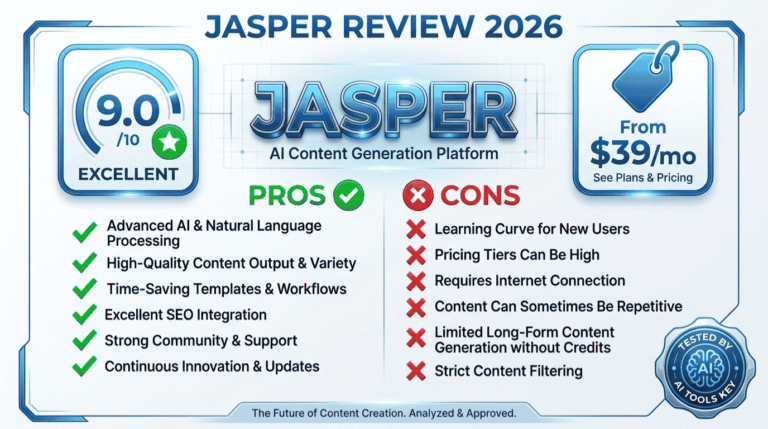
Canva Pro Review 2026: Magic Studio AI, Real Pricing, and Verdict
If you need professional-looking graphics but you are not a designer, this hands-on Canva Pro review will help you decide quickly. Canva Pro is one of the best-value design tools for small business in 2026, and its Magic Studio AI suite has turned it into a genuine creative powerhouse. We earn a commission if you upgrade through our links, which never changes our scoring (see our affiliate disclosure).
Here is the honest headline before we dig in: for non-designers who create content regularly, Canva Pro is close to essential, but the AI credit limits and single-user restriction are worth understanding first.
Quick Answer
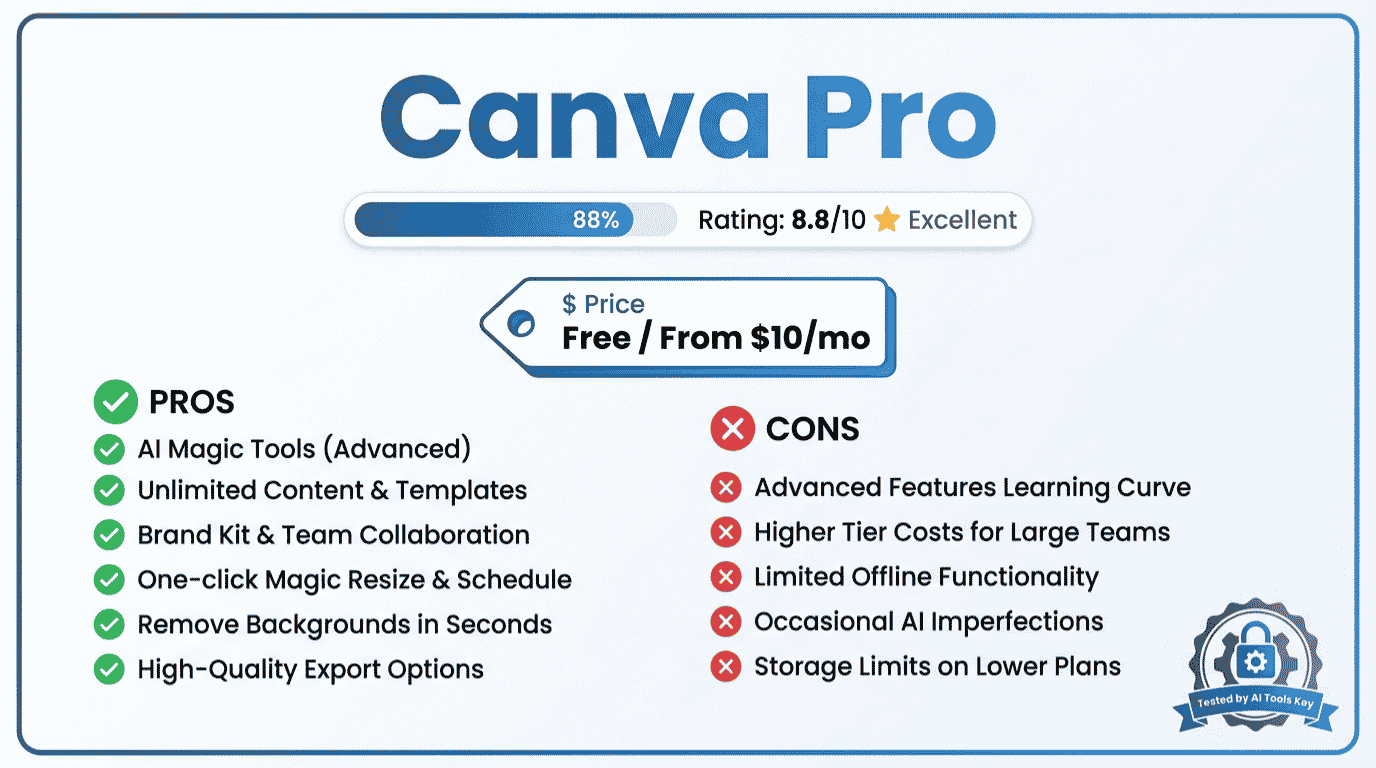
Canva Pro is the best all-in-one AI design tool for small business in 2026, rated 8.8/10. It costs $120 per year, about $10 per month on annual billing, or roughly $13 to $15 billed monthly. You get the full Magic Studio AI suite, 141M+ premium assets, Brand Kit, and Magic Resize. There is also a genuinely useful free plan.
This Canva Pro review is part of our complete guide to the best AI tools for small business. Read the full guide for a side-by-side overview of every category that matters for your workflow.
What Is Canva Pro?
Canva Pro is the paid individual plan of Canva, the drag-and-drop design platform used by hundreds of millions of people. It turns anyone into a designer with templates, premium assets, and a deep set of AI tools, all in your browser or phone.
Over the past two years Canva has evolved from a simple graphics tool into a full creative suite. Magic Studio bundles more than 20 AI design tools, from text-to-image generation to one-click background removal.
Pro builds on the free plan by unlocking the complete asset library, the full Magic Studio suite, Brand Kit, and far higher usage limits. This Canva Pro review focuses on whether that upgrade is worth paying for, and exactly who benefits most.
Canva Pro Review Verdict at a Glance
After testing Canva Pro across social graphics, presentations, video, and the Magic Studio AI tools, here is where it lands. We rate it . It is arguably the most accessible creative tool on the planet, with outstanding value, held back only by tight AI credit limits and a steep jump to team plans.
Our rating considers five factors: ease of use, AI quality, features, pricing value, and integration. Canva Pro scores highest on ease of use and value, and lowest on advanced AI iteration controls.
Our verdict: Canva Pro is the best design tool for non-designers and small business owners in 2026. If you create social posts, presentations, or marketing graphics regularly, it pays for itself in saved time within the first week. The free plan is a great place to start.
The value case is strong on the numbers alone. Canva Pro unlocks 141M+ premium photos, videos, graphics, and audio tracks. You can confirm current plan details on the official Canva website before you commit.
Key Features That Stand Out
Canva Pro packs an enormous amount into a clean interface. These are the features that actually matter when you are producing content week after week.
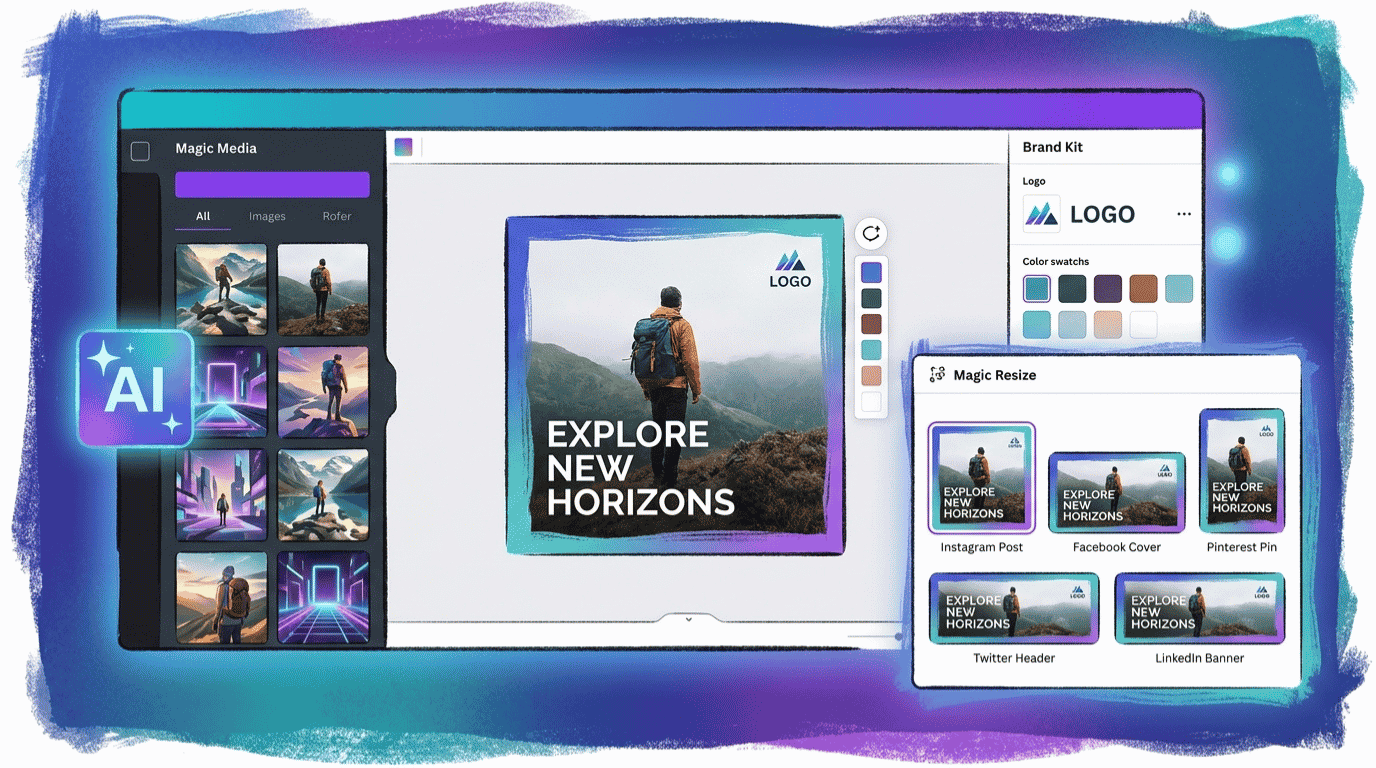
Massive template and asset library. Pro unlocks the full library of premium templates and 141M+ stock assets, so you rarely start from scratch or pay extra for a good photo.
Brand Kit. Store your logos, brand colors, and fonts, then apply them to any design in one click. The Brand Kit also feeds into the AI tools, so generated content stays on brand.
Magic Resize. This is a small feature that saves hours. Design once, then automatically reformat for Instagram, a story, a flyer, or a presentation. It is Pro-only and genuinely addictive.
Background Remover. One click removes the background from any image cleanly. For product shots and headshots, it replaces a job that used to need Photoshop.
The Affinity bundle. Canva now bundles the Affinity professional design suite at no extra cost, which strengthens the case for Pro as an affordable alternative to pricier creative software.
Magic Studio: The AI Tools That Matter
Magic Studio is the reason most people upgrade to Canva Pro in 2026. It is not one feature but a whole collection of AI tools woven directly into the design workflow, which is what makes them so useful.
Magic Design turns a text prompt or an uploaded image into a complete, editable design in seconds. Magic Write generates captions, headlines, and product copy right inside your design, and it can learn your brand voice. Dream Lab, powered by Leonardo.ai, is the standout text-to-image generator with photorealistic and stylized options.
You also get Magic Eraser to remove objects, Magic Expand to extend an image outward, and Magic Translate to convert a design into other languages. Canva Pro includes around 500 monthly AI credits, roughly ten times the free plan’s allowance.
Here is the honest caveat. Those 500 credits sound generous, but image work burns through them fast, often three to five generations per concept. Heavy users will hit the cap, and there are no pay-as-you-go top-ups, so you either wait for the monthly reset or upgrade. The AI also lacks fine iteration controls, so you regenerate rather than nudge a result.
Testing tip: Set up your Brand Kit before you generate anything with Magic Studio. In our testing, that single step took first drafts from roughly 20% on-brand to around 80% on-brand, which saves a huge amount of editing. Use Dream Lab for hero images only, and lean on the stock library for icons and backgrounds to protect your credits.
Canva Pro Pricing in 2026
Canva keeps pricing simple, but the monthly versus annual gap matters, so always confirm the live rate on the official Canva site before you subscribe. Here is the current structure.
| Plan | Price | Best For | Key Limits |
|---|---|---|---|
| Free | $0 forever | Light, occasional design | ~50 AI credits/month, 5 GB storage |
| Pro | $120/year (~$10/mo), or ~$13/mo monthly | Solo creators and small business | ~500 AI credits/month, single user |
| Teams | From ~$15/user/month | Teams needing collaboration | Minimum seat commitment applies |
| Enterprise | Custom | Large organizations | Unlimited credits, admin controls |
The headline to remember: Canva Pro is $120 per year, which works out to about $10 per month on annual billing. If you pay month to month instead, expect roughly $13 to $15 depending on your region and any current promotion.
That makes Pro one of the best values in the entire AI tool space. For comparison, professional creative software can run $55 or more per month, while Canva Pro plus the bundled Affinity suite covers most small business design needs for a fraction of that.
Two limits to plan for. Pro is a single-user plan, so real-time team collaboration requires Canva Teams, which carries a minimum seat commitment and a noticeable price jump. And some premium stock elements can still cost extra even on Pro.
Need a polished logo, brand kit, or a deck that actually impresses? Our vetted experts deliver done-for-you branding through our AI logo design and branding service, perfect if you want a professional result without learning the tools yourself.
Get Custom BrandingCanva Pro Pros and Cons
No tool is perfect, and an honest Canva Pro review has to weigh the trade-offs clearly. Based on our testing and analysis of verified user feedback, here is the balanced picture.
- Exceptional value. A full design suite plus AI tools for about $10 per month on annual billing.
- Effortless for non-designers. Templates and drag-and-drop make professional results genuinely easy.
- Deep AI integration. Magic Studio’s 20+ tools live inside your workflow, not in a separate app.
- Huge asset library. 141M+ premium photos, videos, and graphics included.
- Brand consistency. Brand Kit and Magic Resize keep everything on brand and on format.
- AI credits run out fast. 500 monthly credits disappear quickly with heavy image work, and there are no top-ups.
- Limited AI iteration control. No fine sliders; you regenerate from scratch rather than adjust.
- Single-user only. Collaboration requires the pricier Teams plan with a minimum seat count.
- Image quality trails specialists. Dream Lab is good, but Midjourney still wins on pure output quality.
- Not for advanced pros. Serious prepress or broadcast video work still needs dedicated software.
Is Canva Pro a Fit for You?
Use the interactive checklist below to see how Canva Pro matches your situation. We have pre-set each row to the tool’s real strengths and weaknesses, so the verdict reflects honest testing, not marketing claims. Tap any row to flip it based on your own needs.
Who Is Canva Pro Best For?
Canva Pro suits a wide range of users, but matching it to your situation makes the value obvious. Here is who gets the most out of it.
Social media managers and marketers. If your week is full of posts, stories, and ad graphics, Magic Resize and the template library are a massive time-saver. This is Canva’s sweet spot. For more options, see our roundup of the best AI design tools for small business.
Solopreneurs and non-designers. You get a professional look without hiring a designer or learning complex software. The free plan lets you test everything before paying.
Content creators who also need video. Canva handles short-form video and presentations too. If video is a bigger focus for you, compare dedicated options in our best AI video generators guide.
Who should look elsewhere? Anyone whose main need is best-in-class AI image quality, who may prefer a specialist, and professional designers who require advanced prepress or broadcast tools.
Canva Pro Alternatives Worth Comparing
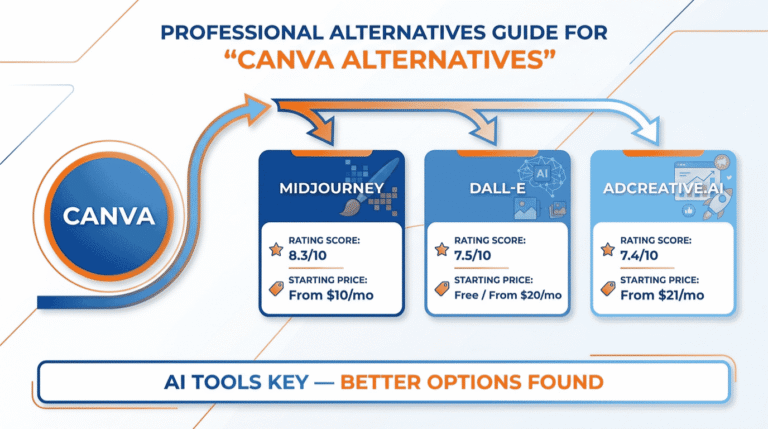
Canva Pro is a complete suite, but depending on your main need, a specialist tool might serve you better. Based on our analysis, here is how the main alternatives stack up.
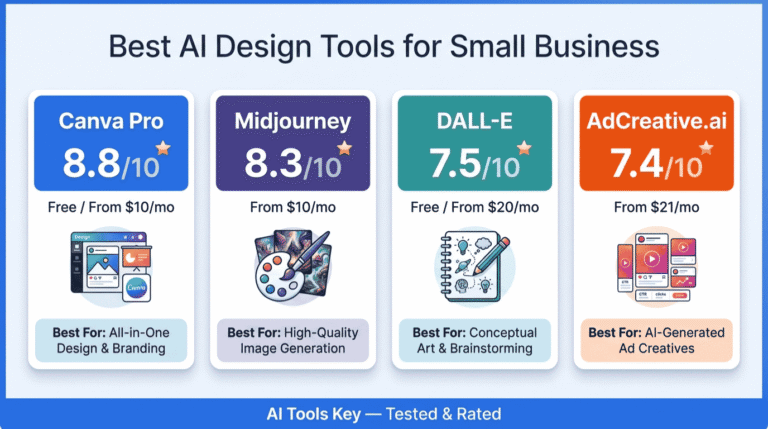
| Tool | Best For | Starting Price | Free Plan | Rating | Visit |
|---|---|---|---|---|---|
| Canva Pro | All-in-one design | ~$10/mo (annual) | Yes | 8.8/10 | Try Free |
| Midjourney | Best AI image quality | $10/mo | No | 8.3/10 | Try Midjourney |
| AdCreative.ai | Performance ad creatives | $21/mo | No | 7.4/10 | Try AdCreative |
| DALL-E | Quick AI images in chat | Free / $20/mo | Yes | 7.5/10 | Try DALL-E |
If pure AI image quality is your priority, Midjourney produces sharper, more artistic output, though it lacks Canva’s editing and layout tools. We break down that exact trade-off in our Canva vs Midjourney comparison.
For high-volume advertising visuals, AdCreative.ai is purpose-built for performance ads, while DALL-E is handy for quick AI images inside ChatGPT. None of them replace Canva’s all-in-one breadth, which is its real advantage.
Is Canva Pro Worth It?
So, after all this testing, is Canva Pro worth it? For almost any small business that creates visual content regularly, yes. At about $10 per month on annual billing, it pays for itself in saved time and avoided stock-photo costs within the first week.
The smart move is to start on the free plan. Build a few real designs, try the Magic Studio tools, and watch how quickly you bump into the storage and AI credit limits. When you do, that is your clear signal to upgrade.
Canva Pro Editor’s Pick
- Full Magic Studio AI suite with ~500 monthly credits
- 141M+ premium assets and full Brand Kit
- Magic Resize, Background Remover, and the Affinity bundle
Just keep its limits in mind. Protect your AI credits, expect to upgrade to Teams if you need real collaboration, and reach for a specialist when image quality is everything. For most small business owners, though, Canva Pro is the easiest, best-value design decision you can make. If you would rather hand off a big project, our AI presentation design service can do the heavy lifting.
The Information People Are Looking For
Is Canva Pro worth it in 2026?
Yes, for most small businesses and non-designers. At about $10 per month on annual billing, Canva Pro unlocks the full Magic Studio AI suite, 141M+ assets, Brand Kit, and Magic Resize. If you create visual content regularly, it pays for itself in saved time within the first week of use.
How much does Canva Pro cost?
Canva Pro costs $120 per year, which works out to about $10 per month on annual billing. If you pay month to month, it is roughly $13 to $15 depending on your region. Canva Teams starts around $15 per user monthly with a minimum seat commitment for collaboration features.
What is the difference between Canva Free and Canva Pro?
Canva Free includes templates, basic AI tools, around 50 monthly AI credits, and 5 GB storage. Canva Pro adds the full 141M+ asset library, the complete Magic Studio suite, roughly 500 AI credits per month, Brand Kit, Magic Resize, Background Remover, and far more storage. Pro is the practical choice for regular use.
Is Canva Pro good for small business?
Yes, it is one of the best design tools for small business. It lets non-designers produce professional social posts, presentations, ads, and branding affordably, with AI tools built in. The Brand Kit keeps everything consistent, and Magic Resize repurposes designs across platforms in seconds, saving significant time.
Is Canva’s AI image generator any good?
Canva’s Dream Lab, powered by Leonardo.ai, produces solid, production-ready images and is excellent for workflow because it lives inside your design. For pure output quality, dedicated tools like Midjourney are sharper. For most marketing visuals, though, Dream Lab is more than good enough and far more convenient.
Can you use Canva Pro for free?
Canva offers a permanent free plan, not a stripped-down trial, with templates, real-time collaboration, and basic AI tools. New users can also start a free Pro trial to test premium features. For light or occasional design work, the free plan is genuinely sufficient without ever paying.