Best AI Design Tools for Small Business in 2026 (Tested and Compared)
If you want the short version, the best AI design tools for small business in 2026 are Canva Pro for everyday graphics, Midjourney for premium images, and a free option like Google Gemini for quick visuals. We tested all five tools below on real small business projects, so you can skip the trial-and-error and pick the right one for your budget and skill level.
Here is the honest truth most roundups skip. You do not need a designer, a big budget, or any technical background to produce professional visuals anymore. You just need the right tool for the job in front of you.
Quick Answer
The best AI design tool for small business in 2026 is Canva Pro ($15/month or $120/year), an all-in-one suite with templates, AI image generation, and one-click resizing. For artistic images, Midjourney ($10/month) leads on quality. For a free option, Google Gemini with Nano Banana and DALL-E inside ChatGPT both generate strong visuals at no cost.
Before we get into each pick, one quick note on where this fits. This article is part of a much larger resource, linked just below, so you can see how design tools slot into your wider AI stack.
This article is part of our comprehensive Complete Guide to AI Tools for Small Business. Read the full guide for a complete overview of the AI tools that help small teams compete with much larger ones.
Ready to try our top pick right away? You can start with Canva for free and upgrade only when you need the Pro features.
What Is an AI Design Tool?
An AI design tool is software that uses artificial intelligence to create, edit, or enhance visual content. Some tools generate images from a text prompt, others remove backgrounds or resize designs automatically, and the best ones do all of it inside one editor. For small businesses, they replace expensive freelancers for routine design work.
There is an important split worth understanding. AI image generators, like Midjourney and DALL-E, create brand-new visuals from a written description. AI-assisted design suites, like Canva, layer smart features on top of templates and drag-and-drop editing. You will likely want one of each.
In practice, that means a Canva-style tool for your social posts and flyers, plus an image generator for the unique hero shots and illustrations that templates cannot give you.
Best AI Design Tools for Small Business at a Glance
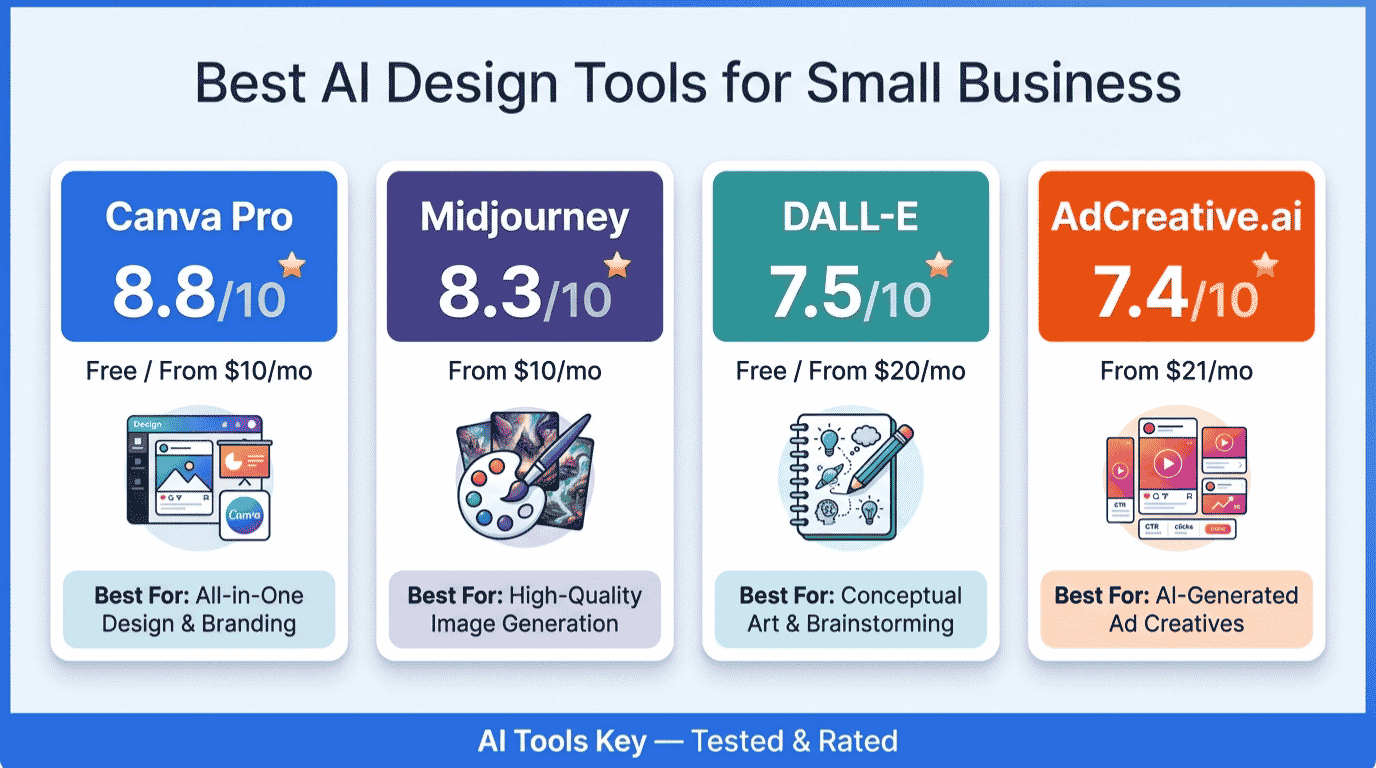
Here are the five best AI design tools for small business in 2026, ranked for everyday use by a non-designer:
- Canva Pro: Best overall all-in-one design suite
- Google Gemini (Nano Banana): Best value, strongest free image generation
- Midjourney: Best for premium, artistic image quality
- DALL-E (GPT Image): Best free image generation inside ChatGPT
- AdCreative.ai: Best for high-converting paid ad creatives
The table below gives you the headline numbers at a glance. We will break down each tool in detail right after.
| Tool | Best For | Starting Price | Free Trial | Rating |
|---|---|---|---|---|
| Canva Pro | All-in-one design | Free / $15/mo | Yes (30 days) | 8.8/10 |
| Google Gemini | Free image generation | Free / $19.99/mo | Yes | 8.6/10 |
| Midjourney | Artistic image quality | From $10/mo | No | 8.3/10 |
| DALL-E (GPT Image) | Quick images, free option | Free / $20/mo | Yes | 7.5/10 |
| AdCreative.ai | Paid ad creatives | From $39/mo | Yes (7 days) | 7.4/10 |
Want to explore beyond these five? You can browse our full AI tools directory or the dedicated AI design tools category for more options as your needs grow.
How We Tested and Rated These Tools
We do not rate tools from a spec sheet. After testing all five on real projects, from social posts to ad campaigns to product mockups, we scored each one on what actually matters to a small business owner.
Our 10-point rating weighs five factors: features (30%), ease of use (25%), pricing value (20%), support quality (15%), and integrations (10%). You can read the full method on our editorial guidelines page.
One thing we noticed across the board: the gap between these tools is rarely about quality anymore. It is about fit. The right pick depends on whether you need graphics, original images, or ads, and how much you want to spend.
1. Canva Pro: Best Overall AI Design Tool for Small Business
Canva Pro is the best all-in-one AI design tool for small businesses in 2026. If you only buy one design tool, make it this one. It handles social graphics, presentations, logos, flyers, and short videos in a single drag-and-drop editor that a complete beginner can learn in an afternoon.
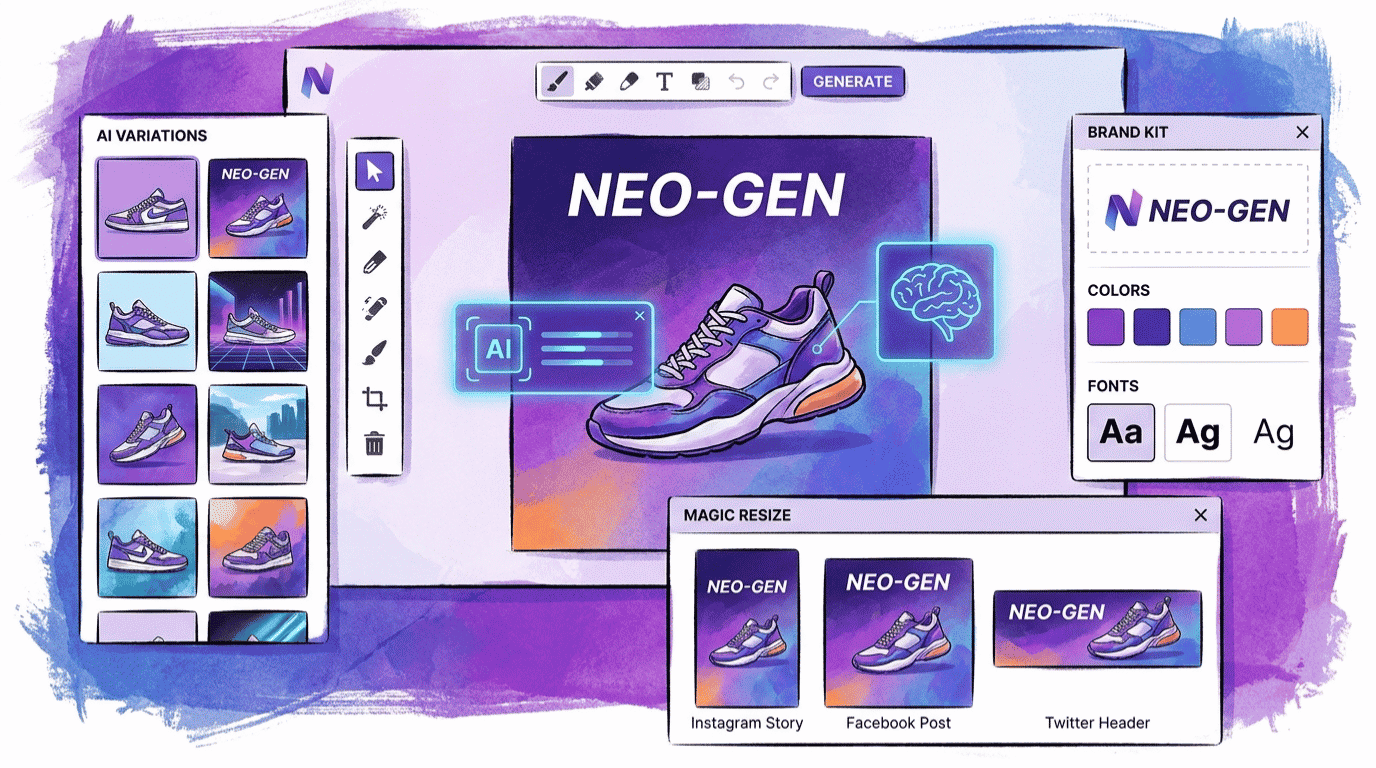
The AI layer, called Magic Studio, does the heavy lifting. Magic Design builds a full branded layout from a prompt, Background Remover clears photos in one click, Magic Write generates copy inside your design, and Magic Resize reshapes one design for every platform instantly.
Canva serves more than 200 million monthly active users and includes over 140 million premium stock photos, videos, and graphics. For most small businesses, that single subscription replaces several separate stock and editing tools.
Canva Pro Editor’s Pick
- Magic Studio AI: text-to-image, Magic Write, and Magic Edit
- One-click Background Remover and Magic Resize for every platform
- 140 million-plus premium stock assets and 5 Brand Kits
- Templates for social, print, presentations, and video
- Easiest tool here for non-designers, with a genuinely useful free plan
- Covers almost every design job a small business has, in one place
- Brand Kit keeps colors, fonts, and logos consistent automatically
- Resizes one design for Instagram, Facebook, LinkedIn, and print in seconds
- AI image generation is good, not best-in-class like Midjourney
- Pro is a single-user license; adding a teammate moves you to Business
- Monthly AI credits can run out with heavy image generation
Pricing: The free plan is excellent for casual use. Canva Pro costs $15 a month, or $120 a year (about $10 a month on annual billing), and includes a 30-day free trial. For teams, Canva Business runs $20 per user a month with collaboration and approval workflows.
Tip: Start on the free plan. The moment you find yourself manually resizing designs, copying brand colors from a note, or hitting locked premium templates every week, Pro pays for itself in saved time within days.
Best for: Almost every small business. If you produce any visual content, and every business does, Canva Pro is the safest, highest-value choice. Read our deeper take in our best AI tools for content creation guide, where Canva also earns a top spot.
2. Google Gemini (Nano Banana): Best Value AI Image Generator
For free AI image generation, Google Gemini with its Nano Banana model is the strongest no-cost option in 2026. If your main need is creating original images from a description without paying a cent, start here before anything else.
Gemini, available through Google’s Gemini, generates clean, on-brand visuals and handles text inside images far better than older models did. The free tier covers a few images a day, which is plenty for a business posting a handful of times a week.
What makes it stand out is value. You get genuinely competitive image quality, plus a capable AI assistant for writing and research, all from one free login. For a lean business watching every dollar, that combination is hard to beat.
Google Gemini Best Value
- Nano Banana image generation with strong text rendering
- Generous free tier for everyday social and blog visuals
- Doubles as a writing and research assistant
- Higher daily image limits on the paid Pro plan
- Best free image quality of any tool on this list
- One tool for images, writing, and research
- No subscription needed for light, regular use
- Free daily image limits are tight for high-volume needs
- No built-in design editor; you still need Canva for layouts
- Fewer brand controls than a dedicated design suite
Pricing: Free for everyday use, with roughly a few images per day on the free tier. Google AI Pro at $19.99 a month raises the daily image limit and unlocks more capacity. For most small businesses, the free tier is enough.
Best for: Owners who want professional images from a prompt without paying, or who want one free tool that also helps with writing. Pair it with Canva to drop your generated images straight into a finished layout.
3. Midjourney: Best for Premium, Artistic AI Images
Midjourney produces the highest-quality artistic AI images of any tool we tested. When you need a striking hero image, a unique brand illustration, or a photoreal product concept that looks expensive, Midjourney is the one that consistently delivers.
The catch is that Midjourney sells you fast GPU time, not a fixed number of images. The $10 Basic plan generates roughly 200 images per month, working out to about 5 cents per image. Heavier plans add unlimited slower generation and private creation.
It also has a learning curve. You write prompts and refine them, which takes practice. But once it clicks, nothing else matches the look. For commercial use, paid plans grant you broad usage rights, which you can confirm on the official Midjourney site.
Midjourney
- Best-in-class artistic and photoreal image quality
- Strong control over style, mood, and composition
- Unlimited Relax mode generation on Standard and above
- Commercial usage rights included on paid plans
- Unmatched image quality for hero shots and brand visuals
- Deep creative control once you learn prompting
- Standard plan offers effectively unlimited images in Relax mode
- No free trial; you pay before you can test it
- Prompt-based workflow has a real learning curve
- No layout, text, or template tools; images only
Pricing: Basic is $10 a month for about 200 images. Standard at $30 a month adds unlimited Relax-mode generation, which most regular users prefer. Annual billing cuts roughly 20% off each tier. There is no free plan.
Best for: Businesses that need standout, original imagery and are willing to pay and practice for it. Think brands, creators, and product sellers who want visuals that look custom-made rather than templated.
4. DALL-E (GPT Image): Best Free AI Image Generation Inside ChatGPT
DALL-E is now folded into GPT Image inside ChatGPT, and it remains the easiest way to generate an image without learning anything new. You simply describe what you want in plain English, in the same chat where you write copy or brainstorm.
That convenience is the whole pitch. There is no separate app, no prompt syntax to master, and a free tier that covers a couple of images a day. For a quick blog graphic, a simple product mockup, or a social visual, it gets you there in seconds.
Quality has jumped with the latest GPT Image models, especially text inside images. It still trails Midjourney on pure artistic polish, but for everyday business visuals it is more than good enough, and the free access makes it an easy starting point.
DALL-E (GPT Image) Free Option
- Generate images in plain English, no prompt syntax needed
- Lives inside ChatGPT alongside writing and ideas
- Free tier for a couple of images per day
- Improved text rendering with the latest GPT Image models
- Easiest image generator to use, full stop
- Free tier and no extra app to install
- One place for images, copywriting, and brainstorming
- Free tier image limits are low for steady use
- Less artistic control than Midjourney
- No design editor for assembling finished layouts
Pricing: Free inside ChatGPT with daily image limits. ChatGPT Plus at $20 a month removes most caps and unlocks the newest image features. If you already pay for ChatGPT, image generation is included.
Best for: Owners who want fast, no-fuss images and may already use ChatGPT for writing. It is the lowest-friction way to test AI images before committing to a paid image tool.
5. AdCreative.ai: Best for High-Converting Ad Creatives
AdCreative.ai is the best AI tool for generating high-converting paid ad creatives at scale. If you run Facebook, Instagram, or Google ads and you are tired of guessing which design works, this is the specialist built for you.
Unlike a general design tool, AdCreative.ai is trained specifically on ad performance. It generates dozens of on-brand ad variations, then scores each one for likely conversion before you spend a dollar on it. AdCreative.ai is trained on real ad performance data and is used by more than 4.2 million marketers.
When I set up a campaign and compared generating ad variations here versus designing each one by hand in Canva, the time saving was the real story. You get a batch of scored options in minutes instead of an afternoon.
AdCreative.ai
- Generates on-brand ad creatives trained on conversion data
- Creative scoring predicts which design will perform
- Connects directly to Meta Ads and Google Ads
- Unlimited iStock photos and AI ad copy included
- Purpose-built for ads, with conversion scoring you cannot get elsewhere
- Produces many on-brand variations fast
- Pulls brand colors from your logo and connects to ad platforms
- No free plan; only a 7-day trial that auto-renews
- Starter plan limits downloads to 10 credits a month
- Video features are locked behind a much pricier tier
Pricing: The Starter plan is $39 a month on monthly billing, dropping to about $21 a month on annual billing. There is no free plan, only a 7-day trial. Watch the auto-renewal; set a reminder to cancel if it is not a fit.
Do not want to build ads yourself? A vetted freelancer can design a full set of high-converting ad creatives for you. Explore our AI ad creative generation service for a done-for-you option.
Best for: Businesses actively spending on paid ads that want more winning creatives without hiring a designer for every test.
How to Choose the Right AI Design Tool for Your Business
You do not need all five. The smart move is to match the tool to the job, then add a second one only when a real gap appears. Here is the simple framework we use.
Start with what you make most. If it is social posts, flyers, and presentations, get Canva Pro and stop there. If it is original images and illustrations, start with a free generator like Gemini, then add Midjourney when quality matters. If it is paid ads, AdCreative.ai earns its keep.
Then match your budget. On a tight budget, Canva Free plus Gemini and DALL-E covers most needs at zero cost. With $15 to $30 a month, Canva Pro or Midjourney each deliver strong value. Spending on ads already? AdCreative.ai is the targeted add-on.
Our recommended starter stack: Canva Pro for layouts and everyday graphics ($15/month), plus a free image generator like Gemini or DALL-E for original visuals. That combination handles the vast majority of small business design work for the price of one tool.
Still want a human touch for a logo or full brand identity? AI gets you most of the way, but a designer can polish the last 10%. You can compare options in our AI services directory or jump straight to a logo specialist below.
Need a professional logo and brand kit? Skip the trial and error. Our AI logo design and branding service connects you with a freelancer who delivers a polished, ready-to-use identity.
For more visual content beyond static design, our best AI video generators guide covers the video side, and our best free AI tools for business roundup lists more zero-cost options worth trying.
Quick Finder: Match Yourself to a Tool in 30 Seconds
Choosing between five tools is a lot. The matcher below asks three quick questions about what you create, your budget, and your comfort level, then returns one tested pick with current pricing. Nothing is collected; your answers stay in your browser.
AI Design Tool Quick Finder
3 questions, about 30 seconds, one tested recommendation.
Our Verdict: Which AI Design Tool Should You Pick?
Canva Pro is the best AI design tool for small business in 2026, and it is the one to start with. It covers the most ground, is the easiest to learn, and offers the best value at $15 a month. Add a free image generator like Google Gemini or DALL-E for original visuals, and you have a complete design stack for almost nothing extra.
Choose Midjourney when image quality is the priority and you are willing to pay and practice. Choose AdCreative.ai when you run paid ads and want winning creatives fast. For everyone else, the Canva-plus-free-generator combination is the smart, affordable answer.
Whichever you pick, start free where you can, test it on one real project this week, and only upgrade once the time savings are obvious. For the bigger picture, our guide to the best AI tools for small business shows how design fits alongside the rest of your stack.
The Information People Are Looking For
What is the best AI design tool for small business in 2026?
Canva Pro is the best AI design tool for small business in 2026. At $15 a month, it combines templates, AI image generation, background removal, and one-click resizing in one beginner-friendly editor. For original images, pair it with a free generator like Google Gemini or DALL-E inside ChatGPT.
Is there a free AI design tool?
Yes. Canva has a genuinely useful free plan for graphics and layouts. For free AI image generation, Google Gemini with Nano Banana and DALL-E inside ChatGPT both let you create images at no cost, with daily limits. Together, these free tools cover most small business design needs.
Can AI design tools replace a graphic designer?
For routine work like social posts, flyers, and ad variations, AI design tools can replace a designer and save real money. For brand strategy, a polished logo, or a unique identity, a human designer still adds value. Many small businesses use AI for daily work and hire a freelancer for branding.
Which AI tool is best for generating images from text?
Midjourney produces the highest-quality artistic images from text, starting at $10 a month. For a free option, Google Gemini offers the strongest no-cost image generation, and DALL-E inside ChatGPT is the easiest to use. Pick Midjourney for quality, or a free tool for everyday business visuals.
Are AI-generated images free to use commercially?
It depends on the tool and your plan. Midjourney grants commercial usage rights on paid plans, and Canva covers commercial use within its license. Always check each tool’s current terms before using images in ads or for sale, since policies vary and can change. When unsure, read the official usage terms first.
How much do AI design tools cost?
Most AI design tools range from free to about $40 a month. Canva Pro is $15 a month, Midjourney starts at $10, DALL-E in ChatGPT is free or $20 with Plus, and AdCreative.ai begins at $39. A free starter stack of Canva Free plus Gemini costs nothing.
Do I need design skills to use AI design tools?
No. Tools like Canva, Gemini, and DALL-E are built for non-designers. You describe what you want or drag elements onto a template, and the AI handles the rest. A complete beginner can produce professional visuals within an hour, with no prior design experience needed.