How to Automate Customer Support With AI: A Step-by-Step Guide (2026)
If answering the same customer questions over and over is eating your day, AI can take most of that off your plate. Learning how to automate customer support with AI means setting up a smart agent that answers FAQs instantly, routes tickets, and handles routine requests around the clock, while your team focuses on the hard problems. You do not need a developer or a big budget to start. In this guide, we will walk through the exact process after our hands-on testing, compare the four best tools, and show you what it costs.
The easiest place for a small business to start is Tidio, which pairs live chat with a capable AI agent, so we will reference it throughout this walkthrough.
Quick Answer
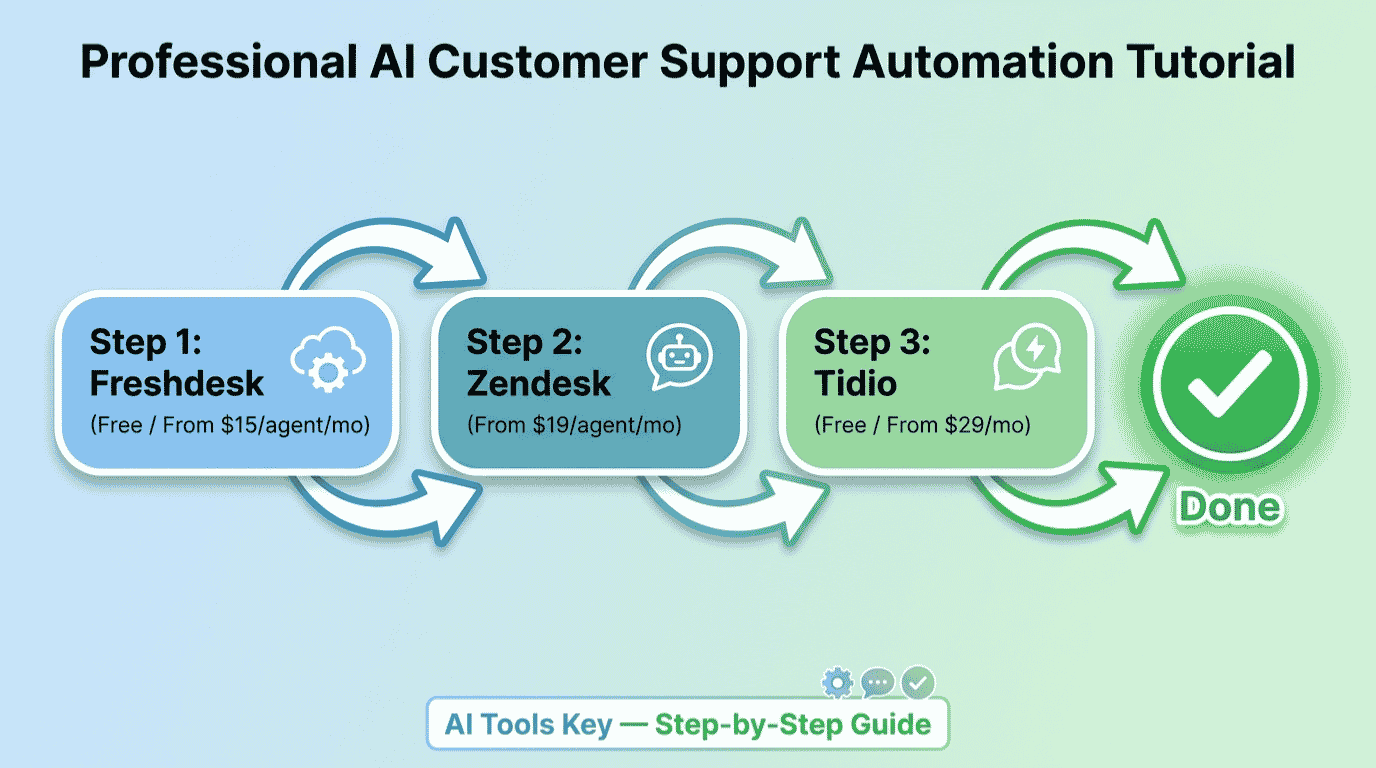
To automate customer support with AI, choose a tool like Tidio (from $29/mo), Freshdesk (from $15/agent/mo), Zendesk (from $19/agent/mo), or Intercom (from $29/seat/mo), build a knowledge base, set up an AI agent to answer FAQs, and route complex issues to a human. Tidio is best for small businesses, while Zendesk and Intercom suit scaling teams. Most setups take about an hour.
This guide is part of our complete Guide to AI Agents for Business. Read the full pillar to see how AI agents can handle support, sales, and operations.
What Is Customer Support Automation?
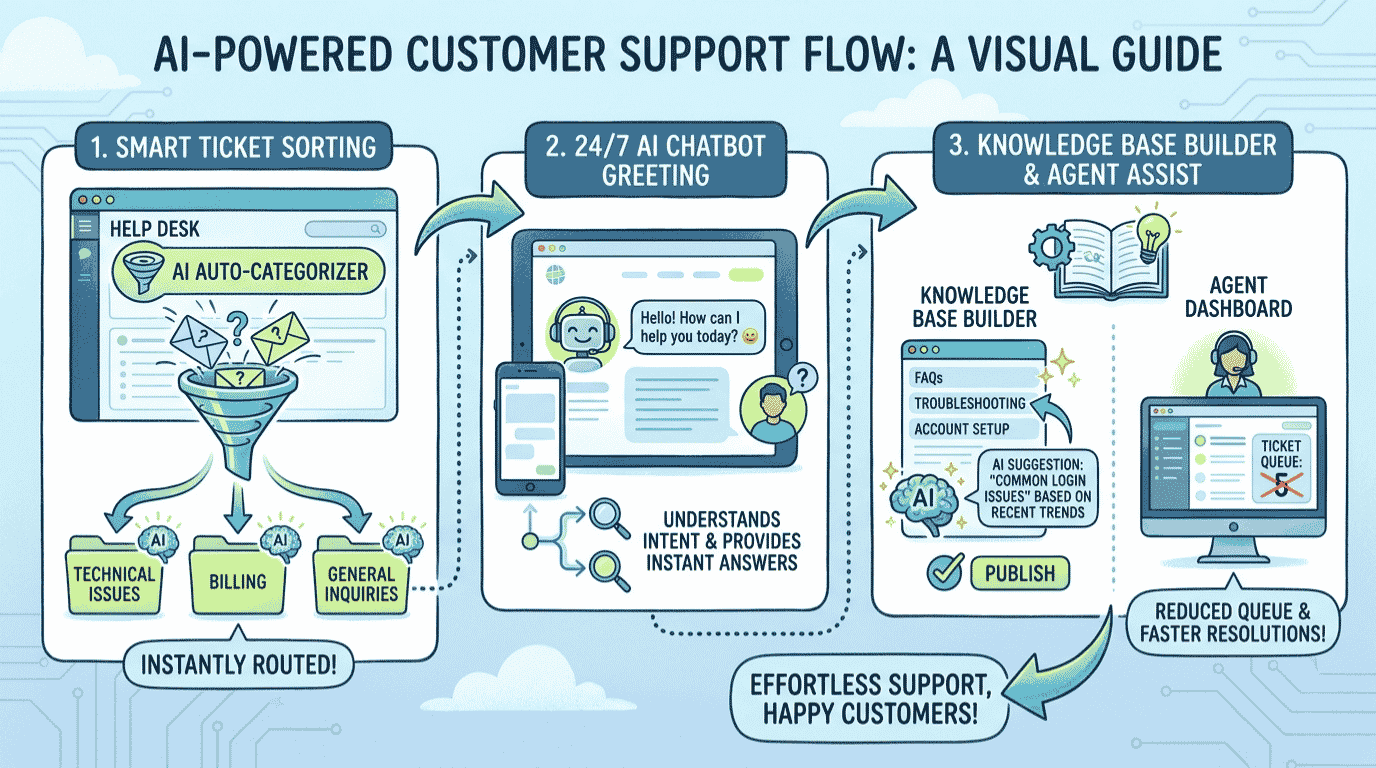
Customer support automation is the use of AI to handle routine support tasks with little or no human involvement. An AI agent reads a customer’s question, finds the answer in your knowledge base, and replies instantly. For anything it cannot solve, it hands the conversation to a human with full context. The result is faster service that runs 24/7.
This is not the rigid, frustrating phone-tree automation of the past. Modern AI understands plain language, tone, and intent. AI can resolve most routine support questions instantly, freeing your team for the issues that truly need a human. AI can automate up to 80% of repetitive support tasks, which is why adoption is accelerating fast.
For a plain-English primer on the concept, IBM publishes a helpful overview of customer service automation.
What Support Tasks Can AI Automate?
AI will not replace your team, but it will erase the repetitive work. Here is where tools like Tidio, Freshdesk, Zendesk, and Intercom earn their keep.
- Answer FAQs instantly: handle common questions like order status, hours, and returns 24/7.
- Live chat conversations: greet visitors, answer questions, and qualify leads on your website.
- Route and prioritize tickets: sort incoming requests by topic, urgency, and sentiment automatically.
- Draft replies: write accurate, on-brand responses for agents to review and send.
- Multilingual support: answer customers in dozens of languages without hiring bilingual staff.
- Escalate to humans: hand complex or sensitive issues to a person with full conversation context.
The impact is real. FAQs make up 40 to 60% of Tier 1 support tickets, and AI can resolve most of them instantly, cutting both wait times and workload.
What You Need to Get Started
The barrier to entry is low. To follow this guide, you really need four things.
- A set of common customer questions you answer repeatedly.
- Help docs or FAQs for the AI to learn from (even a simple list works).
- One support tool with AI features (free plans work to start).
- About an hour of focused time to set up and test your AI agent.
Not sure if you are ready? Use the quick checker below. Answer four yes-or-no questions and it tells you whether to start Step 1 now or set something up first. Everything stays in your browser, and nothing is saved or shared.
Are You Ready to Automate Your Customer Support?
4 quick questions. Takes about 20 seconds.
How to Automate Customer Support With AI in 6 Steps
Here is the exact process we use to set up AI support from scratch. Follow it in order and you will have an AI agent answering customers by the end.
Step 1: Map your most common questions
Start by listing the questions you answer most: shipping, returns, pricing, hours, account help. These repetitive questions are the perfect candidates for automation. Pull them from your inbox, live chat history, or support tickets so you know exactly what your AI agent needs to handle.
Step 2: Choose your support tool
Next, pick the platform that will run your AI agent. The four best options are Tidio for small businesses, Freshdesk for affordable ticketing, Zendesk for scaling teams, and Intercom for its powerful Fin AI agent. We compare all four in detail, with pricing, in the next section.
Step 3: Build your knowledge base
Your AI is only as good as the information you give it. Add help articles, FAQs, and answers to your common questions so the AI can pull accurate replies. Most tools let you import existing docs or train the AI on your website. The better your knowledge base, the more questions your AI resolves correctly.
Step 4: Set up your AI agent
Now turn on the AI. Connect it to your knowledge base, set a friendly greeting, and define its tone so it sounds like your brand. Start by letting it handle a few specific topics, like order status or returns, before expanding. Test it with real questions and refine the answers until they are accurate.
Step 5: Set routing and human handoff rules
This step protects your customer experience. Decide which issues the AI handles alone and which it escalates to a person. A smart rule: let AI answer confidently when it knows the answer, and hand off anything sensitive, complex, or emotional to a human with full context. Never trap a frustrated customer in a bot loop.
Step 6: Test, launch, and improve
Before you go live, test the AI with your toughest real questions and fix any weak answers. After launch, review conversations weekly to spot gaps, then add missing answers to your knowledge base. Your AI gets smarter over time as you feed it the questions it could not handle.
Want your AI support set up for you?
A specialist can build your knowledge base, configure your AI agent, and set up routing so your support runs smoothly from day one. Skip the learning curve.
See Customer Support Setup ServicesThe 4 Best Tools to Automate Customer Support
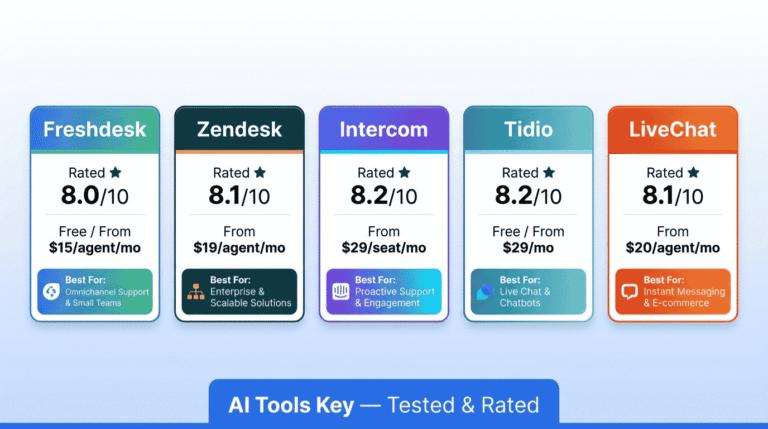
The tool you pick shapes how easy and affordable your AI support will be. Here is how the four best options compare after our testing.
| Tool | Best For | Starting Price | Free Option | Rating |
|---|---|---|---|---|
| Tidio | Best for small businesses | $29/mo | Free plan | 8.2/10 |
| Freshdesk | Best value help desk | $15/agent/mo | Free plan | 8.0/10 |
| Zendesk | Best for scaling teams | $19/agent/mo | 14-day trial | 8.1/10 |
| Intercom | Best AI agent (Fin) | $29/seat/mo | 14-day trial | 8.2/10 |
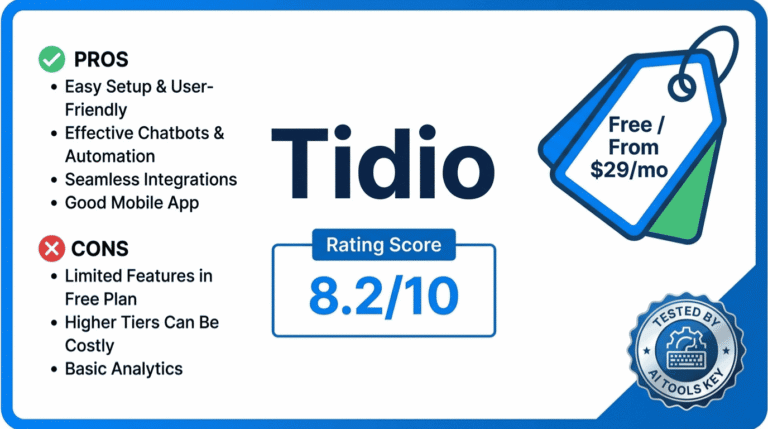
Tidio Best for Small Business
- Live chat plus AI agent in one tool
- Easy setup, no developer needed
- Learns from your FAQs and website
- Affordable for small teams
Tidio is our top pick for small businesses. It combines live chat and an AI agent in a tool you can set up in an afternoon, with a free plan to start.
Freshdesk Best Value
- Affordable per-agent ticketing
- Strong free tier to get started
- Email, chat, and social in one inbox
- Part of the Freshworks ecosystem
Freshdesk is the best value for a traditional help desk. Its low per-agent price and useful free plan make it a smart pick for budget-conscious teams.
Zendesk and Intercom are more powerful but pricier, and both bill AI separately, so watch the add-on costs as you scale. For more options, see our roundup of the best AI tools for customer service, and if you want to start with a website chatbot specifically, our guide on how to build an AI chatbot walks through it step by step. You can also read our hands-on Tidio review for a closer look at our top pick.
A Real Example: A Small Store’s Support
Let me make this concrete. Say you run a small online store and spend hours each day answering “Where is my order?” and “What is your return policy?” Here is the system you would build.
You set up Tidio, import your shipping and returns FAQs into its knowledge base, and turn on the AI agent to handle those exact questions. When a customer asks about an order, the AI answers instantly with tracking info. When someone has a complex problem, like a damaged item, the AI collects the details and hands the chat to you with full context. You go from answering 50 repetitive messages a day to handling only the handful that truly need you.
That is hours back every day, faster answers for customers, and no message left waiting. The same setup works for a SaaS app, an agency, or a service business.
What Does It Cost?
The honest answer: you can start free and pay only as you grow. Tidio and Freshdesk both have free plans, so you can test AI support at no cost before committing.
For a realistic small business budget, most owners spend between $15 and $50 per month to start. Note that Freshdesk, Zendesk, and Intercom charge per agent or per seat, so costs rise with team size, and Zendesk and Intercom bill their advanced AI separately. The savings are dramatic, though: automation can cut the cost per support ticket from $6 to $12 down to under $0.50. Browse our full AI chatbot tools category for more options.
Can AI Replace Support Agents?
This is the worry behind every support automation decision, so let me be direct. No, AI will not replace your support team, and you should not want it to. AI handles the repetitive, low-value questions, while humans handle the complex, emotional, and high-stakes ones that build loyalty.
The best support blends both: AI for speed and availability, people for empathy and judgment. The goal of automation is not fewer people, but better service and a team freed from busywork. Used this way, AI makes your support faster and your agents happier, not redundant.
DIY vs Hiring an Expert
So should you set this up yourself or hire help? It comes down to time and complexity.
Do it yourself if
- Your support needs are simple and you enjoy learning the tools.
- You have an hour or two to set things up.
- Your budget is tight and you want full control.
Hire a specialist if
- You want a polished knowledge base and AI agent built for you.
- Your time is better spent running the business.
- You need complex routing or multi-channel support configured.
If you would rather skip the setup, a freelancer can build your knowledge base, configure your AI agent, and connect your channels. Compare experts and budgets in the full directory of AI services on Fiverr.
Want your AI support handled by an expert?
Hand your setup to a vetted specialist and get a reliable AI agent that answers customers accurately and escalates the right issues to your team.
Hire a Support Setup ExpertIs It Worth Learning How to Automate Customer Support With AI?
In our view, yes, clearly. AI support turns a constant drain on your time into a system that answers customers instantly, around the clock, while your team focuses on what matters. Every hour you invest in setup returns many times over in saved time and happier customers.
We rate every tool on a transparent 10-point scale across features, ease of use, pricing value, support, and integrations. You can read more about how we test in our editorial guidelines. By that standard, Tidio is the best place for a small business to start, Freshdesk is the best value, and Zendesk and Intercom are best for scaling teams.
Our Recommendation
Start with Tidio or Freshdesk on a free plan, build a solid knowledge base, and set up an AI agent to answer your most common questions. Always include an easy human handoff for complex issues. It is the fastest way to deliver 24/7 support without growing your team.
Get Started With TidioThe Information People Are Looking For
What is customer support automation?
Customer support automation is the use of AI to handle routine support tasks with little or no human involvement. An AI agent reads a customer’s question, finds the answer in your knowledge base, and replies instantly, then hands complex issues to a human. The result is faster, 24/7 service that lowers cost and workload.
How do I automate customer support with AI?
Choose a tool like Tidio, Freshdesk, Zendesk, or Intercom, build a knowledge base from your FAQs, set up an AI agent to answer common questions, and create rules to route complex issues to a human. Test it with real questions before launch, then review conversations weekly to keep improving the answers.
What is the best AI tool for customer support?
For most small businesses, Tidio is the best AI support tool thanks to its ease of use, free plan, and built-in AI agent. Freshdesk is the best value help desk, while Zendesk and Intercom are best for scaling teams that need omnichannel support and advanced AI, though both cost more.
Can AI replace customer support agents?
No. AI handles repetitive, low-value questions, but it cannot replace the empathy, judgment, and problem-solving humans bring to complex or sensitive issues. The best support blends both: AI for speed and 24/7 availability, people for the hard conversations. Automation frees your team from busywork rather than replacing it.
How much does AI customer support cost?
You can start free with Tidio or Freshdesk. A realistic paid budget is $15 to $50 per month to begin: Freshdesk from $15/agent/mo, Zendesk from $19/agent/mo, and Tidio or Intercom from $29/mo. Zendesk and Intercom bill advanced AI separately, so factor that in as your support volume grows.
Does AI customer support work 24/7?
Yes. An AI agent answers customer questions instantly at any hour, with no breaks or wait times. This is one of automation’s biggest benefits, especially for businesses with customers in different time zones. Routine questions get resolved around the clock, while complex issues are queued or escalated for your team during business hours.
How long does it take to set up AI customer support?
Most small businesses set up a basic AI support agent in about an hour. Building your knowledge base and refining the AI’s answers take the most time at first. Once it is live, you simply review conversations and add missing answers over time, which keeps improving accuracy with minimal ongoing effort.