Best Free AI Tools for Business in 2026: 7 We Actually Use
The best free AI tools for business in 2026 let you write, design, sell, and automate without spending a dollar. We signed up for every free plan on this list and ran them for a month. The standouts are ChatGPT for writing, Canva for design, and HubSpot for your CRM, and each one is genuinely useful, not a crippled trial.
Here is the honest truth most lists skip: every free plan has a catch. A message cap here, a credit limit there, a feature locked behind a paywall. So for each tool below, we tell you exactly what the free plan gives you, where it hits a wall, and when it is worth paying.
Quick Answer
The best free AI tools for business in 2026 are ChatGPT (writing and ideas), Canva (design), HubSpot CRM (sales), MailerLite (email), Tidio (customer chat), Make (automation), and Grammarly (writing polish). All seven have a permanent free plan with real limits, so start with the tool that solves your biggest task first.
This article is part of our complete Guide to AI Tools for Small Business. Read the full guide for a complete overview of building your stack, free or paid.
Are Free AI Tools Good Enough for Business?
Yes. In 2026, the free tiers of the top AI tools do real work, not just demos. You can draft emails, design social posts, manage leads, send newsletters, answer customer chats, and automate tasks without paying anything. The limits show up only when your volume grows.
These tools run on a freemium model: a useful free plan that nudges you to upgrade as you scale. The free plan is the product’s best marketing, so companies make it genuinely capable.
The “AI” in these tools is generative artificial intelligence, which can write, design, and summarize for you. ChatGPT alone serves more than 800 million weekly active users, many of them small businesses running on the free plan.
The catch you should expect: free plans limit you on usage (messages, AI credits, subscribers, conversations) or lock premium features. None of that is a dealbreaker for a lean business. You just need to know the ceiling before you build on it, which is exactly what we map out below.
How We Tested These Free AI Tools
We did not skim feature pages. To find the best free AI tools for business, we created an account on every free plan here and used each one for real work over a month, tracking where each tool hits its wall.
Our rating weighs five factors: features (30%), ease of use (25%), pricing value (20%), support quality (15%), and integrations (10%). You can read the full method on our editorial guidelines page, and see who runs the tests on our about page.
A quick note on trust. Some links here are affiliate links, so we may earn a commission if you upgrade to a paid plan, at no extra cost to you. That never changes our ratings or which free tools we recommend. Read our full affiliate disclosure for details.
Best Free AI Tools for Business at a Glance
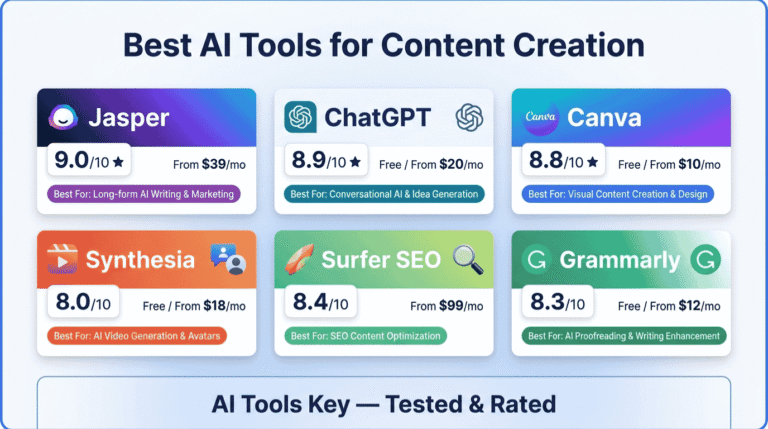
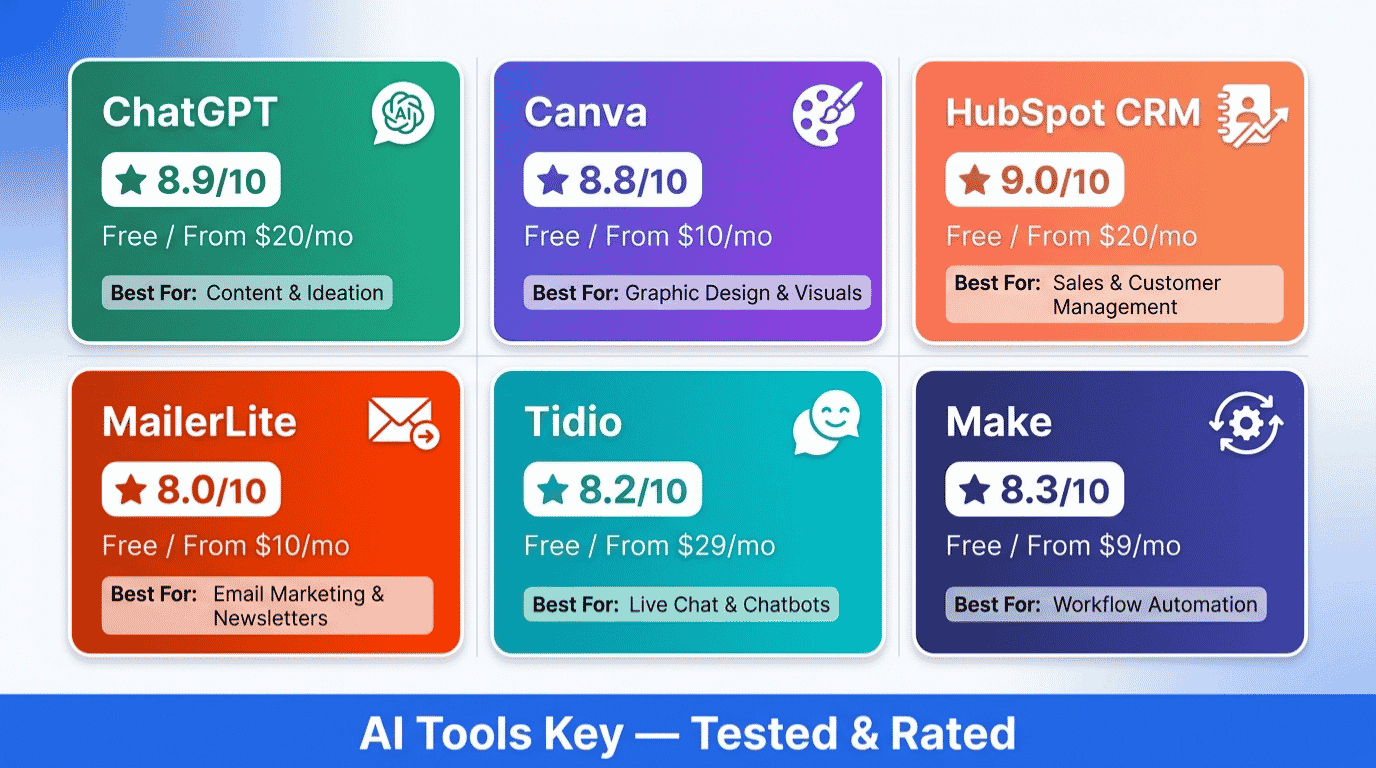
Here is the quick view. Each tool below has a permanent free plan, so the table shows what the free tier gives you, the upgrade price when you outgrow it, and our rating.
| Tool | Best Free For | Free Plan Includes | Paid From | Rating |
|---|---|---|---|---|
| ChatGPT | Writing and ideas | Flagship model, about 10 messages per 5 hours | $20/mo | 8.9/10 |
| Canva | Design and visuals | 250,000+ templates, about 50 AI generations/mo | $15/mo | 8.8/10 |
| HubSpot CRM | Sales and leads | 1,000 contacts, 2 users, Breeze AI assistant | $20/mo | 9.0/10 |
| MailerLite | Email marketing | 250 subscribers, 2,500 emails/mo, automations | $12/mo | 8.0/10 |
| Tidio | Customer chat | 50 live chats/mo, 50 Lyro AI chats one-time | $29/mo | 8.2/10 |
| Make | Automation | 1,000 operations/mo, 2 active scenarios | $9/mo | 8.3/10 |
| Grammarly | Writing polish | Unlimited checks, 100 AI prompts/mo | $12/mo | 8.3/10 |
Want to see every tool we have reviewed, free and paid? Browse our full AI tools directory. Now, the details.
1. ChatGPT: Best Free AI Tool Overall
ChatGPT Editor’s Pick
- Drafts emails, content, plans, and replies in seconds
- Free access to the latest flagship model for everyday tasks
- Handles research, summaries, and brainstorming in one chat
If you try only one free AI tool, make it ChatGPT. It is the most versatile assistant on this list, handling writing, planning, customer replies, and research from a single chat box. For most owners, it replaces an hour of daily busywork.
The free plan gives you the latest flagship model with a cap of about 10 messages every 5 hours before it switches to a lighter model. That is plenty for short bursts of work. US free users now also see occasional ads in responses.
The catch: the free plan skips Deep Research, longer context, and app connectors. If you live in ChatGPT all day, the $20 per month Plus plan removes the message cap and unlocks the advanced features.
- The single most useful free AI tool for general work
- Strong flagship model available at no cost
- No setup, works in your browser or phone instantly
- Message cap interrupts long work sessions
- No Deep Research or connectors on free
- Ads now appear for US free users
2. Canva: Best Free AI Tool for Design
Canva Best Value
- Drag-and-drop design with thousands of free templates
- Magic Studio AI tools for text, images, and background removal
- Create social posts, logos, and ads with no design skills
Canva is how non-designers make professional visuals. Its free plan is a real design tool, not a teaser. Canva’s free plan includes more than 250,000 templates and about 50 AI generations per month, plus 5 GB of storage.
The Magic Studio AI suite lets you generate images, write copy, and clean up photos. On free you get a taste of each, which covers light, occasional design work comfortably.
The catch: premium stock assets, the one-click Background Remover, and Magic Resize sit behind Pro. AI credits also run out at roughly 50 a month with no top-up. Pro runs about $15 per month, or close to $12 a month billed annually, and lifts those limits.
- Genuinely useful free plan for everyday graphics
- Huge template library and easy AI tools
- Works in the browser, no install needed
- Best assets and Background Remover are Pro only
- Around 50 AI credits a month runs out fast for heavy use
3. HubSpot CRM: Best Free AI CRM
HubSpot CRM Top Rated
- Free forever CRM with contact and deal tracking
- Breeze AI assistant for summaries and email drafts
- Meeting scheduler, live chat, and email tools built in
For tracking leads and closing deals, HubSpot has the strongest free CRM on the market. HubSpot’s free plan supports up to 1,000 marketing contacts and 2 users, and includes the Breeze AI assistant for writing emails and summarizing records.
You get contact management, deal pipelines, a meeting scheduler, live chat, and basic email marketing, all free. For a new business, that is a complete sales foundation at zero cost.
The catch: the powerful Breeze AI Agents, advanced automation, and custom reporting need a paid plan, which starts around $20 per seat per month. Costs also climb as your contact count grows.
- The most generous free CRM available
- Built-in AI assistant on the free plan
- Scales with your business as you grow
- AI Agents and deep automation are paid
- Pricing rises with contacts and add-ons
Verdict: HubSpot is the best free AI CRM for any small business serious about sales. Start free, and only upgrade when you need automation or AI Agents.
4. MailerLite: Best Free AI Email Marketing Tool
MailerLite Best Budget Pick
- Clean drag-and-drop email and newsletter builder
- Free automations, signup forms, and a landing page
- Charges only for active subscribers, never dead contacts
To start an email list without paying, MailerLite is the easiest option. After a 2026 update, MailerLite’s free plan covers up to 250 subscribers and 2,500 emails per month, with 2 user seats, automations, signup forms, and a landing page included.
It is refreshingly simple to learn, and you only pay for active subscribers, so bounced or unsubscribed contacts never count against you. For email marketing on a budget, the value is hard to beat.
The catch: the AI writing assistant and unlimited templates are paid features, so you build emails from a blank canvas on free. The Comfort plan starts at about $12 per month and adds the AI assistant plus templates.
- Simple, beginner-friendly email builder
- Free automations and a landing page included
- Active-subscriber billing keeps costs honest
- AI writing assistant is paid only
- Free subscriber cap is now lower than before
If email is your main channel, our guide to the best AI email marketing tools compares MailerLite against the top paid options too.
5. Tidio: Best Free AI Chatbot
Tidio Live Chat
- Live chat widget plus a rule-based chatbot builder
- Lyro AI agent that answers questions from your content
- Easy to install on any website in minutes
To add a chat widget and a basic bot to your site for free, Tidio is the simplest pick. Tidio serves more than 300,000 businesses, and its free plan includes 50 live chat conversations a month plus a one-time 50 conversations with its Lyro AI agent.
Lyro can read your website content and answer common questions automatically, and Tidio says it resolves a large share of routine inquiries. The free tier is a good way to test whether an AI chat agent fits your support flow.
The catch: those 50 Lyro AI conversations are a one-time allowance, not monthly. After that, the AI agent needs a paid add-on that starts around $39 per month. Live chat plans begin at $29 per month.
- Quick to install on any website
- Free live chat plus a taste of AI support
- Visual, no-code chatbot builder
- Lyro AI is limited to 50 conversations total on free
- Conversation-based pricing climbs quickly
6. Make: Best Free AI Automation Tool
Make (Integromat) Best Free Automation
- Visual builder that connects your apps without code
- Free plan covers light, useful automations
- Strong branching and logic for multi-step workflows
The glue that connects every other tool on this list is Make. Its visual canvas links your apps so data flows automatically, for example sending a new HubSpot lead into a Google Sheet or a Slack alert.
The free plan includes 1,000 operations per month across 2 active scenarios. That is enough to run a couple of genuinely useful automations and prove the value before you pay anything.
The catch: operations get consumed quickly, since each step in a workflow counts. Once you outgrow 1,000 a month, the Core plan starts at about $9 per month for 10,000 operations.
- Excellent free automation for a small stack
- Visual builder is great for multi-step logic
- Cheapest upgrade path of the major platforms
- Free operations run out fast at higher volume
- Slight learning curve versus simpler tools
7. Grammarly: Best Free AI Writing Assistant
Grammarly Best Free Editor
- Unlimited grammar, spelling, and tone checks
- Works inside Gmail, Docs, Word, Slack, and more
- GrammarlyGO AI for rewrites and quick drafts
To make every email and document read clearly, Grammarly is the editor that follows you everywhere. Grammarly is used by 40 million people and works inside more than 1 million apps, from Gmail to Google Docs.
The free plan gives you unlimited grammar, spelling, and tone checks, plus 100 AI prompts a month through GrammarlyGO for rewrites and short drafts. For most owners, that polishes daily writing without any cost.
The catch: plagiarism detection, advanced rewrites, and a bigger AI prompt allowance need Pro, which is $12 per month billed annually. If you write all day, the upgrade pays for itself in time saved.
- Unlimited core checks on the free plan
- Works in nearly every app you write in
- Privacy-friendly: does not sell your content
- Only 100 AI prompts a month on free
- Not a long-form content generator
For more writing options, compare it in our guide to the best AI writing tools.
The Free AI Tool Stack You Can Build Today
Here is the part that turns a list into a system. You can run a lean business on zero software spend by combining these free plans by function. After building this stack ourselves, we found it covers the core of a small operation.
Your zero-cost starter stack: ChatGPT for writing and ideas, Grammarly to polish it, Canva for visuals, HubSpot to manage leads, MailerLite for your newsletter, Tidio for website chat, and Make to connect them all. Total monthly cost: nothing, until your volume grows.
The magic is connection. Use Make to link the pieces, so a new lead from your HubSpot form triggers a welcome email in MailerLite and a Slack alert to you. That turns seven separate free tools into one quiet, automated machine.
You will eventually outgrow a free plan or two, usually email subscribers or AI credits first. When that happens, upgrade only the one tool that hit its ceiling, not all of them. That keeps your spend tied directly to growth.
When Free Is Not Enough: Hire an Expert
Free tools are powerful, but wiring seven of them together takes time, and a misconfigured automation can quietly drop leads. If you would rather have a working system handed to you, bring in help.
Not sure which free tools fit your business, or how to connect them? A strategist can map your stack and set it up so it runs without you babysitting it.
Get an AI Strategy SessionTwo services pair well with a free stack. Our AI business consultant service helps you choose the right tools, and our AI workflow automation setup service connects them into one system. You can browse everything in our AI services directory.
Which Free AI Tool Should You Start With?
Do not sign up for all seven at once. The best free AI tools for business are the ones that solve your biggest problem today, so start with one.
Start with ChatGPT if you want a single assistant for writing, planning, and answers. It delivers the most value on day one for almost any business.
Start with Canva if your bottleneck is visuals: social posts, ads, or a logo.
Start with HubSpot if you are losing track of leads and need a free CRM.
Start with MailerLite if building an email list is your priority, and Tidio if your website needs to answer visitors around the clock.
Ready to mix in paid tools too? Our broader guide to the best AI tools for small business covers the full picture across categories.
Our pick: for most businesses, start with ChatGPT plus Canva. Together they cover writing and design, the two tasks every small business needs daily, and both are free. Add HubSpot, MailerLite, Tidio, Make, and Grammarly as each need appears.
Find Your Free AI Tool in 60 Seconds
Answer four quick questions and we will point you to the free tool to start with today.
What is your biggest business task right now?
The Information People Are Looking For
What are the best free AI tools for business in 2026?
The best free AI tools for business in 2026 are ChatGPT for writing, Canva for design, HubSpot CRM for sales, MailerLite for email, Tidio for chat, Make for automation, and Grammarly for editing. All seven have a permanent free plan, so start with the one that solves your biggest task.
Is ChatGPT free for business use?
Yes. ChatGPT has a permanent free plan that gives you the latest flagship model with a cap of about 10 messages every 5 hours, then a lighter model. It covers writing, planning, and research for most small businesses. The $20 per month Plus plan removes the cap and adds advanced features.
Which free AI tool is best for a small business?
For most small businesses, ChatGPT is the best free AI tool to start with because it handles writing, ideas, and customer replies in one place. If your main need is design, choose Canva; if it is tracking leads, choose HubSpot’s free CRM. Match the tool to your biggest task.
Do free AI tools have hidden costs?
Not hidden, but limited. Every free plan caps usage, such as ChatGPT’s message limit, Canva’s roughly 50 AI credits a month, MailerLite’s 250 subscribers, or Tidio’s one-time 50 AI chats. You only pay if you choose to upgrade after hitting a ceiling. The free plans themselves are genuinely free.
Can I run a business entirely on free AI tools?
Yes, a lean one. You can combine ChatGPT, Canva, HubSpot, MailerLite, Tidio, Make, and Grammarly into a complete free stack covering writing, design, sales, email, chat, and automation. Most businesses run free for months and upgrade just one tool at a time as volume grows.
Is there a free AI tool for design?
Yes. Canva’s free plan is the best free AI design tool, with more than 250,000 templates and about 50 AI generations per month for images and copy. It handles social posts, ads, and basic branding. Premium assets and one-click background removal require the Pro plan from about $15 per month.
What is the best free AI CRM?
HubSpot has the best free AI CRM. Its free plan includes contact and deal tracking, a meeting scheduler, live chat, and the Breeze AI assistant, supporting up to 1,000 marketing contacts and 2 users. Advanced AI Agents and automation require a paid plan starting around $20 per seat.
Are free AI tools safe for business data?
The major tools here are reputable and widely used, but always check each one’s data policy before adding sensitive information. Avoid pasting confidential customer or financial data into any AI chat. For client work, review the provider’s privacy terms and use business or paid plans where stronger data controls apply.