
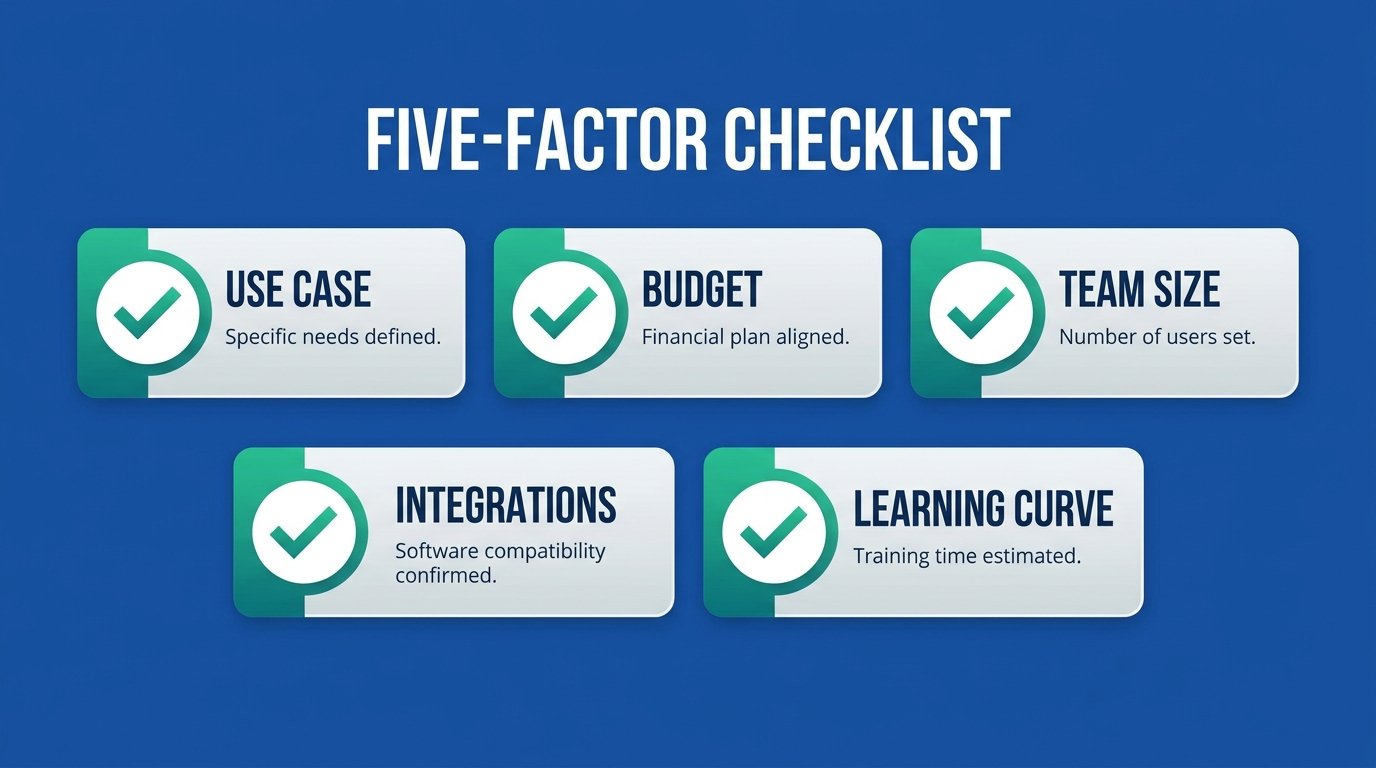
Choosing the right AI tool comes down to five factors: your specific use case, budget, team size, integration needs, and learning curve. Get those five right and almost any decent tool will pay for itself; get them wrong and even the best software on earth becomes another unused subscription. This buyer’s guide shows you exactly how to choose AI tools using the same framework we apply in every review we publish.
The stakes are higher than most owners realize. Capterra’s 2026 Software Buying Trends Report, drawn from 3,385 software decision-makers across 11 countries, found that 66 percent of software buyers experience unexpected disruption, purchase regret, or both. With more than 10,000 AI vendors now competing for your card details, a repeatable way to decide is not a luxury. It is the whole game.
Quick Answer
To choose AI tools, follow five factors: define one specific problem, set a $10 to $50 monthly budget, match features to your team size, confirm it integrates with your current apps, and test the free plan on real work for one week. Two-thirds of software buyers end up with regret or disruption; this framework puts you in the other third.
How to Choose AI Tools: The 5-Factor Framework
Every regretted purchase we hear about skipped at least one of these five questions. Work through them in order, in writing, before you open a single pricing page.
1. Define Your Use Case
Start with the problem, never the product. Write one sentence: “I need to stop spending X hours a week on Y.” If you cannot fill in that sentence, you are shopping for entertainment, not a tool. The sentence does two jobs: it tells you which category to shop in, and it becomes your test for every demo. A tool that dazzles in a demo but does not attack your Y is a distraction with a monthly fee. One problem, one tool, one decision at a time.
2. Set Your Budget
Decide the number before you see the prices, because pricing pages are designed to stretch you one tier higher. For most small business categories, $10 to $50 per month buys an excellent tool, and a complete stack runs $30 to $100. Then apply the billing rule we use ourselves: pay monthly until a tool survives 60 days of real use, and only then switch to annual billing for the discount. Annual-first saves 20 percent on a tool you might abandon in week three, which is not a saving. Budget one level deeper too: note the price of the tier above yours, because that is the bill you will face the month your business grows.
3. Assess Team Size
Solo owners and five-person teams need different software, and the difference is mostly invisible on the homepage. Solo: you want speed and simplicity, and per-seat pricing barely matters. Team: check what actually requires extra paid seats, whether roles and approvals exist, and what happens to a teammate’s work when they leave. Per-seat tools that cost $14 at one user quietly become $70 commitments at five; do that multiplication for every tool on your shortlist before comparing prices. And ask the unglamorous offboarding question early: when someone leaves, can you reassign their seat and keep their work in two clicks?
4. Check Integrations
This is the factor buyers skip and regret most. In Capterra’s research, 89 percent of regretful buyers first hit an unexpected implementation disruption, usually an integration or data migration problem, before the regret set in. Integration failures cause more software regret than missing features. So before buying, list the three apps the new tool must talk to, then verify each connection exists natively or through your automation platform. If wiring your stack together is the part you dread, a specialist can do it in days; our AI workflow automation setup guide covers what that costs.
5. Evaluate the Learning Curve
A tool only saves time after you can use it without thinking. The honest test: can you produce something genuinely useful within the first hour, and can you reach competence within a week? Powerful-but-complex tools have their place, but most small businesses get more from the tool they master in a day than the platform they never finish setting up. During trials, track one number: minutes from login to first useful output. Under 15 is excellent, under 60 is fine, and anything past a day means the tool is fighting you. The best AI tool is the one your team still uses in month three.
Free vs Paid AI Tools: When to Upgrade
Free plans in 2026 are genuinely capable, which makes the upgrade decision the real question. Here is the honest comparison:
| Free Plans | Paid Plans | |
|---|---|---|
| Best for | Testing fit and light, occasional use | Daily operation of a real workflow |
| What you get | Core features with usage caps | Full features, higher limits, priority access |
| Typical limits | Monthly caps, branding, one user, slower AI models | Limits high enough to forget about |
| Risk | Hitting a cap mid-task at the worst moment | Paying for a tool you stop using |
| Upgrade signal | You hit a real limit twice in one month | You stop hitting limits: consider the next tier later |
The decision rule: never pay for an AI tool you have not tested on real work for at least one week, and upgrade the moment a free plan costs you time twice in a month. Run the validation on the free tier, then pay for the one or two tools at the center of your workflow and leave the rest free until they pinch.
Here is what the upgrade moment looks like in practice. You run your email list on a free plan; twice this month a send went out late because you hit the contact cap and spent an evening pruning the list. That is the signal. The $19 upgrade buys back those evenings, and the math works at any wage you would pay yourself. Upgrades made at the moment of friction get used; upgrades made out of optimism get cancelled.
One more honest option the comparison sites never mention: sometimes the right answer is buying the deliverable, not the tool. If you need ten product pages written once, hiring it out beats learning software you will never open again; our AI content writing services guide shows what that costs ($30 to $300) versus a subscription.
AI Tool Pricing Models Explained
Five pricing models dominate AI software, and the model often matters more than the headline number. Here is how to read each one.
Freemium. A permanent free plan with paid upgrades (ChatGPT, Canva, Zapier). The free tier is the trial; the business model bets you will hit a limit. Great for buyers: validate at $0, pay only after proof. Watch for free tiers that shrink over time, a quiet trend in 2026.
Per-seat. You pay per user per month (HubSpot paid hubs, ClickUp, Pipedrive). Fair for teams that all use the tool daily; expensive for occasional users. Always ask which roles need full seats; viewers and approvers are often free or cheaper.
Per-usage. You pay for what runs: tasks on Zapier, operations on Make, even $0.99 per resolved support conversation on Intercom’s Fin. The fairest model when volume is low and the most dangerous when volume spikes. Non-negotiable with usage pricing: set spend caps and alerts on day one.
Flat rate. One price, generous or unlimited allowances (Pabbly Connect is the classic example, with lifetime deals on top). Predictable bills and the best value at high volume. The trade-off is usually a smaller integration catalog or fewer polish features, so verify your three must-have connections first.
Enterprise. “Contact sales” pricing with custom contracts. For most small businesses this is a polite sign the product is not built for you yet. If a vendor hides every price behind a call, assume the answer starts at four figures a year and shop the tiers below.
To compare tools across different models, normalize everything to one number: expected cost per month at your real volume. Estimate your monthly tasks, seats, or resolutions honestly, price each shortlisted tool at that volume, then add 30 percent for growth. A $9 per-usage plan that becomes $45 at your actual volume is not cheaper than a $29 flat plan, and this five-minute calculation catches that before the invoice does.
Red Flags: What to Avoid When Choosing AI Tools
After testing more than 50 tools, these are the warning signs that reliably predict regret. Any one of them is a reason to slow down; two or more is a reason to walk.
No data export. If you cannot download your contacts, content, or workflows in a standard format, you do not own your work. A tool without data export is a tool you rent, never own. Check the export page before the pricing page.
Vendor lock-in by design. Proprietary formats, punitive downgrade rules, contacts held hostage on cancellation. Search “[tool name] export data” and “[tool name] cancel” and read what real users found before you commit.
Hidden costs and credit math. “From $29/month” that quietly needs add-ons, AI credits, or overage fees to do the job advertised. If you cannot calculate your realistic monthly bill in five minutes, the opacity is the strategy.
Thin AI wrappers. Hundreds of products are a basic interface over the same models inside ChatGPT and Claude, sold at three times the price. The test: ask what the product does that the $20 general assistants cannot. If the answer is a template library, save your money.
Poor or missing support. No documented help center, no response channel, reviews full of unanswered tickets. Support quality is invisible until the day you desperately need it, which is why it carries 15 percent of our rating weight.
Vendor-only evidence. Capterra found that roughly 9 in 10 regretful buyers relied solely on vendor-provided information before purchasing. Demos and homepages are marketing. Cross-check every shortlisted tool against independent reviews and real user reports before paying.
The whole background check takes 10 minutes. Search the tool’s name plus “export data,” plus “cancel subscription,” and plus “price increase.” Skim the newest reviews on an independent review site and read the three angriest ones; patterns matter, single rants do not. Ten minutes of this beats ten months of the wrong subscription.
Jump ahead: every head-to-head comparison and alternatives guide, organized by goal, is in the Compare Before You Buy section below.
Find Your AI Tool Match in 60 Seconds
Reading frameworks is one thing; applying them to your own situation is the part that stalls people. So we built the framework into an interactive tool finder. Answer five quick questions about your biggest time drain, budget, team, and comfort level, and it returns your tested top pick with real pricing, a sensible pairing, and a done-for-you option if you would rather hire it out. Recommendations come straight from our published 10-point ratings, the same ones in the matrix below, and your answers stay in your browser; nothing is stored or sent anywhere.
AI Tool Finder for Small Business
5 questions. About 60 seconds. Tested recommendations with real June 2026 pricing.
Please select an answer before continuing.
Want a deeper match in one category? Our AI Tool Finder has nine category-specific quizzes, from writing and SEO to chatbots and AI assistants.
Prefer to see every option side by side instead of answering questions? The full selection matrix is next.
AI Tool Categories: Quick Selection Guide
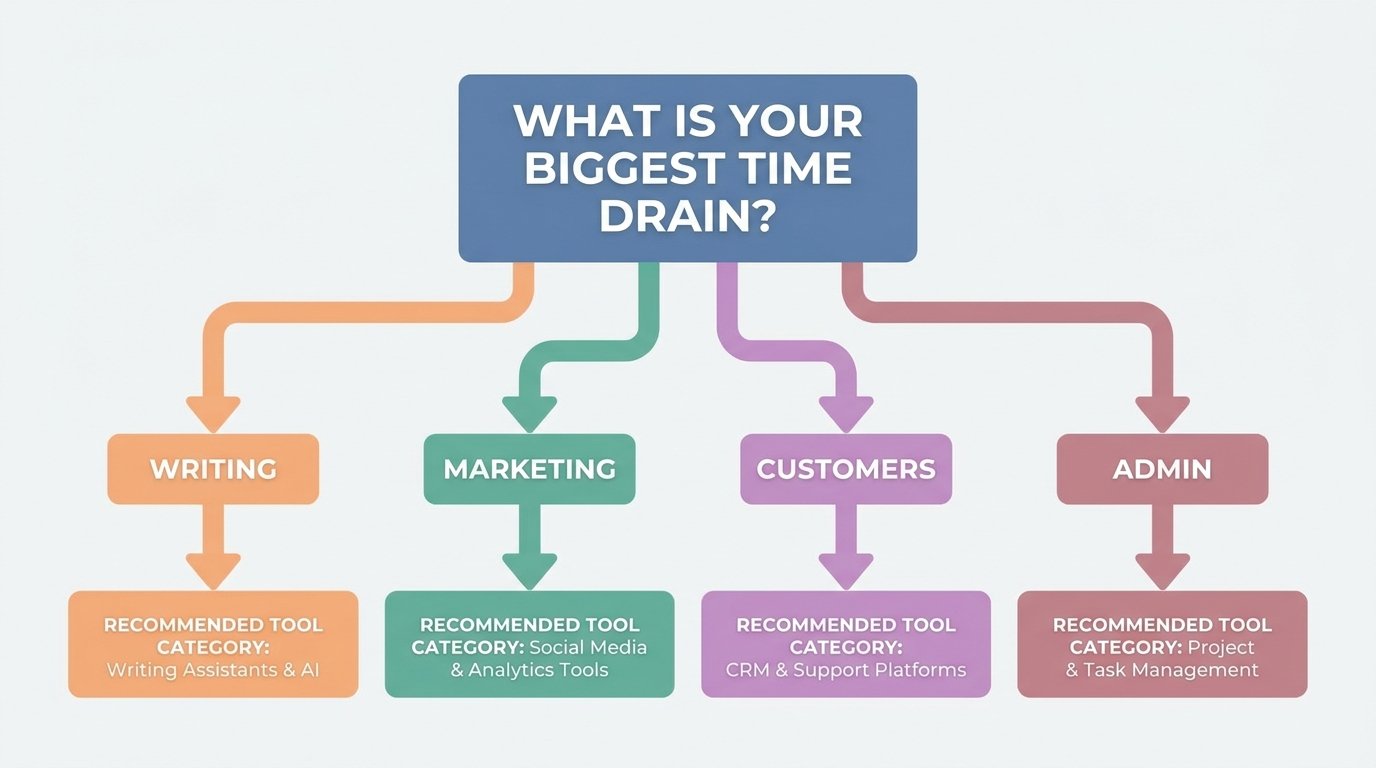
Once your use case is defined, this matrix takes you straight to the tested top pick for each job. Every recommendation links to our full breakdown, and you can browse every tool we have reviewed in the AI Tools Directory or see all current winners in our Best Roundups archive. Two rules for using the matrix: match the row to the problem sentence you wrote in factor one, and resist buying two rows at once; sequential adoption is how tools actually stick.
| Your Goal | Our Top Pick | Starting Price | Try It |
|---|---|---|---|
| Write marketing content faster | Jasper AI (9.0/10) | From $39/mo | Visit |
| Rank higher on Google | Semrush (9.2/10) | From $139.95/mo | Visit |
| Grow an email list that sells | GetResponse (8.6/10) | Free / From $19/mo | Visit |
| Stop losing track of leads | HubSpot (9.0/10) | Free / From $20/mo | Visit |
| Automate repetitive admin | Zapier (8.5/10) | Free / From $19.99/mo | Visit |
| Answer customers on social 24/7 | ManyChat (8.6/10) | Free / From $15/mo | Visit |
| Make videos without a camera | Synthesia (8.0/10) | Free / From $18/mo | Visit |
| Design like you hired someone | Canva Pro (8.8/10) | Free / From $10/mo | Visit |
| Keep projects and tasks on rails | ClickUp (8.1/10) | Free / From $7/user/mo | Visit |
| One assistant for everything | ChatGPT (8.9/10) | Free / From $20/mo | Visit |
Compare Before You Buy: Head-to-Head Comparisons and Alternatives
Down to two finalists, or stuck with a tool that fails the red-flag check? These guides settle it. Each row matches a goal from the selection guide above.
| Your Goal | Head-to-Head Comparisons | Alternatives |
|---|---|---|
| Write marketing content faster | Jasper vs Copy.ai Jasper vs ChatGPT for Content Grammarly vs ChatGPT | Jasper Alternatives |
| Rank higher on Google | Surfer SEO vs Semrush | Semrush Alternatives |
| Grow an email list that sells | GetResponse vs Mailchimp ActiveCampaign vs GetResponse | Mailchimp Alternatives |
| Stop losing track of leads | HubSpot vs Pipedrive | — |
| Automate repetitive admin | Zapier vs Make | Zapier Alternatives |
| Design like you hired someone | Canva vs Midjourney | Canva Alternatives |
| One assistant for everything | ChatGPT vs Claude for Business | ChatGPT Alternatives |
How We Rate AI Tools at AI Tools Key
You should know exactly how the recommendations on this site are made, because Capterra’s data shows independent research is precisely what regretful buyers skipped. Here is our published methodology, applied identically to every tool whether or not it has an affiliate program.
Every tool gets hands-on testing on real small business tasks for 5 to 14 days before we publish a word. We score five weighted factors: features (30 percent), ease of use (25 percent), pricing value (20 percent), support quality (15 percent), and integrations (10 percent), producing the X.X/10 rating you see on every review. The weights mirror what actually predicts whether a small business keeps a tool past month three.
Each factor is scored against questions, not vibes. Features: does it do the core job better than the general assistants? Ease of use: how far did we get in the first hour without opening the documentation? Pricing value: what does the realistic monthly bill buy compared to alternatives? Support: how fast and how useful was the answer when we asked a real question mid-test? Integrations: did it connect to a standard small business stack without workarounds?
Two commitments worth stating plainly. First, affiliate status never touches ratings: we earn a commission on some tools at no cost to you, and our highest-rated email platform is not our highest-paying one, which is how it should be. Second, we re-verify pricing on every page we update, because vendors change prices far more often than review sites change articles. When we get something wrong, we correct it and date the correction.
What we refuse to do is just as important: no pay-for-placement, no vendor-written reviews, no ratings for tools we have not personally used. Our full standards live on our Editorial Guidelines page if you want the complete picture.
Top AI Tools by Budget
Budget is where theory meets the card statement, so here are our tested picks at every spending level.
$0: The Free-Tier Stack
You can run a genuinely useful AI stack for nothing: ChatGPT’s free plan for daily assistance, Claude‘s free plan when quality of writing matters, Canva and HubSpot free tiers for design and CRM, and Zapier’s 100 free tasks for your first automation. The free stack is for validation; expect caps, slower models at peak times, and single-user limits. Graduate to paid the week the free stack costs you time twice; staying free past that point is a false economy.
Under $50/Month: The Sweet Spot
This is where most small businesses should live. ChatGPT Plus at $20 plus one category specialist covers enormous ground: GetResponse from $19 for email, ManyChat from $15 for social inboxes, Pipedrive from $14/user for a sales-first CRM, Notion AI from $20/user for a smart workspace, or Make from $9 for budget automation. Two well-chosen tools here outperform five impulse buys every time. The pairing logic is simple: the assistant handles everything generic, and the specialist goes deep on the single function closest to your revenue.
Under $100/Month: The Growth Stack
Add a revenue-driving specialist once the basics run smoothly: Jasper at $39 for a content engine, Surfer SEO at $99 for on-page optimization, or upgraded automation tiers as your volume grows. The test at this level is attribution: every tool over $30 should trace to revenue or hours you can actually point at.
Scaling Past $100/Month
Semrush at $139.95 earns its price when organic traffic is a primary channel, and per-seat platforms like HubSpot’s paid hubs make sense as the team grows. Two cautions before you cross this line: redo the per-seat multiplication for the team you will have in 12 months, and re-run the export check, because switching costs grow with every contact and workflow you store.
Torn between two of these? Read HubSpot vs Pipedrive, Zapier vs Make, ActiveCampaign vs GetResponse, Surfer SEO vs Semrush, or ChatGPT vs Claude for business.
Our Verdict
Start at $0, prove the habit, then spend $30 to $70 per month on the two tools closest to your revenue. Most small businesses never need to pass $100 per month to get 90 percent of the value AI offers in 2026. The framework above is how you make every one of those dollars defensible.
Start Free With ChatGPTNeed Help Deciding?
If you have read this far and still feel stuck, the bottleneck is usually not information; it is an outside eye on your specific situation. Decision fatigue is real when every vendor sounds identical, and a one-hour consult often saves weeks of trial subscriptions. Two good next steps, depending on how hands-on you want to be.
Want a Professional to Map Your Stack?
An AI consultant looks at your business, your budget, and your existing apps, then hands you a prioritized tool plan you can implement in a weekend. Vetted consultants on Fiverr do exactly this for $50 to $500; our AI business consultant guide explains the tiers and what a good brief looks like.
Prefer to browse and decide yourself? Our Complete Guide to AI Tools for Small Business walks through every category with tested picks, starter stacks, and real pricing in one place.
The Information People Are Looking For
How do I choose the right AI tool for my business?
Work through five factors in order: define one specific problem, set your monthly budget before seeing prices, match features to your team size, confirm the tool integrates with your existing apps, and test the free plan or trial on real work for one week. Commit only after the tool proves itself on your actual tasks.
What should I look for when choosing an AI tool?
Look for a free plan or trial, native integrations with your current apps, transparent pricing you can calculate in minutes, data export in standard formats, documented support, and independent reviews from real users. Capterra research shows roughly 9 in 10 regretful buyers relied only on vendor information before purchasing.
Are free AI tools good enough for a small business?
Free AI tools are good enough for validation and light use: ChatGPT, Claude, Canva, HubSpot, and Zapier all offer genuinely useful free plans. Upgrade once a free tier costs you time twice in one month. The pattern that works is validating free, then paying for the one or two tools central to your workflow.
How much should a small business spend on AI tools?
Most small businesses get 90 percent of the value for $30 to $100 per month total. Individual tools in the $10 to $50 range cover writing, email, design, chatbots, and automation. Spend past $100 only when a tool traces directly to revenue, such as SEO platforms for search-driven businesses.
Should I pay monthly or annually for AI tools?
Pay monthly first, even though annual billing saves 15 to 25 percent. Switch to annual only after a tool survives 60 days of consistent real use. An annual discount on software you abandon in week three is not a saving; it is the most common small waste in AI budgets.
How many AI tools does a small business need?
Three to five tools cover most small businesses: one general assistant, plus specialists for your two or three biggest time drains, usually email marketing, design, and automation. Research shows AI-using small businesses run a median of five tools. More than that usually signals overlap, not capability.
What are red flags when buying AI software?
The big six: no data export, lock-in by design, hidden costs behind credits and add-ons, thin wrappers over ChatGPT sold at premium prices, missing or undocumented support, and vendor-only evidence with no independent reviews. Any one is a reason to pause; two or more is a reason to walk away.
How do you test an AI tool before buying?
Give it one real task from your actual week, not the vendor’s demo scenario, and use the free plan or trial for seven days. Judge three things: output quality on your work, how fast you reached something useful, and whether it connected cleanly to your existing apps. Then decide once, in writing.
What is the best AI tool overall?
There is no best overall, only best for a use case, which is why “best AI tool” lists mislead buyers. The closest thing to a universal answer is ChatGPT ($20/month) as a first general assistant. After that, the right tool depends entirely on the problem: Semrush for SEO, GetResponse for email, Canva for design.
Choosing AI tools well is a skill, and like most skills it compresses into a checklist once someone shows you the moves: one problem, a budget set in advance, the per-seat math, the integration check, the one-week real-work test. Run that play for every purchase and you will spend less, keep more of what you buy, and never again pay a monthly fee out of optimism. That is the whole job of a trusted advisor, and now the framework is yours.