AI Tools for Ecommerce Product Photography: Your Complete 2026 Workflow
Need professional product photos but cannot justify a studio shoot? AI tools for ecommerce product photography let you turn a single phone snapshot into clean, on-brand images for a fraction of the cost. The right stack handles background removal, lifestyle scenes, and marketplace-ready exports in minutes, not weeks. Here is the exact workflow we use, the tools that power each step, and what the whole setup costs.
Quick Answer
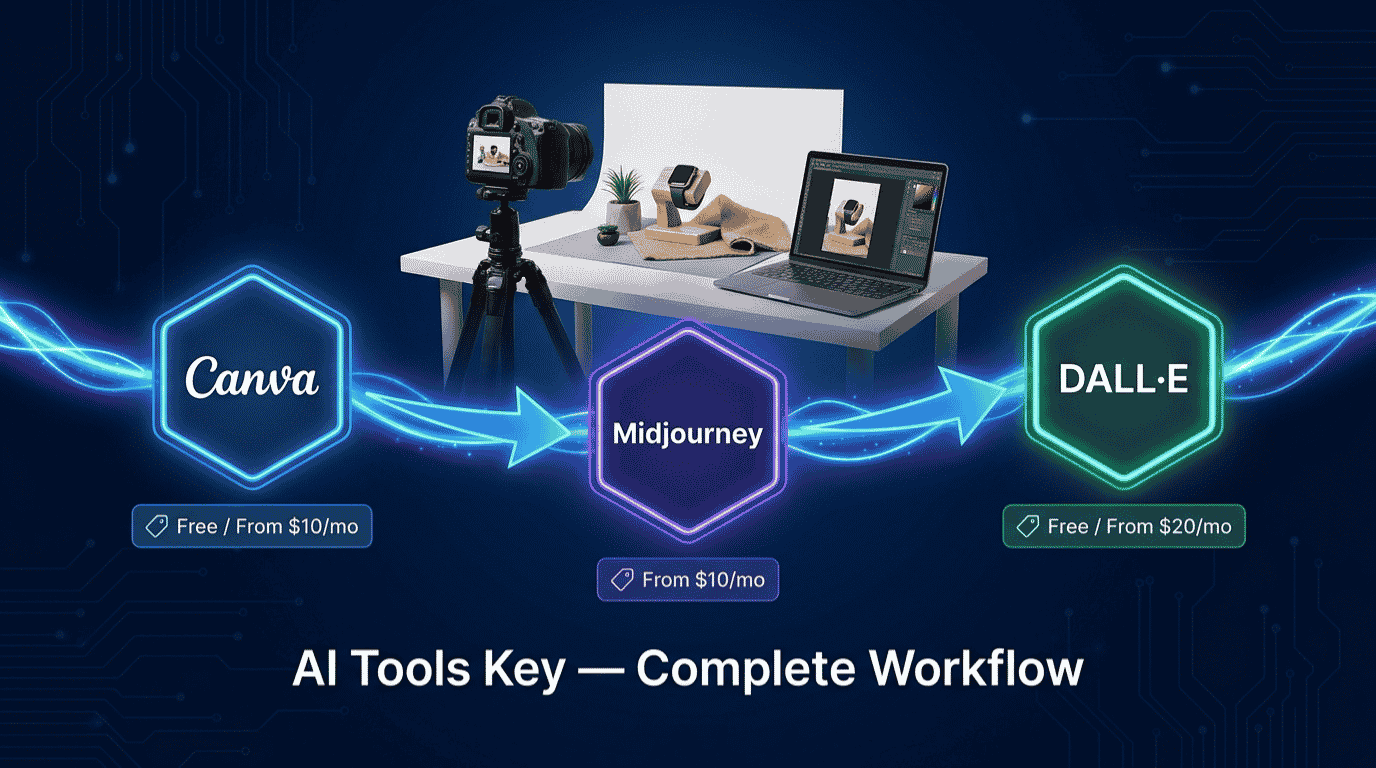
The best AI tools for ecommerce product photography in 2026 are Canva Pro ($15/month) for background removal and resizing, Midjourney (from $10/month) for photorealistic lifestyle and hero shots, and DALL-E, now built into ChatGPT Plus ($20/month), for adding text and precise edits. Together they replace most studio work for about $45 per month.
This guide is part of our complete guide to AI automation for small business. Read the full pillar for a wider view of how to automate your marketing, content, and operations with AI.
Why use AI tools for ecommerce product photography?
Your product photos are doing the selling when you cannot be there in person. Shoppers cannot touch, weigh, or try your product, so the image is the whole pitch. Shopify notes that product photography directly influences whether a shopper clicks add to cart or bounces to a competitor.
The problem is that traditional photography is slow and expensive. You book a studio, ship samples, wait for edits, and pay per shot. Professional product photography typically costs $15 to $50 per image, while AI tools cost a few dollars per image or a flat monthly fee. For a store with dozens of SKUs, that gap adds up fast.
AI changes the math. Instead of a reshoot, you generate unlimited backgrounds, angles, and seasonal looks from one photo. You get speed, lower cost, and an easier path to a consistent catalog. That said, AI is a tool, not a magic button, so the workflow below keeps a real photo of your real product at the center.
We rate every tool on a 10-point scale. Our ratings weigh five factors: features, ease of use, pricing value, support, and integrations. You can read more about how we test and rate AI tools if you want the full methodology.
The AI tools for ecommerce product photography workflow, step by step
After running the same product photo through Canva, Midjourney, and DALL-E side by side, here is the workflow we recommend. Each step names one tool, explains what it does, and shows where it fits. You do not need every tool on day one, so start with the steps that solve your biggest pain point first.
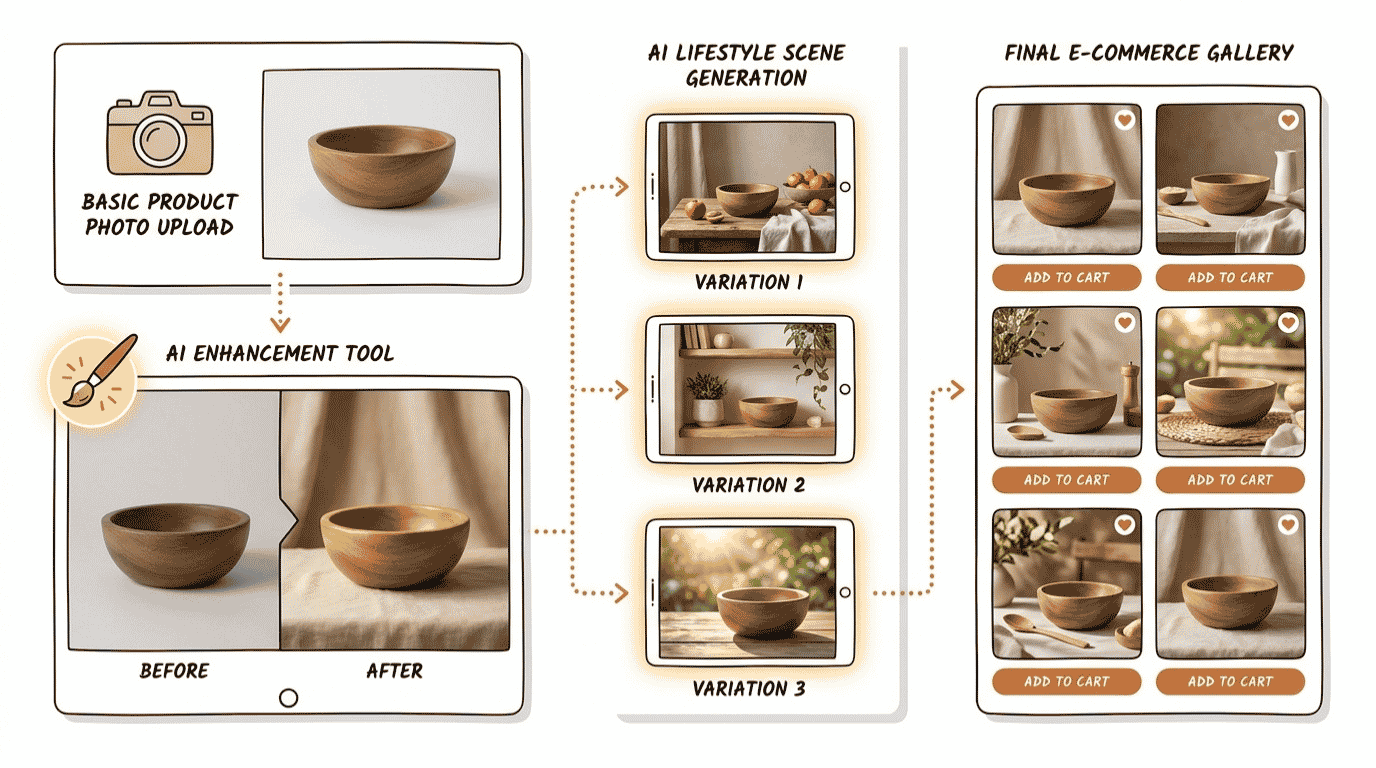
Step 1: Shoot a clean source photo
Start with a sharp, well-lit photo of the actual product. A modern phone, a tripod, and window light beat expensive gear in most cases. Keep the background simple and the product in focus, because clean input gives AI a much easier job.
Workflow tip: Shoot on a plain white or neutral surface near a large window on an overcast day. Soft, even light means fewer shadows for the AI to fix later, which saves you edits down the line.
Step 2: Remove or replace the background with Canva
This is where most of your day-to-day work happens. Canva Pro includes a one-click Background Remover, so you can strip the backdrop and drop in a clean white scene for your marketplace listing in seconds. Its Magic Studio AI suite also covers object erasing, expanding, and text-to-image backgrounds through Dream Lab.
Canva Pro includes a one-click Background Remover, Magic Resize to 50+ formats, and 500 AI credits per month. For most small stores, Canva Pro is the best all-in-one AI tool for ecommerce product photography in 2026, because it handles editing, branding, and exporting in one place. The free plan lets you test the basics, though the best AI features sit behind Pro.
Canva Pro Best Overall
- One-click Background Remover and Magic Eraser
- Dream Lab text-to-image backgrounds and scenes
- Magic Resize for every marketplace and social format
Step 3: Generate lifestyle and hero scenes with Midjourney
White-background shots get the click, but lifestyle images close the sale. Midjourney creates rich, photorealistic scenes that place your product in a setting: a mug on a sunlit kitchen counter, a candle on a styled shelf, a bag on a city street. Midjourney produces the most photorealistic lifestyle and hero shots of any tool in this workflow.
Midjourney’s Basic plan costs $10 per month and generates roughly 200 images. Any paid plan grants commercial usage rights for businesses under $1 million in revenue, which covers nearly every small seller. There is no free trial, so you do commit a small amount up front, but the quality is worth it for scene work.
Midjourney Best for Lifestyle Shots
- Best-in-class photorealism for lifestyle and hero images
- Cinematic lighting, scenes, and seasonal backdrops
- Commercial rights on every paid plan (under $1M revenue)
Not sure whether to lean on Canva or Midjourney for your scenes? Our Canva vs Midjourney comparison breaks down where each one wins.
Step 4: Refine details and add text with DALL-E
DALL-E, OpenAI’s image tool, now runs through ChatGPT’s built-in image generator, so you reach it with a ChatGPT account. DALL-E, now built into ChatGPT, is the best AI tool for rendering readable text and making precise edits to a product photo. You can ask it to fix a label, swap a color variant, or add a clean promotional graphic to a secondary image.
ChatGPT Plus costs $20 per month and creates around 50 images every three hours through its built-in image generator. Its conversational editing is the standout feature: you describe a tweak in plain English and it adjusts that region instead of starting over. The free tier gives you a couple of images per day, which is fine for testing.
DALL-E (GPT Image) Best for Text and Edits
- Accurate text and label rendering on images
- Conversational editing of specific regions
- Fast color and variant swaps from one photo
Step 5: Resize, brand, and turn shots into ad creatives
Finish back in Canva. Magic Resize adapts one design to 50-plus formats, so a single hero shot becomes an Amazon listing, an Instagram post, and a Pinterest pin in one click. Add your logo and brand colors to keep every channel consistent.
If you also run paid ads, a specialist like AdCreative.ai can turn finished product shots into conversion-focused ad creatives at scale. Once your images are ready, the natural next step is writing the copy, so see our guide to AI tools for writing product descriptions to pair strong visuals with strong words.
AI tools for ecommerce product photography compared
Here is how the core stack stacks up at a glance. Use the “best for” labels to match each tool to the job it does well, rather than expecting one tool to do everything.
| Tool | Best For | Starting Price | Free Trial | Rating |
|---|---|---|---|---|
| Canva Pro | Best overall: editing, background removal, resizing | $15/mo ($10/mo annual) | Yes (free plan + trial) | 8.8/10 |
| Midjourney | Best for lifestyle and hero shots | $10/mo | No | 8.3/10 |
| DALL-E (GPT Image) | Best for text, labels, and precise edits | Free / $20/mo | Yes (free tier) | 7.5/10 |
In short: Canva Pro is your everyday workhorse, Midjourney is your scene specialist, and DALL-E is your editor for text and fine fixes. The best free starting point is Canva’s free plan paired with the ChatGPT free tier. Want more options? Browse our full AI tools directory or the wider category of AI design tools.
An honest note on consistency across your catalog
Here is the trade-off nobody likes to mention. General image generators like Midjourney and DALL-E treat every prompt as a fresh start, so two batches can drift in lighting and tone. On a single hero image that flexibility is a feature. Across a hundred listings, it can read as inconsistent.
You have two ways to handle this. First, do your scene generation in batches with the same prompt and reference image, then run everything through Canva for a final, uniform pass. Second, for very large catalogs, you can add a dedicated product-photo app built for batch consistency on top of this stack.
For most small stores, the three-tool workflow is plenty. The key is to pick one background style and one lighting look, then apply them everywhere. Consistency builds quiet trust, and it tells buyers your brand knows what it is doing.
Are AI product photos allowed on Amazon and Shopify?
Yes, with one important rule. Amazon allows AI-edited and AI-generated images for secondary slots, but your main image must be a real photo of the actual product on a pure white background. The official Amazon image guidelines spell this out, and breaking them can suppress your listing.
Amazon main images must be at least 1,000 pixels on the longest side and fill 85% or more of the frame on a pure white background. So use AI for background cleanup, lifestyle scenes, and secondary infographics, and keep a genuine product shot as your primary image.
Shopify is more flexible, since you control your own store. Even so, the same principle applies: your images must accurately represent what the customer receives. Use AI to enhance and stage, never to misrepresent the product itself.
What this AI product photography stack costs
The full three-tool stack lands at a friendly price. A full three-tool AI stack costs about $45 per month, far less than a single traditional product shoot. You can also run a free version using Canva’s free plan and the ChatGPT free tier, trading some quality for zero cost.
Use the calculator below to build your own stack. Toggle each tool on or off, and it returns your monthly total, your annual total, and what a free-only version would cost. Everything stays in your browser, and no data is collected.
Product Photography Stack Cost Calculator
Toggle the tools you want and see your monthly and annual cost.
Do it yourself or hire an expert?
The workflow above is friendly for beginners, and you can learn it in an afternoon. Still, time is the real cost. If you have hundreds of SKUs or a launch deadline, doing it yourself can eat the week you needed for selling.
That is where a freelancer helps. You hand over your raw photos and your brand look, and you get back a finished, consistent set ready to upload. It costs more than the tools alone, but it buys back your time.
Do not want to do this yourself? Hire a vetted specialist to turn your raw photos into polished, conversion-ready product visuals and ad creatives.
Get Product Visuals Done on FiverrLearn more on our AI ad creative generation service page, or explore the full range of AI services on Fiverr to find the right fit for your store.
How a small store owner would use this workflow
Here is how a candle-shop owner would use this workflow in a single afternoon. She has 20 candle scents and a phone, but no studio and no budget for one.
First, she shoots each candle on a white poster board by the window. Next, she runs every photo through Canva to clean the background and produce a crisp white-background main image for each listing. Then she opens Midjourney and generates a warm, styled shelf scene for her three best sellers, giving them lifestyle shots that build desire.
After that, she uses DALL-E to add a small “Hand Poured” label graphic to her secondary images and to fix one stubborn reflection. Finally, she resizes everything in Canva for her Shopify store, Instagram, and Pinterest. Total spend that month: about $45, plus a couple of hours of her time.
If you sell on Shopify too, our roundup of the best AI tools for Shopify store owners covers the rest of the toolkit beyond photography, from listings to support.
Our verdict: For ecommerce product photography in 2026, start with Canva Pro for editing and exports, add Midjourney when you need lifestyle and hero shots, and use DALL-E for text and precise fixes. This three-tool stack delivers studio-style results for about $45 per month, and you can test the whole thing for free first. Keep a real product photo as your main image, and let AI handle the rest.
Your complete tool stack:
- Canva Pro (from $15/mo): editing, background removal, resizing — Try Canva
- Midjourney (from $10/mo): lifestyle and hero shots — Try Midjourney
- DALL-E in ChatGPT (free / $20/mo): text and precise edits — Try DALL-E
- Done-for-you option: hire a Fiverr specialist for product visuals — Hire on Fiverr
We may earn a commission from links on this page at no extra cost to you. See our affiliate disclosure for details.
The Information People Are Looking For
What is the best AI tool for ecommerce product photography?
Canva Pro is the best all-in-one AI tool for ecommerce product photography, since it covers background removal, editing, and resizing for about $15 a month. Pair it with Midjourney for photorealistic lifestyle shots and DALL-E for text and precise edits. Together they replace most studio work for roughly $45 monthly.
Can you use AI for product photography?
Yes. You can use AI to remove backgrounds, generate lifestyle scenes, swap colors, add text, and resize images for every channel. The best results come from a real photo of your real product, enhanced with AI rather than fully invented. Start with Canva Pro and add Midjourney for scenes.
Are AI product photos allowed on Amazon?
Yes, with one rule. Amazon allows AI-edited and AI-generated images for secondary slots, like lifestyle shots and infographics, but your main image must be a real photo of the actual product on a pure white background. Following the official Amazon image guidelines keeps your listing from being suppressed.
How much do AI product photography tools cost?
The core stack runs about $45 per month: Canva Pro at $15 (or $10 billed annually), Midjourney from $10, and ChatGPT Plus at $20 for DALL-E. You can start free with Canva’s free plan and the ChatGPT free tier, then upgrade only the tools you use most.
What is the best free AI tool for product photography?
Canva’s free plan is the best free starting point, since it includes basic AI editing and templates. Pair it with the ChatGPT free tier, which generates a couple of images per day. You lose some quality and one-click background removal, but it is enough to test AI product photography before paying anything.
Can Midjourney create product photos?
Yes, Midjourney creates excellent lifestyle and hero scenes from a product photo. It is weaker on batch consistency and readable text, so it works best for staged scenes rather than identical catalog shots. Generate scenes in Midjourney, then clean and standardize them in Canva for a uniform store look.
Do AI product photos hurt SEO or conversions?
No, as long as your images accurately represent the product. Clear, consistent photos improve conversions, and descriptive file names plus alt text help image SEO. Problems only arise if AI images mislead buyers, which raises returns. Keep images honest, consistent, and well-labeled to help both rankings and sales.