Best AI Tools for Freelancers and Agencies in 2026: The Complete Client Stack
If you run client work for a living, the best AI tools for freelancers and agencies in 2026 can quietly absorb the unglamorous overhead that eats your billable hours: proposals, content, decks, project admin, and the endless tool-to-tool busywork. We have tested dozens of them, and the pattern is clear. The freelancers and agencies winning right now are not the most talented ones. They are the ones running a small, connected stack where AI handles the repetitive 80% so they can focus on the creative 20%.
Quick Answer
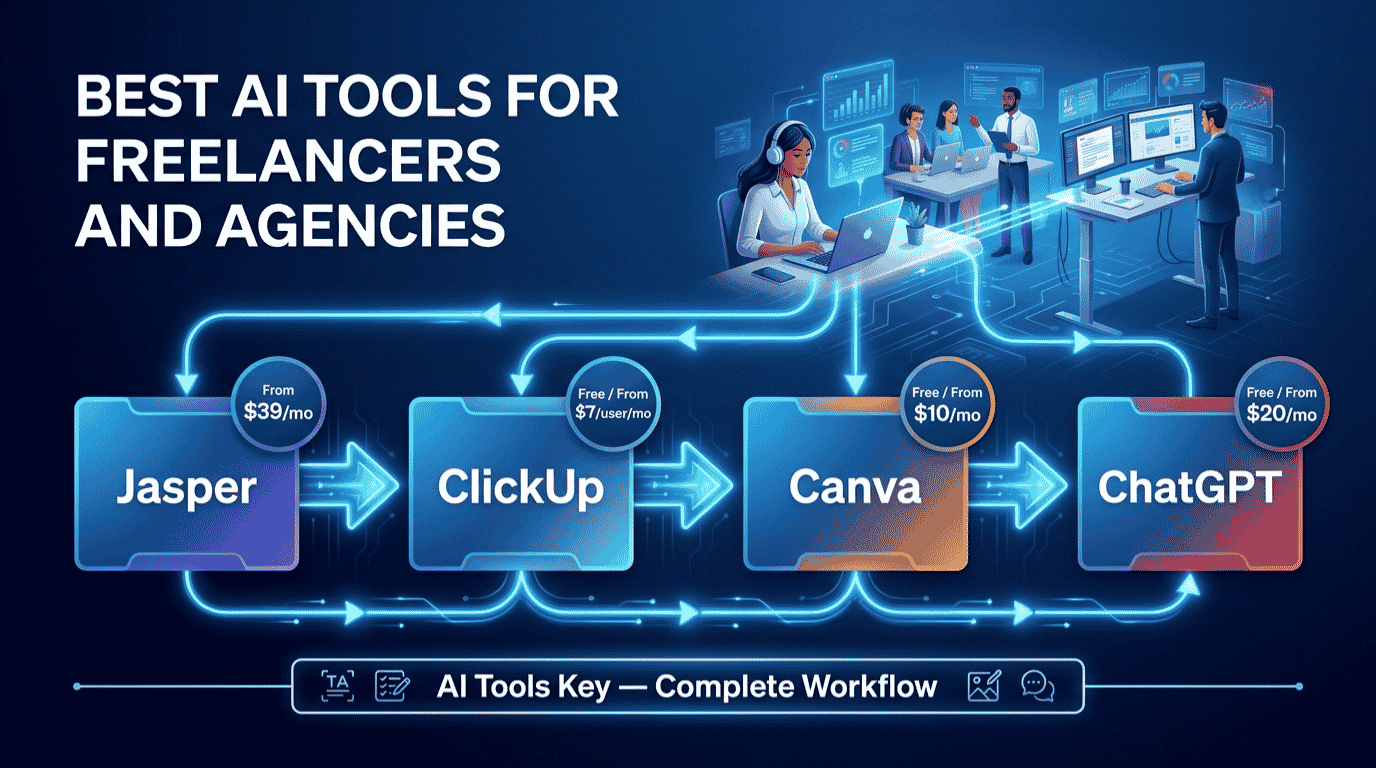
The best AI tools for freelancers and agencies in 2026 are ChatGPT (free) for proposals and client emails, Jasper ($39/mo) for client content at scale, Canva Pro ($10/mo) for design deliverables, ClickUp (free) for managing client projects, and Zapier ($19.99/mo) to automate the busywork. Start free, then add one paid tool per client you win.
This guide is part of our complete Guide to AI Tools for Small Business. Read the full pillar for a wider view of how small teams use AI across marketing, content, and operations.
Why Freelancers and Agencies Need an AI Stack in 2026
Here is the reality of client work. You are not just doing the work. You are also the salesperson, the project manager, the designer, and the admin team. All of that overhead has nothing to do with why you went independent, and it quietly drains the hours you could be billing.
That is exactly where AI helps. Recent industry surveys put AI adoption among freelancers at around 77% in 2026, and the ones using it well report meaningful productivity gains. Research from firms like McKinsey suggests generative AI can automate a large share of the routine tasks knowledge workers do today.
The point is not to replace your skill. It is to let one freelancer deliver like a small team, and a small agency deliver like a big one. The shift toward AI-assisted client work is now well covered in outlets like Harvard Business Review, and the freelancers who ignore it are working harder for the same output.
Before we get into the workflow, you can also browse our full AI tools directory if you want options beyond the five core picks below.
The Best AI Tools for Freelancers and Agencies at a Glance
Here is the full stack in one view. Each tool earns its place at a different stage of the client lifecycle, so you are not paying twice for the same job. Prices shown are the lowest monthly cost, which usually means billing annually.
| Tool | Best For | Starting Price | Free Option | Rating |
|---|---|---|---|---|
| ChatGPT | Best all-rounder for proposals and emails (free) | Free / $20/mo | Yes | 8.9/10 |
| Jasper | Best for client content and brand voice | From $39/mo | 7-day trial | 9.0/10 |
| Canva Pro | Best value for design deliverables | Free / $10/mo | Yes | 8.8/10 |
| ClickUp | Best for managing client projects (free) | Free / $7/user/mo | Yes | 8.1/10 |
| Zapier | Best for automating the busywork | Free / $19.99/mo | Yes | 8.5/10 |
Some links in this guide are affiliate links, which means we may earn a commission at no extra cost to you. See our affiliate disclosure for the details. It never changes our ratings.
How We Picked the Best AI Tools for Freelancers and Agencies
We did not pull this list from a press release. Every tool here was tested against one question: does it remove real work from your week, and can a non-technical freelancer run it without a developer?
Our rating considers five factors: features, ease of use, pricing, support, and integrations. You can read the full process in our editorial guidelines. In short, we favored tools that fit naturally into client work and do not need a steep learning curve.
We also weighted free tiers heavily. The best AI tool stack for freelancers and agencies in 2026 is one you can start completely free and scale per client. Three of our five picks have a real free plan, and the other two pay for themselves with a single project.
The 5-Step AI Workflow for Freelancers and Agencies
This is the part that matters. Below is the exact pipeline we recommend, from winning the client to delivering the work. Each step names one tool, links to our full review, and shows where it fits. Follow it in order and nothing falls through the cracks.
Step 1: Win Clients and Write Proposals With ChatGPT
Start where most freelancers lose time: pitching. ChatGPT turns a messy brief into a clear proposal, a scoping email, and a list of discovery questions in minutes. It is the fastest way to sound professional without spending your Sunday night on admin.
Use it to draft proposals, reply to client questions, summarize long briefs, and brainstorm angles before a kickoff call. The trick is context: paste the brief, your rates, and your past wins, then ask for a tailored draft you can edit in five minutes.
Workflow tip: Save your three best proposals as a reusable prompt. Tell ChatGPT to match that structure and tone for every new pitch, and you will cut proposal time from an hour to ten minutes.
For a deeper playbook, our guide on how to use ChatGPT for business goes further. For most freelancers, the free plan handles proposals and client emails just fine.
Step 2: Produce Client Content at Scale With Jasper
When you are writing for several clients at once, raw AI drafts start to feel generic and off-brand. That is where Jasper earns its keep. It is built for marketers and agencies, not general chat, and the Brand Voice feature is the reason.
Jasper ships with 50+ content templates and 30+ languages, plus a Brand Voice feature that keeps every client’s content on-brand. You train it once per client, then it writes blog posts, ad copy, emails, and social captions that sound like that brand, not a template.
Here is the part other lists miss for agencies. One Jasper draft becomes five deliverables. The same brief can be repurposed into a blog, a newsletter, a thread, and a set of ad variations, so one piece of work fills a whole client content calendar.
Jasper Editor’s Pick
- Brand Voice keeps each client’s content consistent
- 50+ templates for blogs, ads, emails, and social
- Repurpose one brief into a full content calendar
Jasper is one of several strong writing tools. To compare options and prices, see our roundup of the best AI writing tools for small business.
Step 3: Design Client Deliverables With Canva Pro
Most freelancers are not designers, but clients still expect polished visuals. Canva Pro is the best value tool for the job, and it covers social graphics, pitch decks, one-pagers, and brand kits without a design background.
Canva Pro unlocks 140 million-plus premium photos, videos, and graphics plus the Magic Studio AI tools for about $10 a month billed annually. The one-click background remover, Magic Resize, and a per-client Brand Kit let you spin up on-brand deliverables in minutes.
For agencies, the Brand Kit is the quiet hero. You store each client’s colors, fonts, and logos once, then every team member produces consistent work without asking you for the hex codes.
Our pick for design: Canva Pro. It is the cheapest high-impact upgrade a freelancer can make, and the free plan covers a surprising amount before you ever need to pay. For more options, see our best AI design tools guide.
Step 4: Manage Every Client Project With ClickUp
Juggling five clients in your head is how deadlines slip. ClickUp gives every project a home, with tasks, deadlines, docs, and a clean dashboard you can share with clients or subcontractors.
Here is the value that matters for independents. ClickUp’s Free Forever plan supports unlimited members and unlimited tasks, so you can add clients and contractors as guests without paying per seat. When you outgrow free, the Unlimited plan adds unlimited storage, dashboards, and Gantt charts from $7 per user a month.
For an agency working with subcontractors, that unlimited-member free plan is a real edge. You get structure, time tracking, and client-sharing options that lighter tools simply do not offer.
Workflow tip: Create one ClickUp template for a standard client project, then duplicate it for each new client. Your onboarding goes from a scramble to a two-minute setup with every task and deadline already in place.
ClickUp is one of several strong options. To compare project tools side by side, see our roundup of the best AI project management tools.
Step 5: Automate the Busywork With Zapier
The last step ties the whole stack together. Zapier connects your tools so the handoffs happen on their own, with no copy-paste between apps. This is the layer most freelancer roundups skip, and it is where the real time savings hide.
Zapier connects more than 8,000 apps and charges by task, not by the number of apps or users you connect. You can wire a new client form to create a ClickUp project, drop the lead into your CRM, and send a welcome email, all automatically.
Think of the repetitive glue in your week: new-client onboarding, invoice reminders, saving attachments, notifying yourself of replies. Zapier handles each one in the background while you do billable work. The free plan covers 100 tasks a month to test it, and the Starter plan unlocks multi-step automations from $19.99 a month.
Workflow tip: Start with one automation that hurts the most, usually client onboarding. Build it once, watch it run, then add the next. Do not try to automate everything on day one.
Zapier is one of several automation options. To compare alternatives and pricing, see our roundup of the best AI automation tools.
A Real Example: How a Solo Agency Uses This Stack
Let me make this concrete. Picture a one-person agency running social and content for four small-business clients, with no employees and a packed calendar.
A new lead comes in on Monday. They paste the brief into ChatGPT and get a tailored proposal in ten minutes. The client says yes, and a Zapier automation instantly spins up a ClickUp project from their standard template, with every task and deadline already set.
Through the week, they draft each client’s content in Jasper using that client’s Brand Voice, then build the matching graphics and a monthly report deck in Canva Pro. Invoice reminders and file-saving run quietly through Zapier in the background. Nothing gets forgotten, and no hour is lost to copy-paste.
That is four clients served, on-brand and on time, by one person. Based on our testing, this is the realistic payoff of a connected stack: not magic, just far less friction at every step.
What This Freelance and Agency AI Stack Costs
Now the question everyone asks: what is the bill? The honest answer is that it depends on how much you turn on. You do not need everything at once.
Toggle the tools below to see your real monthly and annual cost. It also shows the free-alternative total, so you can see exactly where paying is worth it. Nothing is saved, and all the math stays in your browser.
Freelance and Agency AI Stack Cost Calculator
Toggle tools on or off to see your monthly and annual cost. Prices are the lowest monthly rate (billed annually).
Three numbers are worth memorizing. A lean free starter, with ChatGPT, ClickUp, Canva, and Zapier all on their free plans, costs $0. A solid paid starter of ChatGPT Plus plus Canva Pro runs about $30 a month. The full stack with all five tools on paid plans lands near $96 a month, billed annually. For most freelancers, one new client covers the entire bill many times over.
DIY vs Hiring an Expert
The stack above is fully doable yourself. Still, time is the one thing freelancers never have enough of, and sometimes the smarter move is to hand off the parts that are not your specialty.
Why run the stack yourself
- Lowest cost, since three of the five tools have free plans
- Full control over your client deliverables and brand
- You build a system that compounds with every project
Why hire it out instead
- Wiring up Zapier automations can be fiddly to get right
- Overflow content production is easy to outsource at scale
- Great for launching fast or clearing a backlog during a busy run
Want it done for you? If connecting your tools is not how you want to spend your week, our vetted freelancers handle AI workflow automation setup. Drowning in client content? Try AI content writing services, or browse all AI services on Fiverr.
Your Complete Tool Stack
The full freelancer and agency stack at a glance, with current pricing:
- ChatGPT (proposals and client emails): Free or $20/mo. Try free
- Jasper (client content and brand voice): From $39/mo. Start trial
- Canva Pro (design deliverables): Free or $10/mo. Get Canva
- ClickUp (client project management): Free or $7/user/mo. Start free
- Zapier (automation glue): Free or $19.99/mo. Automate
Our recommendation: Start with the free tier of ChatGPT, ClickUp, Canva, and Zapier to build the workflow at zero cost. The moment your client load grows, add Jasper first for on-brand content at scale, then Canva Pro for polished deliverables. Reach for paid Zapier when manual handoffs start eating real time.
Frequently Asked Questions
What are the best AI tools for freelancers and agencies in 2026?
The top AI tools for freelancers and agencies in 2026 are ChatGPT for proposals and client emails, Jasper for client content and brand voice, Canva Pro for design deliverables, ClickUp for managing client projects, and Zapier for automation. Together they cover the full client lifecycle from pitch to delivery at low cost.
Will AI replace freelancers?
No, AI will not replace freelancers. It absorbs the repetitive overhead like proposals, admin, and first drafts, but clients still hire people for judgment, creativity, strategy, and relationships. The freelancers who thrive use AI to deliver faster and serve more clients, not to remove themselves from the work entirely.
Can I use AI-generated content in client deliverables?
Yes, but always edit and fact-check it first. AI is excellent for first drafts, outlines, and ideas, yet it needs your voice, accuracy checks, and final polish. Be transparent with clients about AI-assisted work where it matters, and use tools like Jasper that train on each client’s brand voice for consistency.
What is the best AI project management tool for agencies?
ClickUp is the best AI project management tool for freelancers and agencies on a budget. Its Free Forever plan supports unlimited members, so you can add clients and subcontractors at no cost. Paid plans start at $7 per user a month and add dashboards, Gantt charts, and unlimited storage for growing teams.
Are free AI tools good enough for freelancers?
Yes, free AI tools are good enough to start. ChatGPT, ClickUp, Canva, and Zapier all have capable free plans that cover proposals, project management, design, and light automation. You can run a full beginner workflow at zero cost, then upgrade only the tools you use most as your client load grows.
How much does an AI tool stack cost for freelancers?
You can run a capable stack for free using the free tiers of ChatGPT, ClickUp, Canva, and Zapier. A paid starter runs about $30 a month, and the full stack with all five tools on paid plans is roughly $96 a month billed annually. For most freelancers, a single client covers that cost easily.
What is the best AI tool for writing client content at scale?
Jasper is the best AI tool for writing client content at scale. Its Brand Voice feature trains on each client’s tone, so blogs, ads, and emails stay on-brand across accounts. It costs from $39 a month billed annually and includes 50-plus templates, making it ideal for agencies managing multiple brands.